Buy anything from 5,000+ international stores. One checkout price. No surprise fees. Join 2M+ shoppers on Desertcart.
Desertcart purchases this item on your behalf and handles shipping, customs, and support to Italy.
⌨️ Elevate your workspace with the ultimate compact Bluetooth keyboard — productivity never looked this sleek!
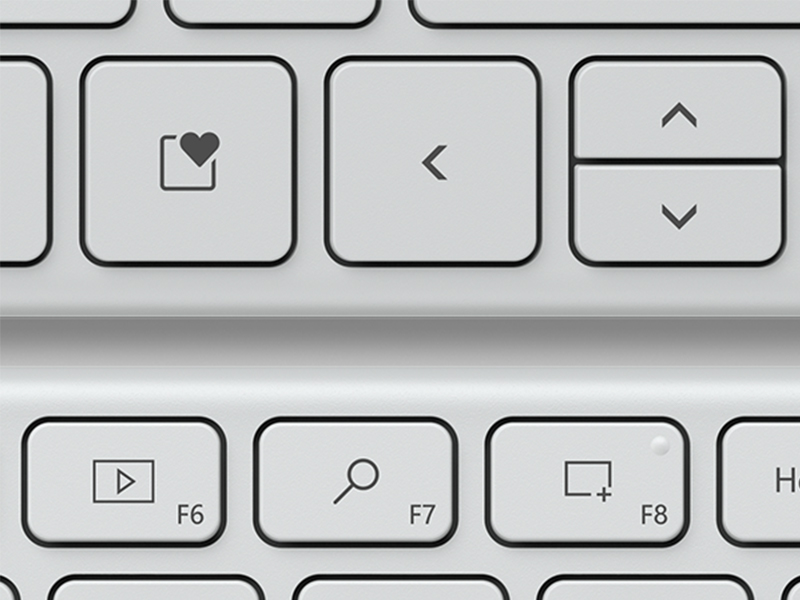
The Microsoft 21Y-00034 Designer Compact Bluetooth Keyboard in white offers a premium, space-saving design with 78 scissor-switch keys optimized for fast, fluid typing. It supports seamless Bluetooth connection to up to three devices, features a dedicated emoji key for expressive input, and is backed by a 2-year manufacturer warranty. Perfect for professionals seeking a stylish, efficient, and reliable wireless keyboard that complements any modern workspace.


| ASIN | B08JQCZDSB |
| Antenna Location | Office |
| Best Sellers Rank | 25,921 in Computers & Accessories ( See Top 100 in Computers & Accessories ) 233 in Computer Keyboard & Mouse Combos |
| Brand | Microsoft |
| Brand Name | Microsoft |
| Button Quantity | 104 |
| Colour | White |
| Compatible Devices | Laptop, PC |
| Compatible devices | Laptop, PC |
| Connectivity Technology | Bluetooth |
| Connectivity technology | Bluetooth |
| Customer Reviews | 4.4 out of 5 stars 284 Reviews |
| Hand Orientation | Ambidextrous |
| Item Dimensions L x W x H | 22L x 281W x 111H millimetres |
| Keyboard Description | QWERTY |
| Keyboard Layout | QWERTY |
| Keyboard description | QWERTY |
| Manufacturer | Microsoft |
| Model Number | 21Y-00034 |
| Number of Keys | 78 |
| Power Source | Battery Powered |
| Product Features | Wireless |
| Product Warranty | 2 Year Manufacturer Guarantee |
| Recommended uses for product | Office |
| Special feature | Wireless |
| Style Name | Single |
| Switch Type | Scissor-switch |
| UPC | 889842668537 |
| Unit Count | 1.00 count |
D**R
Superb keyboard!!
I really love this Bluetooth keyboard. The quality is exceptional. A really nice weight to it and the keys have a lovely feel to them. I was a little concerned to read the negative reviews regarding the auto switch off and recovery time, but I needn't have worried. I think some people are just incredibly impatient! It takes less than a second to get powered back up if it has performed an auto stand by and none of your typing is lost, it catches up very nicely. Obviously you shouldn't expect any backlighting on this device because of the power drain and I'm a little surprised that some are marking it down for not having it! I bought the white version to accompany my lovely ocean plastic MS BT mouse. I'm using them both on my latest PC build. Bluetooth pairing in Win 10 was effortless with my TPLink BT dongle. Windows found the keyboard immediately and asked me to type in a number code to complete pairing. I downloaded MS Mouse and Keyboard Centre software which enables some customisation of both the mouse and keyboard. It's just the right size for me. The keys are smooth in operation with just the right amount of feedback. There's just the right amount of tilt for me too as I sit here at my desk. I really don't mind the relative shift key sizes. I guess I'm used to that on other keyboards and it doesn't cause any issues with me. My fingers automatically find the smaller left shift key with no errors. The lack of backlight isn't an issue for me. There's enough light spill from my twin monitors in a darkened room to help see the keys. This is such great quality and better value than Logitech equivalents. Plus it works flawlessly with my TPLink BT dongle and Logitech devices don't always play nice!! So, yes, thoroughly recommended!
C**N
Amazing Keyboard
I am happily writing this review from my sleek, slim, top notch MS Designer Compact Keyboard! I’ve been looking around for quite a while for a compact tenkeyless keyboard for my WHF set up. I’ve tried the Arteck Bluetooth Keyboard but was not impressed. I’ve then decided to give a go to the Apple Magic Keyboard but was not ready to spend the big money for a brand new one so got a refurbished from a third party seller on Amazon but ended with a fake that I’ve returned pronto! I can now say that I found the one for me. This is very close to the keyboard of my Mac Book Pro 2015 which says a lot about its quality. The keys are soft and smooth and offer a nice travel. The keyboard is made of plastic but with a very nice finish. It felt a bit flat because of its very low profile when I first used it but I’ll definitely get used to it. Last but not least, I’ve got it at a £35 which is great price on Amazon Warehouse - Like New. You can by the photos that it’s looks like it’s brand new.
K**A
Great little BT keyboard, but what's up with those shift keys?
tl;dr All in all, I would have preferred an ANSI layout, but I live in the UK, so what can I expect. This is a good if a bit steeply-priced BT keyboard. It feels well made, and is a decent typing experience, although key travel is a bit short. The left shift-key is wonky, the right shift-key is wonky in a different way, and the arrow keys will be 'so so' to some. Still, this is very much fit for purpose and I wouldn't hesitate to recommend it. --- As other reviews and answered questions have pointed out: despite the product pictures, you will indeed receive a UK ISO layout. The question I have for Microsoft is: what's up with that left shift key? Given how strangely long the right shift key is, couldn't you have shortened it a bit to make the left shift longer? See my picture, to see what I mean. Or you know, it would be nice if companies started providing ANSI layouts. But anyway... The key-travel on this board is a little short, but not terrible. It's greatly reminiscent of laptop typing, and that's not necessarily a bad thing. Although, if you're prone to smashing keys, e.g. you might be used to a heavy mechanical switch, then you're going to feel as if you're typing into your desk -- at first, anyway. The keyboard is all plastic but has a nice texture to it. It has a very slight positive angle and I've heard criticisms around this -- that you can't give it more a positive angle, i.e., tilt it up higher. However, that's bad for your wrists and isn't ergonomic, so I have no fault with MS' decision here. The angle more-or-less replicates key staggering, and that's a good thing. This is essentially a 65% keyboard layout given the inclusion of the arrow keys. Top and bottom are smaller, and both are about the size of either the left or right arrow. I'm not an arrow key person so this doesn't bother me, but I can see how it might. We even have a smaller set of F1 - F12 keys, with media and various other controls that can be interacted with via the 'fn' key. And oh hey, MS has software that you can download to change the behaviour of some of these keys. It's not extensive remapping, but it's some. MS has also added an emoji key that is Windows only, and that's a nice edition. I don't know that I'd ever use it, but I can imagine the odd situation where it might come in handy. There's nothing to fault here, really. The board itself is powered by 4 2032 cell batteries. They have a claimed 36-month lifespan, and that's probably about right. All of that said, I recommend this. Especially if you don't want a keyboard with, say, round keys.
W**T
Excellent keyboard
I’ve bought about five different Bluetooth keyboards over the last 2 years. They’ve been fine except that they’ve all had issues with being a bit noisy/rattly but worse almost all have ended up with sticky-key syndrome where random keys will ‘stick’ and repeat. They’re not actually stuck - it’s almost as if the key ‘release’ isn’t picked up. The result is constant corrections. The reverse has also happened regularly - missed keystrokes. Anyway, this Microsoft keyboard is excellent. Quiet slimline keys and a solid feel. Most importantly though I can now type as quick as I like - no missed keystrokes or ‘stuck’ keys. Great product - thoroughly recommend. Haven’t had long enough cto comment on battery life - and it uses CR2032 so not rechargeable. Couple of comments elsewhere about aggressive sleep functionality and slow ‘wake up’ - not experienced any issues at all.
S**M
Misplaced keys
Lovely compact piece of kit. Only issue was that some keys are not where they claim to be. I’m thinking of £ and @ which were tricky to locate until I got used to where they were hidden.
A**R
Top Quality! Works well with my Samsung S9 Tablet
I was looking for a compact keyboard mainly for travel purposes to use in unison with my Samsung S9 Tablet. I looked at Samsung Trio 500 but wasn't sold on it based on reviews. I did however try a cheaper keyboard at a whim out of curiosity 'Arteck Ultra-Slim Keyboard' , I returned it next day due to the typing experience. To bouncy and spongey and a typing angle not for me. I came across this keyboard and for typing experience alone It is worth it, even if I loose some functionality in terms of the hotkeys/mapping due to using it for a Samsung tablet. I can say that the following work, volume up/down, play/pause for me. The batteries are a bit of a downside, but then again the form factor, the weight, the flatness of the keyboard are due to the battery design. Just make sure you have spares.
B**P
Best chiclet keyboard ever
I have been looking forever for a keyboard with very soft keys that replicate the keys on a laptop. I have tried at least 6 different keyboards (mostly by Logitech, some £80+) to no avail. But this is IT! It is incredibly comfortable to use, quiet and so responsive, with no hardness in typing at all. This allows for very fast, smooth typing. Additional good points: a) the screenshot key (over F8) - saves looking for the sniping tool in Windows 10; b) the emoji key - saves using the windows+; shortcut. c) you can get a separate number pad, which I find very useful. All in all, this is the most comfortable, responsive and quiet chiclet keyboard I have ever seen, for a very reasonable price, with some nice touches. I like it so much that I've bought a spare!
M**Y
Great design
Easy to use, good weight, responsive keys - a great piece of kit for the office or on the move. My only minor reservation is that the keys go right to the edge on all sides so it's easy to press a key by mistake when picking up the keyboard or moving it around the desk.
Trustpilot
3 weeks ago
1 month ago