Buy anything from 5,000+ international stores. One checkout price. No surprise fees. Join 2M+ shoppers on Desertcart.
Desertcart purchases this item on your behalf and handles shipping, customs, and support to Italy.
🌌 Align in minutes, explore for hours — never miss a celestial moment!
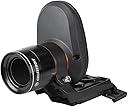
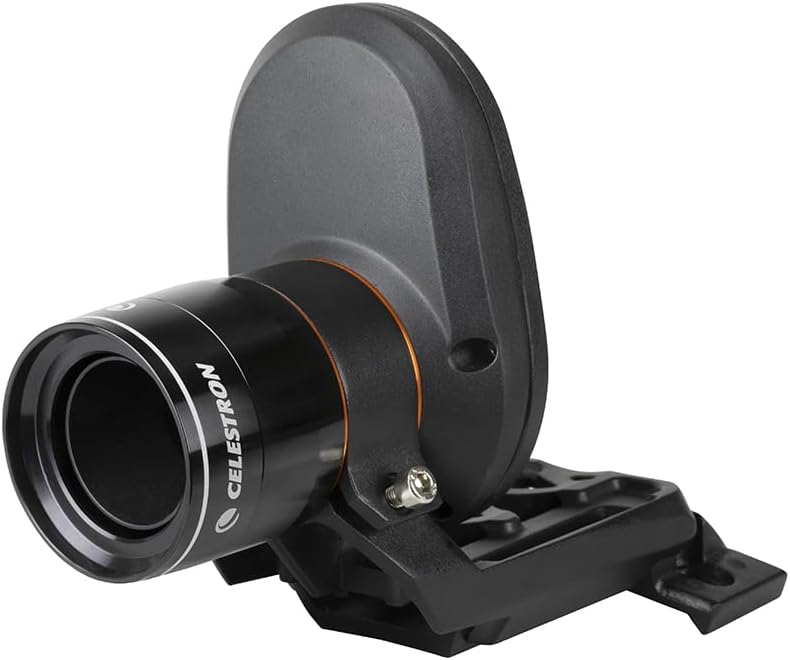
The Celestron StarSense AutoAlign is a cutting-edge telescope accessory that automatically aligns your computerized Celestron telescope in about 3 minutes using patented star pattern recognition technology. It includes a StarSense camera and hand controller, supports advanced mount modeling for ultra-precise pointing, and is compatible with most Celestron mounts. Designed for both beginners and experienced astroimagers, it drastically reduces setup time and improves accuracy, backed by a 2-year warranty and dedicated US-based support.


| ASIN | B00EZILDLS |
| Additional Features | Automatic Alignment, Advanced Mount Modeling, Wide Compatibility |
| Brand | Celestron |
| Built-In Media | StarSense Camera, Hand Control, Small Camera Braket, 4mm Allen Wrench, Camera to Auxiliary Port Cable and 2 Thumbscrews for Large Camera Bracket |
| Coating | StarBright XLT |
| Compatible Devices | Advanced VX, AstroFi, CG-5 Aux, splitter, CGE, CGE Pro, CGEM, CGEM DX, CGX |
| Customer Reviews | 4.2 4.2 out of 5 stars (1,037) |
| Exit Pupil Diameter | 16.04 Millimeters |
| Eye Piece Lens Description | Fiber Optic |
| Field Of View | 0.85 Degrees |
| Finderscope | Reflex |
| Focal Length Description | 1.57 inches |
| Focus Type | Manual Focus |
| Global Trade Identification Number | 00050234940054 |
| Item Dimensions D x W x H | 9.84"D x 9.25"W x 4.33"H |
| Item Weight | 980 Grams |
| Manufacturer | Celestron |
| Manufacturer Part Number | 94005-CGL |
| Model Name | StarSense AutoAlign |
| Model Number | 94005-CGL |
| Mount | Fiber Optic |
| Objective Lens Diameter | 40 Millimeters |
| Optical-Tube Length | 9.25 Inches |
| Power Source | USB 2 .0 |
| UPC | 050234940054 |
| Unit Count | 1.0 Count |
| Warranty Description | 2-Year Warranty |
| Zoom Ratio | 50 |
A**8
Amazing device!
I apologize for the length of this review, but I thought the details might be helpful for folks interested in this awesome little gadget. My Celestron StarSense arrived last week, and I’ve had a couple of chances to try it out. I’ve used the device exactly twice, but I think my experience may provide some useful information to others who are thinking of purchasing this device. My focus is on astrophotography and my rig is 100% portable on a tripod, so alignment is a frequent chore. I held off buying the device because I had read that it had severe issues integrating with Celestron’s native polar alignment process, ASPA (All-Star Polar Alignment). Once those issues were corrected by Celestron and I read a positive review of the device in Sky and Telescope, I went ahead and bought it. So far, I’m very glad I did. After unboxing, I immediately updated the firmware on the StarSense camera and the included hand controller. Be sure to do this – as I mentioned, Celestron fixed some major problems with the software since the release of the device, and you’ll want to be sure to capture these. Be sure you have the appropriate cables and adapters ready for this. Once the firmware was updated, I attached the SS camera to my scope. I have a non-Celestron OTA, but a Celestron Advanced VX mount. This was one point of annoyance with Celestron. They provide two mounting methods – a super-solid one for Celestron OTAs, and a not-so solid one for everyone else. I was mounting to a dovetail plate, and it was annoying that I couldn’t use the more solid method just because Celestron had made the mounting holes too narrow. If they had just provided a couple of holes at the standard mounting sizes they could have given folks a lot more options. Left with the secondary mounting method, I was glad I had an extra mounting base available, because Celestron doesn’t provide one with the unit (they assume you’re replacing your finderscope with the SS camera). I sacrificed my mounted laser pointer in favor of the SS camera and continued. If you have a single finder\guider and no other mounting base available when the unit arrives, you’ll be waiting for Amazon to deliver before you can use the unit. After setting up outside and doing a rough polar alignment with a polar scope, I turned on the mount with the new HC and SS camera attached. The first thing the HC does is search for the SS camera, which it found with no problem. At startup, the HC gets a little “bossy” – there doesn’t seem to be a way to start up without going through the SSA (StarSense AutoAlign) process before doing anything else. I’m used to entering the Date\Time and location, but that didn’t seem to be an option at startup. You can press the Menu button to add those details, but I didn't know that at the time. I let the SSA do its thing, and it slewed to four different sections of the sky. I was in my side yard, where the house and trees block much of the horizon, and light pollution is fairly severe. I had also neglected to turn a bright flood light attached to my roof off, just to keep things interesting. I started quite early, and I could only see 5-10 stars visually. I noticed that the HC was reporting that it was finding dozens of stars in areas of the sky where I still couldn’t see any. After a couple of minutes, the SSA wrapped up and reported success. At this point, I was 90% certain that the device hadn’t actually done anything – it was just a little too quick and easy. I told the HC to find Albireo. There it was – off center, but within the FOV of my 20mm eyepiece. Not bad. I told it to find Antares in the south. There it was. Whoa. At this point, Celestron has you resolve the error between the SS camera and your telescope by performing a centering procedure. This is done in the HC’s software and doesn’t involve adjusting the camera physically, which was a relief – I think I’ve had enough “dance of the thumbscrews” for one lifetime. The HC has a process for this that involves centering the star in your eyepiece and then confirming that it is centered with the HC. This was simple enough, but the (printed) instruction manual actually has a mistake in it about the steps in the process. It's a good idea to just download the (corrected) online manual if you buy this device. After the centering procedure, the HC tells you that you will need to repeat the SSA process. At this point it was a little unclear whether it expected me to simply run the process again or actually reset my mount to the alignment marks and start over. Thankfully, the former seemed to work just fine. Now, I had done all of this before entering the date, time or my current location. It seemed wrong to move on to polar alignment without entering that data, but then again – does the HC need to know the time or location if it knows the positions of all of the stars, especially if you’re not targeting solar system objects? The HC certainly didn’t seem concerned about it – I had to go menu surfing to even find where to enter the date\time\location – I was never prompted for the information. I went ahead and entered the info and the HC told me to perform SSA again, which I did. The polar alignment process was simple. ASPA normally has two steps – the first where you center a star using the direction buttons on the HC, then the second when you’re asked to center the same star using the mount’s ALT and AZ alignment knobs. With SSA, the first step is done automatically and the user is left with the ALT and AZ adjustments. After the centering\calibration process and ASPA, any stars or objects I selected were perfectly centered in the reticle eyepiece. I spent some time selecting objects near the four points of the compass and just being amazed when they all came up dead center. I started guiding and did some test shots using the CCD – I had perfect pinpoint stars for 12 minute exposures. That night I took 14 12-minute exposures of the Pelican Nebula and had some of the sharpest, roundest stars I’ve ever imaged. Long story short - ASPA was very easy and very accurate. On the second night out, I was just doing a rough alignment so I could take pictures of the moon with my bigger scope. I simply took the device off my refractor and put it onto my SCT, put the OTA on the mount, hooked it up, turned it on and let it align. I started even earlier that night, with only a few stars visible to these middle-aged eyes. No re-centering or fine-tuning, no entry of date or location, no polar alignment. A couple of minutes later, the SSA was done and the GOTO put the moon in the FOV of my 20mm eyepiece on the first try – this is with a 10” SCT – the FOV was less than a moon-width. I also tried several stars and they were all close to center, despite a different OTA and not performing a new centering\calibration procedure. The bottom line: this device exceeded expectations on its first two nights out. I’d say if you have a portable setup this is a no-brainer purchase. Pros: Easy setup (other than the firmware update); easier telescope alignment; simplified ASPA; more accurate polar alignment (at least in my experience). Works in twilight, so you can start your alignment earlier. Works despite trees and\or buildings obstructing large parts of the sky. Fast. Cons: Mounting brackets aren’t all that they could be (see above). Finder mount base not included. New HC has small-print display by default – can be hard to read especially from a distance.
B**N
This is a great technology, but it suffers from insufficient troubleshooting documentation
This is a great technology. I attached it to a Celestron 9.25" NexStar Evolution. It works very well. However, Celestron WiFi doesn't. When I tried to set up StarSense using Celestron WiFi and the SkyPortal app on iPhone (not iPad), the StarSense alignment process would align, then lose connectivity, then need to be aligned, then lose connectivity, then freeze. I have been reading several online forums for amateur astronomy, and the Celestron WiFi combined with the SkyPortal app freezing the phone is a common problem. Some users have wireless providers that use "smart" WiFi apps to bounce back and forth between WiFi and Cellular Data, shutting off WiFi on disconnect, and thereby "improving" battery life. These apps appear to conflict with SkyPortal and Celestron WiFi. I have no such app, but I did have tethering enabled, and this probably does pretty much the same thing to SkyPortal as the smart WiFi apps. I'll give it a try again with tethering disabled, but after 5 weekends of trying to get Celestron WiFi to work with SkyPortal (I also tried with SkySafari 5 Pro, where I can save and restore all kinds of settings, but SkySafari 5 Pro is just as bad as SkyPortal with respect to losing connectivity and freezing) I am pretty fed up with SkyPortal. None of this compatibility information is available from the Sky Safari folks, who are contracted by Celestron, nor is it available from Celestron. You have to go out and dig it up yourself. Celestron should have a better knowledge base, along with better unit testing and quality assurance. I know they aren't software developers, and they don't charge for SkyPortal, but I also can't charge them for all of the time I spent trying to get SkyPortal to work with StarSense. Take a lesson from Apple: to sell your hardware, you need easy-to-use software that actually works. I have found the StarSense hand controller much easier to use than SkyPortal. StarSense will do alignment provided it can find enough stars. I have never tried to align on solar system objects, and I don't even know if that is possible with StarSense. You will still need to calibrate StarSense after you've aligned it, which essentially tells StarSense how misaligned the camera is with respect to the telescope aperture. In theory, you should be able to remove the camera from the telescope and replace it without recalibration. I have never been able to affix the camera to the telescope so that recalibration can be skipped. It only takes a few seconds, but afterward, you have to align again. With the hand set, this is about a 5 minute process: align, calibrate, align. With the SkyPortal app, you may never complete this process. If StarSense can't find enough stars, use the NexStar controller together with geolocation information, sky maps, and a star finder. I know you can solar system align NexStar, because I do that in my front and back yard several nights a month using the moon or a planet, and I can even align on the sun when I have a white light solar filter attached. StarSense just gets lost in my light polluted neighborhood, with a very busy airport located 6 miles to the south putting all kinds of lights in the evening sky. I'm not sure I would recommend this item for beginning astronomers. For one thing, it costs about as much as a kid's (really nice) starter scope. For another, learning how to read and use a sky chart - and compass - is not a bad thing. It's also a good thing to know how to align your telescope to a finder scope, and how to use the finder scope to point at objects in the sky. Since StarSense gets the information it needs directly from the telescope hardware, you also don't need to know what kind of mount you have, which means that you don't know all that you can do with your telescope. Lastly, if something doesn't go right in the connection, alignment, and calibration of StarSense, you should be able to swear very loudly, remove the StarSense camera and controller, attach the NexStar controller, cycle power on the scope, and then align it yourself.
L**S
Compré el StarSense Autoalign para simplificar la alineación de un telescopio Nexstar 8SE y puedo confirmar que funciona de maravilla. Es fácil montarlo y la fijación es muy solida. Una vez montado es muy rápido y no hay necesidad de identificar o localizar estrellas: alinea automáticamente el telescopio. Lo pones en marcha y se puede observar en pocos minutos. Es bastante mas preciso que hacer la alineación manualmente. Lo uso con un Celestron SkySync GPS que busca la hora, fecha y y la longitude y latitud de forma automática (algo muy útil si observas en sitios distintos). Es caro pero merece la pena si quieres pasar menos tiempo montando el equipo y mas tiempo observando el cielo.
M**O
premessa 1: possiedo un nexstar 6se, quindi perfettamente compatibile con l'accessorio; premessa 2: trovo l'allineamento con il cercatore in dotazione, ai limiti dell'impossibile; dato tutto ciò e leggendo varie recensioni positive, mi son fidato ed ho fatto l'acquisto dello Starsense. Risultato; dopo 3 giorni di utilizzo è una delusione, almeno per me; da qualcuno è stato paragonato ai "vetri elettrici" di un'auto....io lo paragono ai "vetri elettrici che si chiudono solo a metà in un giorno di pioggia"..... (quindi inutile.....). Il dispositivo è parecchio impreciso nell'allineamento; diciamo che punta sì la stella, ma.. "+-", con un errore anche di 10 gradi; e chi punta le stelle sa che anche una differenza di 1 solo grado rende la ricerca e visione della citata stella, in un oculare, del tutto impossibile. Così equivale a cercar un ago in un pagliaio. Oltre a questo, in modalità "auto align", va a caccia di fonti luminose dappertutto; il risultato ? a meno che non viviate in un ranch americano a decine e decine di km da un lampione, lo Starsense si "attaccherà" alle luminarie della vs strada e da lì non si schioderà più. vi scrive "acquired 100 stars" e poi impazzisce. metto 2 stelle solo perchè, montato sul nexstar, fa "figo" quando il telescopio è in casa. --- AGGIORNAMENTO DOPO VARI ALTRI TENTATIVI --- quando ci vuole...ci vuole: mi devo ricredere. Dopo AVER LETTO parecchi forum e spiegazioni d'uso in internet, ho trovato la "quadra" ed ora il dispositivo funziona benissimo; la questione è proprio questa: essendo precisissimo nella ricerca, la sequenza delle operazioni da fare (....modalità "manual align"....) per allinearlo DEVE esser altrettanto precisa; è vero, SE tutto è perfetto, in 3 minuti avete allineato il vs telescopio. Ecco perchè ora mi sento di metter 5 stelle al prodotto :) mi raccomando...CERCATE in internet la sequenza ESATTA; il manuale (esistente peraltro SOLO in inglese..... ) non è abbastanza dettagliato in merito. e buona visione stellare a tutti ! :)
A**E
très bon accessoire pour tout télescope celestron et autres marques également .permet un alignement rapide et sans prise de tête .pour débutant surtout mais produit trop chère qui équivaut à s’acheter un deuxième télescope donc préférer plutôt un chercheur de bonne qualité et professionnel dans une gamme de prix abordable
J**A
Genial. un poco complicado de usar al principio, unas dos veces y practica, y alineas tu telescopio en 5 minutos.
R**.
First time out, seems to works well, no more fiddling about for ages finding/centering alignment stars. Magic to watch it do it all itself, much faster than you can! (Everything (location,time, mount mechanics) has to be set correctly of course.) Its a bit pricey, but there is a lot to it, and the quality is good. Note: there is no new version of nexremote (to do the pc mimic of the new handcontrol), which is a shame - i found that really useful with the original nexstar handset. However, to make set up easier without nexremote, Ive found I can set the location and time data from a laptop via the starsense handset serial port, communicating with the same command protocol as the old nexstar handset. Once aligned, Goto's etc should therefore work with stellarium etc, communicating through the serial port, but i havent tried that yet.
Trustpilot
1 month ago
2 days ago