Desertcart purchases this item on your behalf and handles shipping, customs, and support to Italy.
๐ธ Capture, Connect, Cherish โ Your memories, redefined.
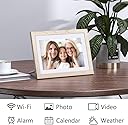
The Dragon Touch Digital Picture Frame features a vibrant 10.1-inch IPS touchscreen with 1280x800 resolution, 32GB of built-in storage capable of holding 80,000 photos, and seamless Wi-Fi connectivity (2.4 GHz) for instant photo sharing via app, email, or cloud. Designed for effortless setup and use, it supports auto-rotate and multiple sharing methods, making it the perfect modern gift to keep families connected across generations.


| ASIN | B08BR8NHXP |
| Aspect Ratio | Unknown |
| Best Sellers Rank | #62 in Digital Picture Frames |
| Brand | Dragon Touch |
| Color | White |
| Compatible Devices | Smartphone |
| Connectivity Technology | Wi-Fi |
| Control Method | App |
| Customer Reviews | 4.4 out of 5 stars 1,752 Reviews |
| Display Size | 10.1 inches |
| Frame Material | Plastic |
| Item Dimensions L x W | 14.53"L x 2.24"W |
| Item Highlight | Digital Photo Frame Display, 32GB Storage, Auto-Rotate, Share Photos via App, Email, Cloud |
| Manufacturer | Dragon Touch |
| Manufacturer Part Number | XKS0001-WT-US2 |
| Memory Storage Capacity | 32 GB |
| Model Number | XKS0001-WT-US2 |
| Power Source | Corded Electric |
| Resolution | WXGA |
| Screen Size | 10.1 inches |
| Software Update Supported to Date | unknown |
| Touchscreen | Touchscreen |
| UPC | 810035151895 |
| Unit Count | 1 Count |
| Warranty Description | 2 year manufacturer |
F**Y
Nice asthetics, nice calendar to help keep busy lives on track!
Looks great in portrait mode on the wall, and a clear display with good touch response. Calendars sync quickly and keeps you on track! Great product at this price point!
J**A
Great digital calendar for busy families!
Amazing digital calendar to help busy families! I haven't tried upload photos yet, but I've used all of the other features. It's been easy to upload events or to do items from the app. Compared to some other name brand calendars, this one is a fantastic option without the monthly fee some brands require.
J**V
Super Convenient Calendar
This calendar is super convenient to have, and is much much more than just a calendar. It's like a centralized family hub. It lets multiple people add their things to the calendar, lists (grocery, events, etc), to-do, and meal planning. It finally gives us a fast and easy way to build our shopping list, or write down appointments before we have time to forget! One of the best things is that all of these features are included, not paid like some of the other popular brands. The 15.6" size is perfect. Everything is large enough to see even from across the room. The screen is bright and sharp. The calendar responds quickly to touch and it's super simple to type on. Everything you add to the calendar can be pulled up on your phone via the app. No more forgetting your shopping list at home! For me this is an absolute 5 stars. I bought it as a gift, but use it just as much as the receiver. The whole family really benefits from it. I highly recommend it.
H**.
Touch screen; easy to download pics; excellent picture quality
I truly enjoy this product for its ability to revisit great memories of family, friends, and shared experiences. I did not take advantage of the wi-fi and sharing feature (its a cyber-security concern of too many IoT devices to worry about.) My most important goal was to be able to use this device to show lots of pictures with its 16Gb internal storage. Good enough for a few thousand picture/memories. I have not used the video feature since I personally think videos are more distraction than stills. I don't use the calendar or clock feature either; since the clcok/calendar display shrinks pics down to thumbnail size, which defeats the purpose of looking at pictures. Cost is middle of the road. For me, the initial setup was a little quirky; I don't understand the need to download a link for my purposes, although for more adventurous users, they might find it useful. The 10-inch screen is big enough to actually see detail while placed on a table. I have another 10-inch digital frame, and I found this Dragon Touch to be very easy to use to download desired pictures from a USB memory stick and then select/delete unwanted downloaded pics. No need to connect to my computer. I very much like the touch screen - very convenient; my other digi-frame doesn't have the touch screen feature, so its a bit clunky when I want to add pictures. I use the timer function to turn on/off the Dragon Touch. The review asked to rate for motion detection; I do not see this feature available on this digi-frame, so if it's available, I'd love to see how to set it up. My 4/5 stars was because of: 1) set up steps which I found unnecessary for my needs; 2) lack of motion detection; 3) or auto-rotation. My other digi-frame has motion detection (very nice) and auto-rotation. Although a caution with respect to auto rotation, when in landscape mode, the auto-rotation forces the portrait pictures to shrink to fit the screen - so I can't appreciate the portrait type pics as much. All in all, I really enjoy this product, since my purpose was very focused for pictures only
M**L
latest adhd hyperfixation
Iโve been wanting a digi calendar for a while now and with the amazon prime deals going on, i stumbled upon this brand! the mainstream brands have evolved and so have their prices. this product was the only one in my research that checked all my main boxes: price, good reviews, good customer service, easy navigation, and hangable. Add on bonus was the cute color way! i got the mint green one! i rly like the ecalendar app as well. its easy to use and I LOVE MAKING LISTS!! the only thing i wish this product could do is like make the tabs on the home screen customizable but itโs no biggie. also when i make lists, i wish it saves the tasks on my lists from old to new instead of new to old. the subtasks does that but not the regular tasks. other than those its working perfectly!
L**N
Great Picture Frame for the Modern Digital World
This was a gift to my mom after we lost our dad earlier this year, and it has definitely been a great way to keep his memory fresh each and every day. We were looking for a picture frame that had a nice looking design but was also connected in a way that family members could share pictures. I read a bunch of reviews that talked about the challenges with setting up, but if you follow the directions included, and have some patience to allow for the binding process (which is not instantaneous), it works very easily. I actually set this up at my house and then switched the wifi to my Mom's with no problems just by using some patience and common sense. I put this together for my family members to share pictures, and everyone was able to get it to work no problem: Method 1 download the OurPhoto App Android Link: play.google.com/store/apps/details?id=com.idwell.ourphoto&hl=en_US&gl=US Apple Link: apps.apple.com/us/app/ourphoto-keep-our-memories/id1476241568 in the app, select "My Devices" and hit the " + " to add a device. You will need to enter a device ID. Then click "ok" Once it goes through, I can approve the request and you can start adding pictures and they will go right to the frame! Method 2 -Send an email to [email protected] (for example, [email protected]) -the subject MUST read the following only: [Frame ID] (ex. if frame ID is bd9QS8VA, then the subject would read only the following: bd9QS8VA -Once your email address is connected to the frame (I will "approve" it once it comes through), you can send emails with pictures and videos as attachments. The Binding Request is not instantaneous but it's not very long either, so just be patient! It could take 10 minutes, but could also take just 2 minutes too. I happen to like Method 1 better, but they are both super easy! What we like: - The design of the frame. - picture quality - being able to see who shared pictures What we don't like as much - that there is no internal battery. - binding new users isn't instantaneous, and takes some time - not being able to manage the photos directly from the App
M**R
The grandparents tell us over and over how much they like it!
Update: This is such a great product! My inlaws are snow birds and go stay with my sister in law in Florida for a good part of the winter. They have loved receiving photos of our kids while there. My niece and nephew have loved seeing the pictures of their cousins that they never see in person. It has probably been the best gift we've ever given, and will continue to bring them smiles for years to come! Also, I'm really liking the app. It just takes a couple of clicks to send them picture, so they can receive them while we are still doing whatever we were doing in the pic. This is a great product to give grandparents who don't live near. We can send pictures easily from the app within seconds of taking them. I like that you can have other siblings get the app as well and send pictures. I was unable to get the email feature to work. I gave it four stars, because that was the feature I had planned on using. I don't like having extra apps on my phone, and had hoped to email pictures to the device. Overall it is a great product, which I know will be loved. I can't wait to give it to them full of photos, and ready for more as our children grow. I did initially need to turn off and back on to start accepting pictures.
J**A
Love this item. Great display.
Absolutely love this item. It has helped keep my appointments organized and I love that it gives you simple recipes to cook. The display is amazing.
S**I
App not working on the first day itself. Disappointing experience
After setting up my username and password on the newly installed app, I get the error 417, User push token or platform error? Couldn't find any solution on the internet or user manual
Trustpilot
2 weeks ago
3 days ago