Buy anything from 5,000+ international stores. One checkout price. No surprise fees. Join 2M+ shoppers on Desertcart.
Desertcart purchases this item on your behalf and handles shipping, customs, and support to Italy.
🎶 Unlock your studio’s secret weapon — make beats, melodies & magic anywhere!
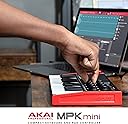
The Akai Professional MPK Mini MK3 is a compact, USB-powered MIDI keyboard controller featuring 25 velocity-sensitive keys, 8 backlit MPC-style drum pads, and 8 endless rotary knobs. Designed for seamless integration with major DAWs, it includes Native Kontrol Standard (NKS) support and comes bundled with professional-grade music production software and sound libraries, making it the ultimate starter kit for millennial producers craving portable, versatile, and powerful music creation tools.


| ASIN | B0886ZPWC8 |
| Best Sellers Rank | 92 in Musical Instruments & DJ ( See Top 100 in Musical Instruments & DJ ) 1 in MIDI Controller |
| Brand | Akai Professional |
| Brand Name | Akai Professional |
| Colour | Standard |
| Compatible Devices | USB-compatible devices |
| Connectivity Technology | USB, 1/4" (6.35mm) TS input for sustain pedal |
| Connectivity technology | USB, 1/4" (6.35mm) TS input for sustain pedal |
| Connector Type | USB 2.0 Type B |
| Control Method | App |
| Control Type | Keyboard Controller |
| Country of Origin | China |
| Customer Reviews | 4.6 out of 5 stars 30,324 Reviews |
| Global Trade Identification Number | 00694318024874 |
| Hardware Interface | USB 2.0 Type B |
| Hardware Platform | PC, Mac |
| Human Interface Input | Keyboard |
| Included Components | music production software |
| Instrument | Keyboard |
| Instrument Key | Any |
| Item Dimensions D x W x H | 17.7D x 31.7W x 4.9H centimetres |
| Item Type Name | 25 Key USB MIDI Keyboard Controller With 8 Backlit Drum Pads, 8 Knobs and Music Production Software included |
| Item Weight | 0.9 Kilograms |
| Keyboard Description | Compact MIDI keyboard with 25 velocity-sensitive keys |
| Manufacturer | inMusic Europe Limited |
| Manufacturer Part Number | MPKMINI3 |
| Material Type | Durable High-Grade Plastic |
| Model Name | MPKMINI3 |
| Model Number | MPKMINI3 |
| Model Year | 2020 |
| Model name | MPKMINI3 |
| Noise Control | None |
| Number of Keys | 25 |
| Number of keys | 25 |
| Outer Material | Plastic |
| Platform | Mac, Windows |
| Product Style | MPK Mini MK3 |
| Product Warranty | 1 year manufacturer. |
| Product dimensions | 17.7D x 31.7W x 4.9H centimetres |
| Size | Tastiera |
| Special Features | Illuminated Drum Pads, Knobs, Native Kontrol Standard (NKS) Integration |
| Special feature | Illuminated Drum Pads, Knobs, Native Kontrol Standard (NKS) Integration |
| Supported Software | MPC Beats |
| Total USB 2.0 Ports | 1 |
| Total USB Ports | 1 |
| UPC | 694318024874 |
| Unit Count | 1.0 count |
P**N
Easy to setup and use. To become a Tardis of exploration and creativity ❤️
Been wanting a mini synth for years. Never had the spare dosh to purchase one. Along came another birthday and instead of spending it on the usual, purchased something for me. Oh boy so glad I did. Although I've still a lot to learn, each time I have a bit of me time I discover another gem sound or technique on this incredible unit (For the money it absolutely brilliant) The software it comes with is also great - especially like the customisability of synth sounds and been able to tweak them. I know a year on I've still barely scratched the surface of what this can do, but it brings a smile to my face every time I plug it in, and away I go 🎹🎶 Happiness is
R**H
Excellent for a small home-studio set up, plus the bundled synth (Hybrid3) is high quality
As with any product of this type, make sure it fits your intended usage before you buy. For me, this product is excellent for the following reasons: - Build quality is solid - Small size is perfect for a minimal home studio (photo attached for indication of product size) - 25 keys ideal for simple leads and bass lines (you can switch up and down octaves with one touch to find the best range) - Plug and play is instant, works with stand alone synths or your DAW of choice (for me that's Cubase and it works great as expected). - 8 pads that are touch sensitive like the keys, great for drums/percussion (and can easily switch between 2 banks so effectively you've got 16 presets) - Control knobs can be assigned to DAW - Excellent synth bundled with the product (Hybrid3) Factors that were relevant to me: - I'm mainly interested in rock/metal and guitars, I just wanted the Akai to be a simple tool to control the rest - I'm not an expert on piano/keyboards, so I don't mind fewer keys and I'm perfectly happy with the feel of the keys on the Akai I also had to weigh up the Akai against an alternative product that offered potentially better out-of-the-box integration with Cubase (but that had less of a software bundle). In the end I decided I wanted the Hybrid3 synth more than the instant integration, as I'm happy to map the controllers myself (it's easy enough) so I went with the Akai. I'm glad I did as Akai feels perfect, and Hybrid3 is actually worth a few quid in itself. There are some excellent freeware synths out there, and I expected it to be like a good one of those, however it surprised me with just how good it is and how much I enjoy using it. It's a great synth offering modern blended sounds (effectively it's 2 synths blended together), it really takes things up a level. There is other bundled software: - Mini Grand and Velvet are 2 decent VSTs, but not necessarily my go-to instruments (Velvet's interesting, Mini Grand is fine but just doesn't really fit with what I'm trying to produce musically) - MPC Beats is a loop-based DAW and there are some sound/sample packs to support it. This could be a great beginner software kit if you're just starting out with loops, it has some interesting tools but doesn't really suit the rock/metal vibe I'm playing with, and my tool of choice is Cubase as mentioned earlier. Having said that, MPC will open as a VST in Cubase so it'll link in neatly if needed. - Also worth mentioning is 'MPK mini Editor' is available to download too (it's hidden in the download manager settings under "Advanced Software"). It will help with all the detailed controller mapping; as yet I've not explored in to too much detail here, for now I'm satisfied just using basic controls and it's good to know the functionality is there for when I'll want it later. Couple of points to bear in mind particularly if you're very new to digital music production: - This is a midi controller and it needs separate software to generate sounds. You get Hybrid3 and a couple of other VSTs which is an excellent start, so once you install them you can get on and make loads of sounds immediately with this package. You will need a DAW to record and mix the sounds (there are plenty at all price points -including free- out there if MPC Beats doesn't quite give you what you need). - The download and install process for the software is a bit extensive if you want all the associated products, but it's only a one-off, and is pretty straightforward. You'll need to make an Akai account online, and also as part of the install you need to create (or log-in with existing) iLock account to validate install. Overall: - Great plug and play product (with VSTs/DAW) - Excellent supporting software synth (Hybrid3) - A real no-brainer 5 stars from me as the MPK mini suits my needs perfectly, and the quality of the supplied synth exceeded my expectations.
J**R
Perfect beginners controller!
For several years I have fancied dabbling in music production and I wanted a MIDI controller that would be easy to use and have as much versatility as possible. For me this I meant having both pads and keys. I looked at several options but settled on the MPK mini as it appeared to offer the best combination of features and value for money. Firstly, it really looks the part, I have the black and white version which has a cool simplistic look with inverted black and white keys. Aesthetically I preferred this to the black/red or white/black options. Setup was easy but this is where a few people will find some difficulty. This is a MIDI keyboard which means that it will work 'out of the box' with almost ant DAW (digital audio workstation) software with no almost no configuration. Personally I use Ableton Intro and it is simply a case of plugging in the keyboard and selecting the MPK mini as the input device in the options. This of course, will vary depending on your software. The keyboard can then be further programmed when you have a bit more experience with your DAW. The keyboard does come with several software synthesizers and the basic version of Akai's own DAW, MPC Beats. The synthesizers can be a little tricky to set up as you will need to set up the authorisation system that they use. All I can advise is that you read the instructions carefully and it is fairly easy to do. You will need to register your keyboard with Akai but then you will have access to the installer which will help you install everything you need to get started. It is worth noting that these synths are not required for the use of the keyboard but will give you a really nice variety sounds to play with and I really do recommend you taking the time to install these. Personally, I use several Native Instruments synthesizers and sample players and this keyboard works really well with all of them also with little to no configuration. Both the keys and pads are velocity sensitive so the volume of my notes/drums will vary depending on how hard I press them. The infinite knobs (meaning the rotation doesn't have a start and end point) are really nice to use and can be configured to control almost anything within your DAW. The built in arpeggiator is a nice touch and is easy to use to create some cool note repeats, a great tool for use in EDM. The pitch/bend joystick control feels a little different to the traditional wheel controls but is really useful when you get the hang of it. The 8 drum pads are really nice to use, they have a really positive feel and react well to being tapped. You can also program a second bank of drums which can be switched easily giving you access to 16 different drum sounds. In my opinion the pads are on par with the pads on the (more expensive) Native Instruments Maschine Mikro beat maker. (I also own this controller and if you're into beatmaking I highly recommend it). This is a really great controller for the beginner, which I very much am. I really enjoy playing with it and I am constantly impressed with the quality and the features of the keyboard. Once you get past the installation of the synths, which is easy if you follow the instructions carefully, you can start making music almost immediately Spend the time to learn how it works - there are literally hundreds of helpful videos on Youtube that will assist you in getting started. I honestly believe that this is the best MIDI keyboard you can buy as a beginner and can't be beaten at the price.
M**Y
Poor instructions mask a decent unit.
Initial impressions of are keyboard were good, it seems pretty robust and decent quality at this price point. Its clear they are trying their very best to force you to use with their supplied free software, and users should note that the free instruments come with the hated and dreaded Ilok software, which is a big shame as this software often cause issues all by itself. The installation files and guides are all out of date on Akai's site, meaning you can scramble around for information with little hope of finding something relevant to the latest release and I followed one tutorial on knobs to functions on studio one that no longer works. Akai use their own software manager, which for some reason doesn't show you one of the most basic bits of software you need. You need a program editor to set up this unit with your DAW and to manually change and assign midi data, pretty essential on a midi controller. By default this essential software is hidden and not offered for download. To see it as an option you need to hit the gear cog in the top left of the window, which shows three lines. You are looking to 'Show Advanced Software' - there should be a check box for you to tick! As Akai are total muppets, the check box is exactly the same colour as the background and therefore invisible. This has cost me almost a day of trawling the web and leaving service tickets, but if you click madly somewhere on the right hand side of the menu in line with the text, you'll eventually hit the checkbox by luck at which point you can download the program editor, which should never have been hidden. So, hardware is OK and works out of the box for the included software. Support is horribly out of date and quite frankly, all over the place and not updated for current models eg tutorials that don't work any more. Setting up for other Daws is a pain and nothing like the Nektar offering which has specific maps to match their keyboards to your Daw of choice, and templates to match many 3rd party instruments. I wish I bought from another supplier to be honest. I bought this to make music not to see how inadequate Akai's software tools are.
F**U
It deserves the accolades given by professional musicians.
The perfect mini mobile controller to complement my Hoton Ampero Multi Effects Pedal and BOSS RC-30 Loop Pedal. My principal instrument is electric violin, but also play guitar, mandolin, and ukulele. This Akai mini controller is perfect for creating rhythms and backing loops for my solo performance as a busker. It's fun to play with but also a serious piece of high quality kit for any musician using pedals, or a composer who needs a mini keyboard that's compact and has a rich pallette of sounds. The keyboard feels well made. It's NOT a guitar pedal that's used on the ground. The AKAI is an instrument that will be used and treated with care and respect like any other keyboard. So, it's build quality is comparable to larger keyboards like my Yamaha. I had no problem connecting the AKAI to my Smartphone and Tablet using a Piano App. Whilst the controller is designed to be used with a DAW on MAC or PC, I like being able to learn, practice, and experiment with chord inversions and progressions on the go, as I recently started learning keyboard with Pianote. The AKAI is not a substitute for a digital piano or keyboard but it's a very useful tool with a lot of potential. IMPORTANT! Don't use Bluetooth to connect to a smartphone or tablet as you'll have latency problems. Use a cable and there's no latency issue. (The age and quality of your PC, smartphone or tablet could issues. But it works fine with my Huawei P20 Pro, DELL XPS 17, and Neocore Tablet. There are plenty of YouTube videos that provide excellent instruction and reviews by professional musicians who give in depth, hands on analysis of the keyboard. Every review I've watched and read is full of praise for this MIDI Controller. Another 'best buy' for me.
K**K
Great tool
Great for makeing house,drum and bass etc,great tool.
S**T
Good price.
Oh AKAI and the ongoing drum pad problem. In allover is a good cheap MIDI Keyboard, but you will more likely have to open it and place some additional tape on each drum pad to make it more responsive. Apart from that will once you buy it, you know you did not pay much as this is not premium quality product.
N**!
Good item
My daughter is happy with it
P**U
Dobry Prezent
Urządzenie jest idealne do użytku domowego jako narzędzie do nauki, jak również do pracy
M**F
Güzel ürün
Tek kelimeyle harika bir ürün eksiği yok bence
C**J
Great for Beginners or Casual MIDI Use
Perfect for anyone who dabbles in MIDI without wasting all of your desk space on a full sized unit. I love using this for finger drumming, and you get enough keys to layer synth/piano parts in recordings for the most part.
P**L
good but send it back ios issues
good device but had to send it back for ios related issues
R**H
It Exceeded Expectations
Hands down one of the best MIDI controllers in this price range. I’ve worked with different gear over the years, but this one really stands out for beginners and home studio producers. I got the Akai MPK Mini MK3 for learning and testing—and honestly, it exceeded expectations. The keys feel much better than older versions, the pads are super responsive (MPC-style), and the overall workflow is very smooth. The built-in arpeggiator and knobs make it even more useful for beat making and production. � SoundGuys It’s compact, portable, and perfect for small setups. If you’re just starting music production, don’t overthink—just go for it. Totally worth it!
Trustpilot
3 weeks ago
2 weeks ago