Buy anything from 5,000+ international stores. One checkout price. No surprise fees. Join 2M+ shoppers on Desertcart.
Desertcart purchases this item on your behalf and handles shipping, customs, and support to Italy.
🖱️ Arc your way to sleek productivity—where style meets unstoppable function!
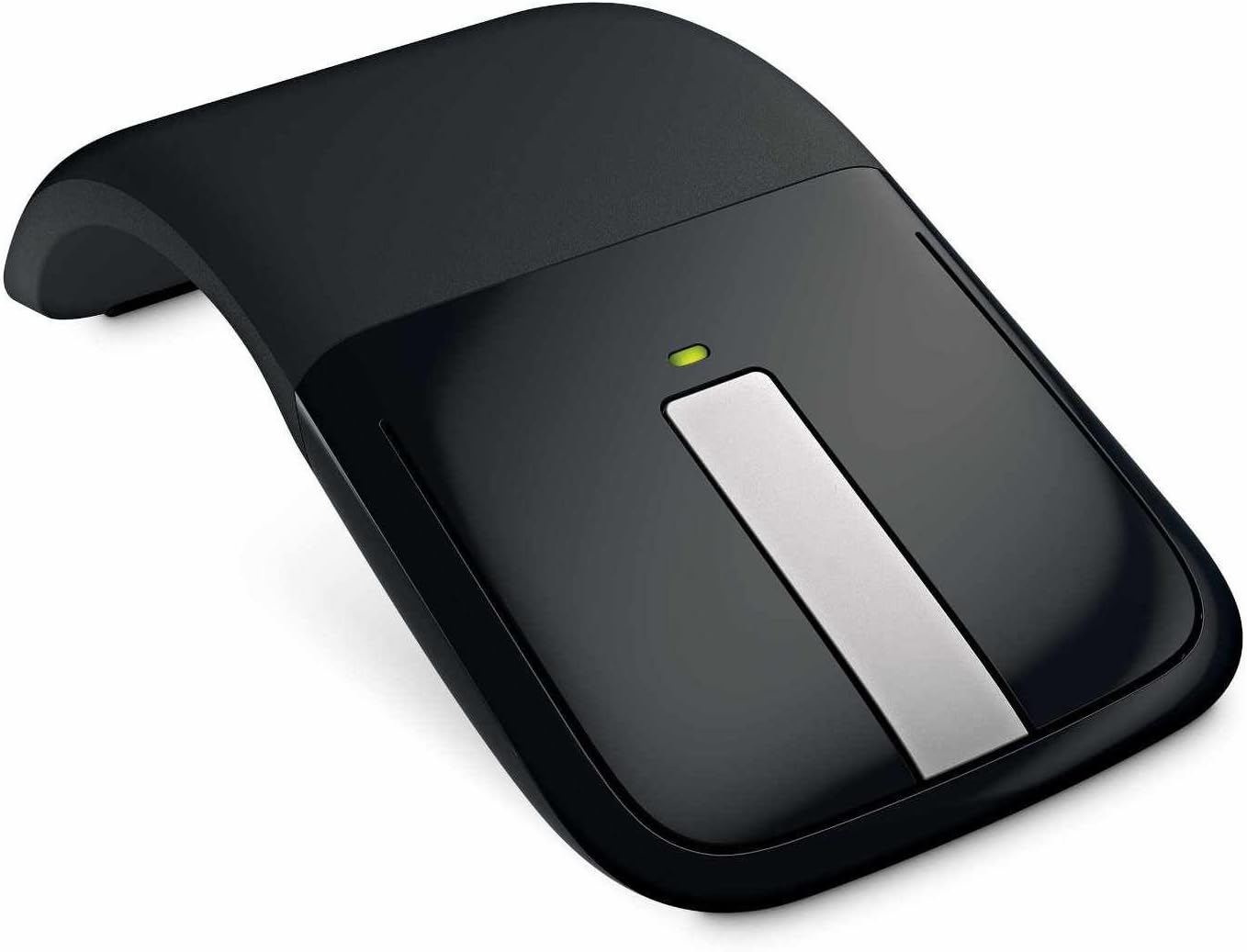
The Microsoft Arc Touch Mouse (Black) is a cutting-edge, foldable wireless mouse featuring BlueTrack Technology for precise tracking on any surface. Designed for professionals on the move, it offers a slim, ergonomic profile that folds flat for easy portability. Powered by 2 AA batteries with months of life, it instantly powers on when arced open, combining style, comfort, and long-lasting performance in one compact device.
| ASIN | B003UT6C9G |
| Additional Features | Wireless |
| Are Batteries Included | Yes |
| Are Batteries Required | Yes |
| Best Sellers Rank | #2,337 in Computer Mice |
| Brand | Microsoft |
| Button Quantity | 2 |
| Color | Black |
| Compatible Devices | Personal Computer |
| Connectivity Technology | Radio Frequency |
| Customer Reviews | 4.4 out of 5 stars 1,544 Reviews |
| EU Spare Part Availability Duration | 3 Years |
| Enclosure Material | Wood |
| Global Trade Identification Number | 00763615970761 |
| Hand Orientation | Ambidextrous |
| Item Weight | 3 Ounces |
| Manufacturer | Microsoft |
| Mfr Part Number | FBA_RVF-00001 |
| Model Name | FBA_RVF-00001 |
| Model Number | RVF-00001 |
| Movement Detection | Laser, Optical |
| Movement Detection Technology | Laser , Optical |
| Number of Batteries | 2 AA batteries required. (included) |
| Number of Buttons | 2 |
| Operating System | Windows 7, Windows 8, Windows Vista, Windows XP |
| Power Source | Battery Powered |
| Range | 30.0 feet |
| Special Feature | Wireless |
| Style Name | Modern |
| UPC | 777781854121 763615970761 885370144550 |
| Unit Count | 1.0 Count |
| Warranty Description | 3-Year Limited Hardware Warranty |
G**K
Great mouse, great service!
I ordered this mouse simply because of how innovative it was; Whether I use it often or use it here and there I just had to have it, now that I have it in my hands, I am glad I purchased it. Starting with the first impression, the box it comes in looks awesome with textures outlining the picture of the mouse, a flip out cover to peak at the product inside which is held by magnets. Just cut two sticky seals and the mouse tray slides out of the side not wrapped in a bag you throw away or zip tied to the tray (kudos Microsoft for not packing anything to throw away). A user manual is tucked underneath the tray the mouse is located in. The mouse comes with 2 Duracell AAA batteries (thanks again for not throwing in some no name battery like so many other companies do), the USB 2.4 GHZ wireless adapter for your host computer is magnetically attached to the bottom of the mouse. It seems to be attached pretty securely but I'm sure if it were bouncing around in your laptop bag it would fall off. It's irrelevant anyways as the USB is so small you can just leave it in your laptop when transporting without worrying about destroying it. You just pop the two AAA batteries into the compartment on the underside of the mouse, plug the USB adapter into your host computer and (I have Windows 7 64-bit) it automatically installs the mouse drivers and then Microsoft's Intellipoint software and gives you a little demo to learn the mouses functions. Probably barely took a minute from removing it from the box to finishing install. To turn the mouse on (I love this part and don't hesitate to show it off) you just bend the back half of the mouse into an arc, you will hear it click firmly into place. A green light above the left/middle/right buttons lights up to tell you that the mouse is powered on, and then turns off to conserve battery power (estimated 6 months battery life). On the underside of the mouse a blue track light lights up as well. The mouse itself feels a lot more natural in your hand than those standard tiny mice for laptops you'll find at Best Buy or other electronic retailers. My only complaint is the learning process of getting used to the right/left click buttons because you have to click them pretty close to the edge of the mouse for them to register. The "scroll wheel" is a touch sensitive strip which has a haptic feedback when you touch it to emulate a physical wheel. If you touch the far top or bottom of the scroll wheel it acts as a page up/down on various applications. It has some smooth strips on the bottoms or the front and back so it slides on any surface pretty smoothly. The whole thing feels like it can take a beating and come out unscathed for a few years. The BlueTrack tracking is very responsive and will not disappoint, especially if you don't always have a desk to use your mouse on. So far I've tried it on a glossy counter top, a clear plastic mat you slide a computer chair on, my bed, my shirt, carpet and it delivered flawlessly on each. I even tried it on my Toshiba Thrive Android 3.1 Honeycomb tablet and it is compatible (although it is a little tough getting the tiny USB adapter out of the recessed port on the tablet). In conclusion, if you are looking for a new mouse for your tablet, laptop, netbook or even desktop, this mouse is a great choice. I have even owned gaming mice and this one stacks up to them (wish it had programmable buttons though). Even if you're a tech freak like me and mainly bought it because it looked too awesome to pass up (the near 50% off price than that of a retail price doesn't hurt either), this is the mouse for you. Pros: Great design, sturdy feel, fits naturally in my average sized hands, works on more surfaces than most mice out there, extremely portable, no little on/off switch to fumble around with, works with Android Honeycomb Tablets (Granted they supply a full USB port), great conversation piece. Cons: No programmable button(s), kinda wish it had a Lithium-Ion rechargeable battery, takes some getting used to the left/right click buttons, also wish it were Bluetooth compatible which would eliminate the need for the USB adapter. On another note, this seller is sensational! I ordered this mouse on 27-JUL-2011 and got the standard 3-5 day shipping (no S&H!!) and received it at 5:00 PM EST when I got home from work on 29-JUL-2011. It seemed they shipped it 10 minutes after I finalized my order. The box and product are in brand new condition (I've had "new" products ordered from other sellers and they looked like a car ran over the box). Great product, great service, very pleased with my purchase.
G**N
perfect mouse for on the go!
This one caught my eye as soon as it came out. The slim design and ability to lay it flat in my laptop bag/backback made it very appealing. However, I wasn't sure based on some reviews if I would like it. I was also very spoiled by a very comfortable and ergonomic Microsoft Bluetooth mouse. Then the price point got low enough to make it worth a try and I took the leap. Very, VERY glad I did. I have to travel to multiple offices for work and need a good mouse on the go that doesn't bulk up my backback any more than needed. This mouse is every bit as slim as it seems and reduces bag clutter and weight. It takes a common AAA battery and I haven't replaced it in MONTHS! I only turn it off when I flatten it to put in the bag. I have flattened and unflattened it many times and it doesn't seem to be wearing out even after months of use. It is very responsive and I don't even notice I am using a such a uniquely designed mouse. I never have any wrist or hand tiring and it is in fact very comfortable. Almost on par with my former ergonomic mouse. The left and right click are a little hard at first, but they wear in and you get used to them to the point where it becomes an unconscious thing. The only con I have is that the scroll wheel takes a bit of getting used to and doesn't always scroll as much or as little as I would like. It is still quite usable however. The noise it makes is audible but not annoying. I sort of like it. Kind of a fun bells and whistles kind of thing. You can feel and hear it. I get tons of comments and compliments on this mouse, especially from road warriors like myself. If you have the kind of exacting requirements I have above, get it! You won't be sorry. Form meets function here in perfect stylish balance. April 2012 update: I still love this mouse. It is now my preferred mouse in every situation. It is remarkably comfortable given its minimalist form factor. I don't use any other mouse even though I have more 'ergonomic' ones. I have yet to replace a battery or have connectivity issues. Starts up instantly as soon as I unflatten it. Amazing mouse!
Z**H
Perfect mouse
I got my Arc Touch just earlier this week, but I have to say I love it. I've always been quite picky over my mice, usually going for very high-end (and expensive) mice, but I took a risk with this one, and it paid off. The Arc touch is very sleek and stylish, comfortable and very easy to carry around with you. If you're someone who uses a laptop for work or college, or travels a lot, this is the perfect mouse for you. Or even if you just want a simple and elegant mouse for your home computer, its great for everything. To turn it on and off you simply bend the mouse. Once it is bent, it turns on. When flattened, it turns off. It uses a micro-USB reciever which can be plugged into your computer and forgotten about. It barely sticks out, and doesn't interfere with anything. If you want to remove it, simply flatten your mouse and place it on the underside where the magnet is and you won't have to give it a second thought. The magnet is quite strong and the receiver will not fall off unless you remove it yourself. I love this feature because I always lose USB drives. So, on to the mouse itself. The back half of the mouse is a soft rubber-like material which feels comfortable and allows you to get a good grip on the mouse. The buttons are made of a shiny black plastic, and the scroll wheel is more or less just a touchpad like you'd find on a laptop. Scrolling is very nice with this mouse. While there is no actual wheel, the mouse vibrates making it feel as if there was an actual physical mouse wheel which was a really nice feature. One thing I learned quite fast was that you really need the driver to get the most out of this mouse. Once you have IntelliPoint downloaded from Microsoft you can customize what your middle button does when you tap it. You can set it for just about anything you could possibly need. Very useful to have that capability. The middle button really makes up for the lack of other buttons other mice normally have. It's really a 3-in-1 button. I could go on but all you really need to know is scrolling is fantastic with this product. Overall it is very comfortable and performs perfectly. The curve of the mouse fits my hand very nicely (it is a bit small for me, but still very comfortable), and very easy to use. You don't need to have any kind of mouse pad for this to work either, it glides smoothly over almost any surface you'd ever use a mouse on without any issues. You can even use it on glass with nothing behind it! I don't want to make this review too long so I'll just do a Pro-Con list to finish this off. PROS: ~ Very sleek look ~ Very comfortable curve, and material ~ Works on almost any surface ~ Very portable ~ Weight is very light, but is also a very sturdy mouse ~ Strong magnetic underside to the mouse to hold USB reciever ~ Can be used for anything including playing computer games (albeit not the best gaming mouse in comparison) CONS: ~ Clicking takes a little to get used to. At the very tip of the mouse it takes almost no pressure to click the right/left buttons, but towards the middle you need to press fairly hard to get a click. You always have to have your fingertips on the top of the buttons to get easy clicks. I got used to this quickly, though. ~ No forward or back buttons. You can only program the middle button double-tap to go Forward or Back, not both. ~ Price. The normal price is something like $70, which is quite steep for this mouse. I paid $42 here on Amazon, and I would not go higher than that. ~ At times the middle button is very sensitive, which results in the double-tap feature going off accidentally.
M**R
Terrific Portable Mouse
As anyone who travels with a laptop a lot surely knows, using the built-in track pad for extended periods of time can be a serious pain (literally and figuratively). Unfortunately, my ongoing search for a great travel mouse has been a long and frustrating one. Typically, "travel" mice are extremely tiny things that vanish in my hand (and I don't even have large hands!), and are extremely flimsy and prone to breaking apart. What I've long been looking for is a portable mouse that's lightweight, big enough to fit comfortably in my hand, and sturdy enough to survive trips in a laptop bag, pocket, backpack etc. Much to my surprise, the Microsoft Arc Touch Mouse accomplishes all of that and then some. Though I've long been a fan of Microsoft keyboards, I've hated their mice for years. However, several friends recommended this little guy to me so I thought I'd give it a try. The Pros: 1. Snaps Flat This is what makes the thing so portable. The mouse can either be snapped into it's "on" curved state for use, or into it's "off" flat state for travel and storage. This makes it very easy to pack and transport, and it serves a dual purpose of telling you the state of the mouse. Which is important for a battery powered device. Flat is off, and not usable. Curved is on. It also takes a bit of pressure to change the state so you don't have to worry about it accidentally turning on in a bag. 2. Comfortable Arc This is a big deal here. Most travel mice are extremely tiny so they can fit in tight bags etc. Because of the curve/flat bit noted above, when clicked into the curved/on state, it can actually be much larger in use than other mice in its class. This is by far one of the most comfortable mice I've owned. It's only beaten out by my specialty ergonomic mice I own for work and home. If it wasn't battery powered, I'd say this would be a great general all-the-time mouse for most people it's so comfortable. 3. Magnetic Back This is just a smart little piece of design that surprised me. The mouse is wireless and comes with a tiny USB receiver that you stick into an available USB slot on your laptop. The thing is so tiny it's begging to be lost. Microsoft did something simple but very neat here. The underside of the mouse is slightly magnetic, so when snapped flat for storage, you can just attach the USB receiver to the mouse magnetically. The magnet is strong enough to firmly hold it in place, preventing loss. It'll also hold extra AAA batteries nicely. Not a huge selling feature, but a cool extra bit that makes life easier. 4. Works out-of-the-box Mac & PC I've used this seamlessly with both my Windows 7 laptop and my MacBook Pro. No issues. Works flawlessly. No need to get special drivers etc. 5. Simulated Tactile Scroll Wheel Another small thing. The scroll wheel on the Arc Touch isn't actually a wheel. It's just a touch-sensitive pad with a slight depression in the middle to tell you where the mid-point is. Aside from on tablet devices, I'm not a huge fan of touch-scrolling because it lacks tactile feedback like I'm used to with a traditional mouse. The Arc solves this by playing a very faint clicking sound when you scroll, and creating a slight click-like vibration in the bad for every click played. This makes it feel like I'm rolling a wheel. Again, not a huge thing, but another small extra that adds up to a great feeling mouse. The Cons: 1. Gunk Magnet The clicking surface on the Arc Touch seems more prone to accumulating gunk than my traditional mice. Not sure why, just seems to happen. I have to clean off this mouse about once every other week. 2. Hard Clicks On all of my regular desktop mice, clicking takes minimal pressure. For some reason, it feels like I have to press 2-3x harder on the Arc Mouse to register a click. This might be because it's still so new and hasn't been "worn in" enough yet, but it's an issue I've never had with any other mouse I've owned. 3. Not Rechargeable The mouse runs on 2 AAA batteries, and while it lasts for a LONG time on those batteries, I still wish I had a method to recharge the mouse. I love my Razer wireless mouse as it has a dual mode where I can switch to wired to recharge while still using the mouse, or putting it on a base station. Now, since this is a travel mouse, the base station doesn't make a whole lot of sense, but a secondary cable for wired/charge mode would have been great. ----------------------- All-in-all, this is the single best travel mouse I've ever used. It fixed everything I hated about tiny travel mice and added some really great touches that make it feel more like a full-on desktop mouse. If you need a mouse to travel with, I wouldn't look further than this guy right here!
H**B
great mouse!
i purchased this mouse several weeks ago for work as well as when i'm mobile. i like my work laptop, but using the mousepad's distinctly more uncomfortable than docked with my desktop setting, particularly away from my desk. the first time i used the mouse, i experienced distinct discomfort, stemming from my wrist posture and how i was used to my logitech mouse + wrist pad. however, the next day i forgot to charge it properly and was 'forced' to use my arc mouse. now, i enjoy using it as often as possible whenever i work remotely! i bought this during gold-box sale, so totally worth it for me. i'm the type who can't buy almost anything full price, no matter how cutting edge or of the latest fashion it is. pros: * silicone padding on bottom is very comfortable and smooth * surface for buttons is very smooth and easy to click * the force-feedback from using the 'middle button' is great to control scrolling up and down. you can control to stop scrolling by tapping again * form factor is utterly impressive for keeping mobile. leave the dongle in your laptop and carry the mouse right in your pocket or in bag * form factor also allows for easy gliding. my traditional mouse isn't even remotely that smooth. esp even more useful on non-smooth surfaces like my bed! * bluetooth range is pretty good * laser optics is amazing. there is no issue on any surface i typically use: mousepad, desk, even bed cons: * button click surface, while smooth, easily collects body oil from fingers. those with sweaty hands and eat finger food snacks but don't clean well enough will surely muck up the product * overcompensating for scrolling: if you have to scroll far down a page, it over-measures your swipe velocity and it'll keep on scrolling. if you don't pay attention and hit a shift or control key during so will wreak havoc and open a ton of windows and/or change your browser zoom settings. uber inconvenient if you're not paying attention * silicone body is a dust collector. can't really stop that * uber-portable as a mouse, but not if you snap your dongle along with mouse: it may be magnetized, but the dongle hitched onto the back of the mouse will easily move esp if you leave the mouse in more of a pouch than a pocket with other things or where it can move around. * dongle is just big enough to over-protrude on say, a laptop, esp packing and unpacking the laptop from bag if you put it in the 'wrong' usb slot. fortunately, the body shape of thinkpad has a slot where i'm comfortable it won't snap (break?) and pop out while moving laptop to/fro my bag if under $40, i'd buy this again. if closer to 40, i'd be very hesitant, as i'd rather just get a regular, comfortable mouse for 1/3 the price with lesser cool (but functional) features
A**M
Exceeds Expectations!
I'm a laptop owner, and was fed up with using the annoying little touch pad to 'get around'. I use my computer for school and leisure, and noticed while using the touch pad my fingers would feel cramped up. I decided to search for a wireless mouse. I searched for a convenient good quality wireless mouse, and this one fit the bill. I read through so many reviews and ratings, not just on amazon.com. And even with the few negative comments I purchased it anyway and was pleased I did so. The negatives (that i've read) : USB not secure to travel on the magnetic bottom of the mouse. That right there was one thing I was worried about, and believe me, its not a big deal. The magnet thats used to adhere the USB to the mouse is quite strong and takes some force to remove it. I wouldnt worry much about it, and if you are worried about losing it you probably dont take very good care of your things anyway. :) another negative ive read of was the part of the mouse used to click is difficult and takes a 'hard' click to complete. this i found to be nonsense since the mouse isnt meant to be clicked on in the center of the button like a cheapo corded mouse... this mouse is meant to comfortably fit your entire hand and effortlessly with the tip of your finger be able to tap the clicking mechanisms. the center scrolling bar is a nice touch how you can 'feel' the scroll clicks happen and hear them as well! nice touch Microsoft. Many uses to the center button. i am very pleased. the mouse works on a number of surfaces, for instance right now im using it on the microfiber cover of my futon. i also used it on the smooth surface of my leather chair. heck i even used it on my leg! very versatile and functional. mouse enters into a 'sleep' mode when its in the bent and on position after a short time of inactivity. and as soon as you move it again it quickly comes back. smooth, sleek design, convenient, practical and stylish this my friends is THE MOUSE to buy. i am in love with my recent purchase and urge you to buy this and try it and prove me and so many other happy customers wrong. And its a great buy too.. a 70$ mouse for 38$ from amazon... free shipping. cant go wrong. comes with 2 triple A batteries and works right out of the box. simpleton can figure this one out. Highly recommended, Great product.
W**G
Form Over Function
I've been a fan of Microsoft's older mouses for many years. The problem is that the mouse wheel always wears out; over time they get seem to get dirty and consequently harder and harder to spin. When I learned about the Arc Touch mouse, with a solid-state touch senor replacing the mechanical mouse wheel, I thought this would be the perfect solution and I pre-ordered one immediately. Sadly, after using it for a couple of days, this mouse just isn't going to work for me. The touch sensor that replaces the mouse wheel is indeed very nifty. Even though it's a touch sensor with no moving parts you still feel and hear little "clicks" when you slide your finger, mimicking the feedback of a traditional mouse wheel. It also lets you slide your finger to scroll slowly, or flick your finger to scroll quickly. However, it doesn't always register like it's supposed to. Many times I'd be moving my finger and nothing would be happening, and it was sometimes difficult to control the speed of the scrolling without being very deliberate. The fact that this is a first-generation device is apparent. The biggest problem for me is that there are no forward and back buttons. (These are the small side buttons on a mouse that let you, among other things, move back and forth between Web pages.) I consider these an essential, standard feature and I don't think I've seen any mouse in the last few years that didn't have them. I suppose it's partly my fault for not specifically looking for them on the feature list before ordering, but it never occurred to me that Microsoft would leave them off a modern mouse. Another feature of the touch sensor is that you can tap at the top or the bottom to page-up or page-down. It occurred to me that I could reassign these actions to forward and back (who needs to page up or down when you have a mouse wheel?), but unfortunately you cannot reassign these to another function. You can turn the action on and off, but you are stuck with page-up and page-down. Another feature that has become more or less standard on modern mouses that is missing here is "tilt wheel" four-way scrolling (which lets you press the mouse wheel to either side to scroll horizontally). I don't use it that much and I imagine most people don't either, but if you do use this feature on a regular basis you won't find it on this mouse. The left and right mouse buttons are the traditional push-to-click type. However, as with recent Microsoft mouses, they are one-piece plastic integrated with the body of the mouse. This means the farther back you press on them the more pressure it takes to make them click. Pushing them in the middle of the button area, which is where it feels most natural to me, requires more pressure than I would like and is too fatiguing over the long haul. (This is one of the reasons I like the older Microsoft mouses; the buttons were independent pieces and consequently easy to push. Isn't that more important than styling?) You bend the bottom of the mouse to turn it on and off. I saw an interview with the Microsoft engineer that designed this and he says it has over 90 parts. I'm sure this is a large part of why this mouse is so expensive. One other potential problem, you store the USB receiver on the back of the mouse by placing it on a magnetic patch; there is no recessed area to lock the receiver in place like with other mouses. It seems to me this is a recipe for disaster as the receiver can be easily knocked off, but I haven't put it in and out of my laptop case enough to know whether or not this would actually happen. The receiver is tiny, and you could easily just leave it in the USB port all the time. It seems like in recent years Microsoft has moved towards offering mouses that look good but don't feel as comfortable or function as well as their older mouses. The Arc Touch mouse advances that trend to another level, and it impresses me as more of an "executive toy" than something designed to do actual work. I suppose I'll just have to keep searching for older model Microsoft mouses (which are getting harder and harder to find), or maybe give Logitech products a look.
R**H
Terrific mouse despite the stiff click
I love this mouse. Despite the uncharasristic stiff click for a Microsoft mouse, I still highly recommend it. First of all, as a laptop mouse, one of the most important thing is probably to track on any surface, and this one really does. On your pants, couch, blancket, throw; you name it, it'll track on it. I don't know how long this technology has been there, but honestly I find it pretty amazing. The central strip works very well. While scrolling up and down is cool, the best feature I found is page up/down. That further minimized my need to access the keyboard, and keep my hand from moving around a bit. The receiver is of nice size, and I personally find it works best when I put it in a USB port closer to the screen of my laptop. It doesn't receive better there -- it receives perfectly in every USB port, but it intrudes less when I move around my laptop. I did first worry about the magnetic holder at the back of the mouse, but after carrying it back and forth a number of times, it seems very safe there. I'll update on this if it starts to separate unintendedly. To the stiffness of the click. I have used a number of Microsoft mise, and this one has the most stiff left and right clicks. It's hard to explain, but sometimes I feel the stiffness actually makes sense, especially the left click. Right click is more often to be too stiff, especially I set the cursor speed relatively fast. Sometimes the stiffness causes the cursor to move, which is annoying when it happens, though to be fair it doesn't happen that much. I like the thin design and the foldable body. It brings portability without sacrificing the nice feeling of holding it. I personally don't have the habbit to use the extra bottoms other than the main three, so the lack of those is completely a non-issue for me, though I do think Microsoft might be able to find a way to put those in if there are such demands. Installation of a Microsoft mouse on Windows 7 machines really takes no effort. Plug it in, wait couple seconds, and then it's ready. My impression on this mouse makes me want to buy another one, one to use at work and one to use at home, though it sort of defeats the purpose of buying a portable one at the first place. I'm still struggling on this, but you can see I really enjoy having it.
Q**E
Microsoft Arc Touch Mouse, not Bluetooth type
It's not a Bluetooth type, but USB. Luckily, this Seller allowed me for a free return. Great service!
A**N
Súper ergonomico y portable.
Muy recomendable para labores estándar de office. NO para gamers o uso en AutoCAD. Llevo + de 10 años usando este modelo y lo recomiendo ampliamente.
Trustpilot
1 month ago
2 weeks ago