⌨️ Elevate your typing game with ergonomic precision and pro-level customization!
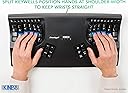
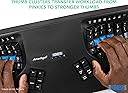
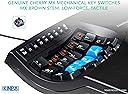
The Kinesis Advantage2 KB600 is a premium ergonomic keyboard featuring concave, tented keywells and vertical column layout to reduce typing strain. Equipped with tactile Cherry MX Brown switches and integrated palm supports, it promotes a natural, comfortable hand posture. Its SmartSet programming engine allows powerful, driverless customization including macros and remapping, all saved onboard. Designed for professionals seeking to prevent RSI and boost productivity, it offers a compact footprint by omitting the numeric keypad, enabling closer mouse placement and reduced arm fatigue.


| ASIN | B01KR1C5PY |
| Antenna Location | Office |
| Best Sellers Rank | 77,194 in Computers & Accessories ( See Top 100 in Computers & Accessories ) 1,203 in Keyboards (Computers & Accessories) |
| Box Contents | Kinesis Advantage2 Keyboard |
| Brand | Kinesis |
| Brand Name | Kinesis |
| Button Quantity | 87 |
| Colour | Black |
| Compatible Devices | Laptop, PC |
| Compatible devices | Laptop, PC |
| Connectivity Technology | wired |
| Connectivity technology | wired |
| Country of Origin | China |
| Customer Reviews | 4.2 out of 5 stars 698 Reviews |
| Enclosure Material | Plastic |
| External Testing Certification | Não aplicável |
| Generation | First Generation" or "Generation 1 |
| Global Trade Identification Number | 00607998600078, 05050914962609 |
| Hand Orientation | Ambidextrous |
| Item Dimensions L x W x H | 46.7L x 27.2W x 10.4H centimetres |
| Item Type Name | KINESIS KB600 Advantage2 Keyboard |
| Item Weight | 2.2 Pounds |
| Item height | 4.1 inches |
| Keyboard Backlighting Color Support | Single Color |
| Keyboard Description | Ergonomic |
| Keyboard Layout | Colemak |
| Keyboard description | Ergonomic |
| Manufacturer | KINESIS |
| Mechanical Keyboard Switch Model | Cherry MX Brown, Cherry ML |
| Model Name | Advantage 2 |
| Model Number | KB600 |
| Number of Keys | 68 |
| Number of Sections | 3 |
| Power Source | Corded Electric |
| Product Features | Ergonomic |
| Product Warranty | 1 year manufacturer |
| Recommended uses for product | Office |
| Series Number | 600 |
| Special feature | Ergonomic |
| Style Name | US QWERTY - Tactile Feel |
| Switch Type | Tactile |
| Theme | Ergonomic keyboard |
| UPC | 607998600078 |
| Unit Count | 1.00 Count |
| Water Resistance Level | Not Water Resistant |
R**S
Fantastic Ergonomics and Powerful Programability
TL:DR the Kinesis Advantage 2 LF (KB600LFQ) is a phenomenal keyboard for anyone spending significant time typing. It's a solid investment in your work comfort and overall hand health. If you're on the fence about purchasing, I highly recommend giving it a go. As someone sat at a keyboard all day writing and programming I have tried many different keyboards with both standard and ergonomic layouts. The Kinesis Advantage 2 LFQ (Low-Force, Quiet) keyboard is the best so far. The biggest selling point for this keyboard is its ergonomics. The Kinesis Advantage 2 LF features a key well design that comfortably accommodates your hands and fingers in their natural resting position, which drastically reduces the strain typically associated with long periods of typing. The key wells are split and angled for a more natural position for your arms, wrists and hands. Additionally, the keys are highly responsive and don't require much force to activate, leading to reduced hand fatigue and a more enjoyable typing experience. One feature this keyboard has that the newer 360 models lack is a piezo speaker. This speaker creates a key click sound on key actuation so you can hear when the key is activated. It's a small detail but helps to avoid "bottoming out" the keys which is a common cause of pain in your fingers from typing. I bought this keyboard because I suffer from RSI, it's not a cheap keyboard but for me the keyboard enables me to keep working pain free. If you are suffering from RSI do seek expert advice though, RSI is a catch all name for a variety of different symptoms with different causes, what works for some may not work for others. The keycap profiles on the Advantage 2 is fantastic with the home row being a different shape so your fingers can quickly recognise where they are on the keyboard without looking. Sadly these keys are made of ABS plastic, giving them a sticky feel. They are pretty thin and wear out quickly getting a very smooth and shiny texture. You can buy replacement PBT keycaps direct from Kinesis, they aren't quite the same profile as the originals but they do feel nicer to type on and should not wear out. The keyboard sounds very hollow which is a real shame, I feel kinesis could have improved on this and with the Cherry Red silent switches it could have been a very quiet keyboard. There are various discussions online on how best to reduce the sound on these keyboards, I personally haven't tried any of them yet though. The Advantage 2 also has powerful programmability with Kinesis own Smart Set system, offering the ability to customise every key to suit your specific needs. It's possible to program it from the keyboard itself switching key positions and recording macros which is useful if your IT department limit the control you have over your PC, but you can also mount the keyboard as a USB device by using a key combination where you can create more powerful customisations such as "mod tap" keys where if you tap the key it performs one action and if you hold the key it performs another. For example, on my keyboard I have the Caps Lock key mapped to Ctrl when it's held down and Esc when tapped. The keyboard has two layers per layout, but supports many custom layouts which you can activate using a keyboard shortcut. It takes a little while to adjust to having come from using a regular keyboard but I was back up to typing at around 90 wpm within a week. The instruction manual that comes with the keyboard provides some useful guidance. If you buy this keyboard, do make sure you read the instructions. This is by no means a cheap keyboard, but given it's programability, and potential to prevent repetitive strain injuries, I believe it's a worthwhile investment. The Kinesis Advantage 2 LF (KB600LFQ) is a phenomenal keyboard for anyone spending significant time typing. It's a solid investment in your work comfort and overall hand health. If you're on the fence about purchasing, I highly recommend giving it a go.
A**S
The best keyboard I have even had.
I have bought the Kinesis Advantage 2 Quiet LF and I also own a Kinesis Advantage Pro with brown keys. The linear switches are in my opinion better suited for this keyboard. I am a heavy CAD user, AutoCAD, Microstation, C3D, OpenRoads, scripting, programming, etc. I am also suffering from RSI and I noticed a vast improvement since using this keyboard. Since I've got it, I switched to a modified Dvorak layout and found it more comfortable. This keyboard is a tool, and like any tool it requires time to adapt and configure, there is a learning curve and some frustration involved, but once getting used to it one can work longer and less stressful. I highly recommend getting a foot pedal, I have a hacked version as Amazon does not have the Kinesis one in stock and importing one to the UK is prohibitive. The foot pedal allows access to a modified layout on the fly. There are enough detailed reviews of this keyboard on the internet so I won't repeat that here. One overlooked feature is the included speaker, I was a hard hitter and always bottomed out, since turning it on helped me to be a "softer" typist. Use the ASCII files to configure the keyboard and have them saved somewhere safe. In CAD the use is limited without proper configuration, this keyboard is great for typing but in CAD we have one hand on the keyboard and one on the mouse, the split layout of this keyboard is less CAD friendly unless tuned for application. Read the manual, it is mandatory to be able to get the maximum of this tool. What I do not like is the function row keys, they could use normal switches since getting there requires a bit of move, in CAD and programming we use these extensively and the small ones are hard to hit. Use of a pedal allows re-mapping to the number keys, but on some occasions it requires the use of the dedicated ones. It is big and hollow and sometimes has echo, especially when working from home in a quiet room. I cannot use it with my Contour Rollermouse, due to size of both, i have to hack something together to get them to play together. Expensive, but any mechanical keyboard is nowadays, if it is ergonomic add some extra. Kinesis has a great customer support, always happy to help. Going back to a laptop keyboard while travelling is annoying at least. If you care about you hands and need them on a keyboard get one and get used to it.
M**I
Well worth the money
Definitely helped my carpal tunnel pain. Maybe another keyboard also would've helped, but I can't think of one that could've done as good a job as this one. The quiet keys were worth it in my opinion. They are indeed quiet, but they also actually feel better than my old, non-quiet mechanical keyboard, especially for quick repeated key presses. Perhaps the Kinesis clicky switches feel even better though, who knows. The best part for me was learning how easy it is to set up a new layout or macro, with the app. I'd say the worst thing about the KA2 is the fact that I have medium-to-small size hands and so reachability isn't quite perfect. I'd give the reachability a score of 87/100 - it's good, but it would be nice if they released, for example, 3 different sizes of keyboard (?). Anyway, it's a huge improvement from using a normal keyboard. And I don't think it's hard to learn at all. You get such an advantage from having Space and Backspace on your thumbs - even if you keep making mistakes at the start you can instantly backspace them away without hassle. In fact, I didn't use to touch type before this keyboard, but... the layout, the thumb clusters, the spacing and most of all the straight matrix of keys make it so easy to learn that I thought why not? I even ended up creating a completely custom layout, and I'd say it only took about a week or two before I managed to get a passable speed (just under 40wpm). I mean, I'm not that fast, even now, but it's not like it's the keyboard that slows me down. The important thing is that it's fun and pain-free, so I don't have to worry about speed anyway!
P**S
Broke after six months of use
I bought this keyboard six months ago and it no longer works. The USB cable has broken, in the area where the cable meets the keyboard. There seems to be no easy way to fix it. It's a shame as this was a nice keyboard. There is no warranty so it seems there's nothing I can do. £322 down the drain. Edit: I was able to buy a replacement cable from Kinesis for $20, plus shipping. The keyboard is working fine again.
B**N
Should have gotten it sooner
I have postoponed getting this keyboard a lot because of the price, but I should have gotten it sooner. It has saved my career and well being. I used to need to wear an orthosis brace at night and needed to stop working because my wrist was hurting so bad. Now, while the discomfort is not completely gone, this makes a world of difference. I recommend fighting through the break in period and also customizing it to your preferences. The most important step, in my opinion, is to change the keys to your liking. My setup looks nothing like what the default is for the pecial keys. Also, make heavy use of the macros to get rid of those weird hand movements. The plastic quality is not the best but that hardly matters when it does what it's supposed to do well.
M**N
Poor thumb key positions, poor build quality.
For an emacs user like me, this keyboard makes it super-hard to press alt+ctrl+shift+5 for query-replace-regexp because alt, ctrl, shift are now thumb keys, and I only have 2 thumbs (but i can press these 4 keys with my left hand only on a plain qwerty keyboard). Just alt+ctrl is difficult because it requires 2 thumbs, or hitting both keys with one thumb which is even more difficult. The locations of thumb buttons are such that one needs to extend the thumb farthest to reach ctrl or alt, which requires an elbow move and rotating the wrist outwards, which displaces your typing fingers off the target key, defeating the main purpose and benefit of this keyboard. I have fairly long fingers and use only the largest screen size phones. I have observed 4 people loving and enjoying the keyboard, but for me its thumb keys are impossible to reach and use without repositioning the main typing 4 fingers. Build quality-wise, the keyboard looks, feels and sounds like a cheap piece of plastic built in early 2000s. It shouldn't cost more than £100, which is still generous for it. Had to return it.
A**R
Great keyboard, but can we have more options?
I got the silent red version. First of all, my review is by no means saying this is a bad keyboard. To be honest, this is a great keyboard, but at this price tag people naturally have very high expectations. I will just comment on things that are kind of unexpected to me. Surprises: The keypad switch is a BIG undersell! The product description just says the keypad key turns your right key well into a numpad, but it actually activates a whole new second layer, and you can customise all keys on this layer as well! I cannot imagine that Kinesis just brands this as "hey, in case you still need the numpad, you can find it here" instead of "you have a whole secondary layer that you can customise, and we just happen to preset the numpad on some keys for you". I programmed the backspace key into second layer shift (my CapsLock works as backspace anyway) and as a Vim user, I programmed HJKL as arrow keys so I don't need to reach the actual arrow keys. Also, I mapped operators (-, =, [, ]) to UIOP which is really efficient. Let's be honest, these keys are awkward to reach, especially when coding with this keyboard, but with a second layer, it is much more efficient than you think. Note that you can change almost any key to keypad shift or keypad toggle to activate the second layer. Now about the two missing stars: This keyboard is designed for medium to large hands. My right pinky had trouble reaching the P key, and if I moved my hand up to reach it, then my right thumb would be at the upper bit of the space key. Those large keys (space, enter, backspace, delete) don't have stabilisers so it can be hard to actuate if you are not pressing right in the middle. Of course, after some getting used to this is not much of a problem, but for me, it would be ideal if the pinky column is further down, and the thumb cluster is moved up a bit. Cherry silent red switches. I am using it in an office environment and MX brown is simply too loud. It is very quiet for sure, not louder than rubber domes and my colleague can just take a nap next to me without complaining. BUT, silent reds are very scratchy. I don't have a problem with it being mushy since I use O-rings on my other keyboards and this level of mushiness is quite acceptable, but silent reds are probably the most scratchy in all the switches I used. I have keyboards with Gateron and Outemu reds and they feel much smoother. I really do hope Kinesis can give us more options on switches. Cherry may have good browns, but in my opinion they simply don't produce the best reds and blues.
M**M
love with Advantage 2
super keyboard. not easy to start but ergonomic of kinesis is top. i am very happy with it.
Trustpilot
1 month ago
3 days ago