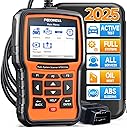
🚀 Unlock your car’s full potential with the ultimate VAG diagnostic powerhouse!
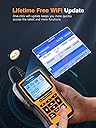
The FOXWELL NT510 Elite is a professional-grade diagnostic scanner tailored for Volkswagen, Audi, Skoda, and Seat vehicles. It offers full system diagnostics, bidirectional control for active testing, and over 31 maintenance reset functions. Featuring one-click WiFi updates with lifetime free upgrades, this plug-and-play tool empowers both DIY enthusiasts and professionals to monitor, diagnose, and maintain vehicle health effortlessly.


| ASIN | B016ZCUSE4 |
| Brand Name | FOXWELL |
| Customer Reviews | 4.1 4.1 out of 5 stars (234) |
| Manufacturer | FOXWELL |
| Manufacturer Part Number | NT510 VAG |
| Model Number | FOXWELL NT510 fit for VW |
| Power Source | Battery Powered |
| Screen Size | 2.8 Inches |
| UPC | 712321437440 |
| Unit Count | 1 Count |
P**L
This works!
Very happy. As a preface, I am a retired ASE certified Master Tech. But, my old scan tools have not been updated for about ten years. I have some newer German vehicles that I still need to maintain. I am fortunate enough to have two vehicles that the VAG programmed 510 works on. One a 2015 Audi RS5, the other a 2016 Volkswagon Touareg. I wanted a scan device that would work without having to download software into my laptop and then have to put my laptop into my car. Something more portable that I could keep in my toolbox. Before my purchase I asked a question if this device would help me diagnose an issue that I have with my Audi where there is a service light on for the adaptive headlights. I received a brief response from the manufacturer that it would with no further instructions or advice, but a message that I could contact them with any other questions. Not a deal maker for me, but it gave me a little confidence. Then I received anther response from someone who said if VAGCOM can do it then the 510 should be able to. Fine then, I decided to give it a try. Received the tool this afternoon and registered it online right away. The tool has its own password built in so if you buy it and try to register it make sure you use that with its serial number instead of your personal password that you used when you set up your account. Brought it home and plugged it into my 2015 Audi RS5. Was disappointed to find out that even though the device read my vin my car was not included in its data bank. Ok, I fiddled around a bit and ended up using an A5 with a 4.2 although I don’t think such an animal exists, in my world anyway. The included instruction book was pretty much worthless and I proceeded with utmost caution making sure that I did not erase any settings. I stumbled around for a while and finally pulled up the only code that my car had stored which stated that the front ride height sensor was open. Now that made sense😳. I inspected the sensor and wiring, found nothing that I could see wrong so I ordered a new one. Moving on to my wife’s diesel Touareg. It has just over 40,000 miles on it and we just had it into the dealer for a def tank recall and and some other updates due to Volkswagons diesel scandal. Upon return of the vehicle it still had a service interval reminder message on the dashboard. Another disappointment 😔. Anyway I could not find a way to turn off this reminder using just the internal vehicle settings. Oil change yes, this message no. I plugged in the 510 and went to work. It found the vin right away, but again using the vin it did not recognize the proper vehicle. I manually found the correct 7 passenger Touareg with tdi and away I went. Stumbling around again without a good manual for guidance I found what I needed and set the distance and time from the last inspection to zero. The wife is happy and I am pleased with myself. Went back to the Audi and played with the rear brake system because I will need to replace the rear pads soon. This car has electric rear parking brakes which need to be fully retracted before you can replace the pads. You can do it with jumper wires but since I now had the correct tool I wanted to see if it worked. Selecting an A5 again. I went into the menu and found where I could retract the parking brake caliper pistons. I told it to go ahead and I could hear both calipers turning open. When they stopped I told the device I was finished installing new pads. The Foxwell screwed them back to the rotors and told me to check the brake fluid. Money well spent.
S**H
Easy to use scan tool
Great scan tool I used it to check codes and reprogram the new battery I installed on my 2019 VW atlas
E**L
Works on my daughter's 2019 Tiguan
I've been limping along on an old Sears scanner and an Android-based Bluetooth scanner for decades. When the battery in my daughter's 2019 Tiguan started failing VW quoted her almost $500 to replace it. That wasn't going to happen. I knew I'd need a bidirectional scanner to adapt (register) the replacement battery. I thought I might avoid the issue by buying a replacement battery from one of the nearby auto stores where they install the new battery for free. Nope. I called around and found they didn't have the right scanner for the job. So I bought this unit. I'd rather pay for this and have the tool for life than spend close to the same money for the dealer to perform the install. Once you receive the scanner you should update it before you use it. Its brains are on a micro-card stuck in its side. Push the card in a bit then release and it will pop out enough for you to grab it. Stick it in the USB adapter that come with the scanner in plug it in your Windows-based computer. (Windows only.) If you get a pop up asking how to handle the device just close the window. Then go to the URL on the enclosed card to download and install FoxAssist. The installation installs the VC++ runtime so it takes a little time then forces you to reboot. Hmmpphhh.... Once you've rebooted launch FoxAssist, create an account and update your scanner's software. The software on the card is old. All four software packages on the card were updated. My VW package was something like version 2.14 and it updated to 3.04. It's half a gig. It took like half an hour to download and unzip to the micro-card. The unzipping took almost all of the time. Apparently writing to the micro-card is super slow. But once that was done I was up and running. I swapped the battery (I hooked a 12 volt power supply to the car to keep it alive during the swap) and registered the battery easy peasy. One of the most important reasons I bought this particular scanner was the ability to add other car manufacturers to it. My daughter and I both drive VWs, but my wife has a Baby Benz. I didn't want to have to buy separate bidirectional scanners for each nor did I want to buy an expensive professional scanner that handles multiple car manufacturers. Now that I have this scanner and I know it works I'll pay another paltry $60 to add Mercedes to it and I'll be able to handle all of our cars going forward.
B**.
Disappointed.b
It does eventually get you a report with all the systems in the car. But at what cost. The directions are really not good for what your paying. Why 'do the Chinese think that having directions which are difficult to follow and at times contradictory is beyond me. I spent way to much time withe the set up that I went ahead and got the scan done by a mechanic and paid for it. The item did not clear the codes as expected. And frankly I did not want to go through any chat tutoring as I read enough reviews which made me think I didn't want to deal with that. The scanner did eventually provide a through scan diagnosis. But I'm unsure whether to take it as gospel. Perhaps if I would have had a lot more time on my hands I might not have been so disappointed, but the listing offered so much I expected. Assuming the codes I got were are correct the machine does eventually give you a good many system diagnosis.. Performance 3, value 3, features 4 and connectivity 2. Just can't keep an item that fell so short of expected.
L**N
Brilliant for VAG worked flawlessly on my Q7
M**A
Easy to use. Grabs all those hidden dealer codes. Coding feature is a welcome addition when switching out a battery or coding injectors.
B**E
Total waste of money. I bought the VAG versions and found it only covers a small number of the more popular VW models, such as a 1.4 Golf, but got a 2008 VW Golf GTI or VW T5 Transporter, forget it, it does not cover these or many other VW models. I contacted support regrading this a number of times and all you get back is a canned reply to update to the latest firmware version, even though I had told support from the outset I am on the latest firmware. I gave it one star as for those few VW models it does cover it has a few extra options to reprogram such as opening all doors with the remote, but many of the reprogramming functions built in simply did nit work. Ended up having to byte the bullet and buy a Ross Tec VAG COM. Save your money either buy a Ross Tech VAG COM or get a £20 scanner that does as much as this. Unfortunately it looks like I have left it too late to return it, so will be listing it for sale on an auction website very shortly.
A**S
We felt the Foxwell Scanner did what we needed as we compared the results with the dealers results.
Trustpilot
1 month ago
1 month ago