Desertcart purchases this item on your behalf and handles shipping, customs, and support to Italy.
🚀 Mesh Your Home, Master Your WiFi!
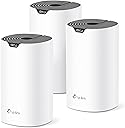

The TP-Link Deco S4 Mesh AC1900 WiFi System (3-pack) delivers seamless, high-speed WiFi coverage up to 5,500 sq ft using advanced mesh technology. With dual-band AC1900 speeds, support for 100 devices, and 6 Gigabit Ethernet ports, it ensures stable, fast connectivity throughout your home. Easy setup via the Deco app, robust parental controls, and Alexa integration make it a top-tier choice for modern smart homes.


| ASIN | B084GTH5LL |
| Antenna Location | Home |
| Antenna Type | Internal |
| Best Sellers Rank | #27 in Computers & Accessories ( See Top 100 in Computers & Accessories ) #5 in Whole Home & Mesh Wi-Fi Systems |
| Brand | TP-Link |
| Built-In Media | Deco S4 (3-pack) 3 Deco S4R Units 1 RJ45 Ethernet Cable 3 Power Adapters 1 Quick Installation Guide |
| Color | White |
| Compatible Devices | All WiFi Enabled devices |
| Connectivity Protocol | ethernet, wi-fi |
| Connectivity Range | 5500 square_feet |
| Connectivity Technology | Ethernet, Wi-Fi |
| Control Method | Voice |
| Controller Type | amazon_alexa, vera |
| Coverage | 5500 square feet |
| Customer Reviews | 4.5 out of 5 stars 29,469 Reviews |
| Data Transfer Rate | 1200 megabits_per_second |
| Frequency | 5 GHz |
| Frequency Band Class | Dual-Band |
| Item Dimensions L x W x H | 3.57"L x 3.57"W x 6.39"H |
| Item Type Name | Whole Home WiFi System |
| Item Weight | 4.2 pounds |
| LAN Port Bandwidth | 1000 Mbps |
| Manufacturer | TP-Link |
| Maximum Upstream Data Transfer Rate | 950 megabits_per_second |
| Mfr Part Number | Deco S4(3-Pack) |
| Model Name | Deco S4(3-Pack) |
| Model Number | Deco S4(3-Pack) |
| Number of Antennas | 9 |
| Number of Ports | 6 |
| Operating System | Linux |
| Other Special Features of the Product | Access Point Mode |
| Security Protocol | WPS |
| Special Feature | Access Point Mode |
| UPC | 840460605014 845973089726 |
| Unit Count | 3 Count |
| Voltage | 12 volts_of_direct_current |
| Warranty Description | 2 year manufacturer |
| Wi-Fi Generation | Wi-Fi 5 |
| Wireless Communication Standard | 802.11ac |
| Wireless Compability | 802.11ac |
S**.
Great value compared to many other mesh systems on the market.
Finally got rid of the dead zones in my house—WiFi stays strong in rooms that used to have weak or no signal. Setup was surprisingly easy, devices switch seamlessly between units as you move around the house, so there are no random disconnects. Handles multiple devices well, including phones, laptops, smart TVs, and smart home gadgets, coverage is impressive and works well for larger homes or multi-story layouts. Great value compared to many other mesh systems on the market. The only issue is that performance can vary depending on how far apart the units are placed!!
D**S
TP-Link Deco S4 (3-pack) – Finally killed every dead spot in my 4,800 sq ft house for under $130
I live in a 1970s two-story brick house with plaster walls that eat WiFi for breakfast. My old ASUS router + extender setup left me with zero bars in the master bedroom, garage, and back patio. After fighting it for years, I grabbed this Deco S4 3-pack on a Prime Day deal for $119 and it’s been flawless for the last 14 months. Coverage & speed Placed one in the basement office, one on the main floor, one upstairs hallway Full bars everywhere now – even the detached garage 70 ft away pulls 180 Mbps down on 5 GHz Real-world speeds: 450-550 Mbps next to a node, 220-300 Mbps in the farthest corners (on a 500 Mbps fiber plan) Zero buffering on four 4K TVs streaming at once + two kids on Fortnite + my WFH Zoom calls Dead-simple setup Took 12 minutes total with the Deco app (literally plug in, scan QR code, done) Seamless roaming – phone/laptop walks from basement to backyard without dropping a single YouTube frame Guest network, parental controls, and QoS actually work and don’t require a PhD Reliability 14 months uptime, zero reboots needed Survived two 4-hour power outages (units just come back online when power returns) Runs cool and silent (no fans) Only two tiny gripes No dedicated backhaul band (it’s AC1900 tri-band in name only – shares 5 GHz for clients and backhaul), but with wired backhaul option or good node placement it’s never been an issue No USB port or fancy features, but I don’t care when it just works For $119-140 the 3-pack is stupid cheap compared to Eero or Nest (which I tried and returned). If you have a big house, thick walls, and just want rock-solid WiFi that you never have to think about again, buy these before the price goes back up. Already convinced three neighbors and my parents to ditch their old routers for the exact same kit. 10/10 – best money I’ve ever spent on networking. My WiFi problems are officially dead and buried.
J**N
Superb value and coverage, but place them smartly!
I have used the 3 node Deco S4 for just over 4 years now. It has been reliable and stable, but I wanted to share some recommendations to get the most out of it. 1. Regularly check the Deco app to see if the network needs to be optimized due to interference. I find doing this a couple times per week helps a lot and it is my first troubleshooting if speed drops. 2. Restart your modem periodically, at least once per month 3. When setting up, at first just turn on the main node. Then use a wireless device like an iPad and run a speed test as you move away from that location. Very close to it you should get close to your contracted speed from your internet provider (in my case about 400Mb per second). The further away you move the speed will drop, more so when you pass the signal through walls or other obstructions. When you get to a spot where the signal is starting to degrade (in my case 250Mb per second) place your next node. Repeat for the third hopefully in a way where you achieve good coverage at a reasonable speed. In my case I can get a minimum of 100mb per second across an area of 10,000 sqft across 3 levels by spending some time on the placement. Keep in mind that the further away you place the nodes the more thinly you are spreading coverage. Remember, having a strong signal to a remote node doesn’t mean fast wifi if the signal TO that node is already degraded. Likewise, if you place them too closely you will just create network interference due to overlapping. I found the coverage below a node is better than above so given the choice place them on a higher floor. It may take a little trial and error. I did not see a need to do any wired backhaul and I am HD streaming all TV/Netflix, etc. with tons of smart devices. One thing I did notice is microwave ovens really interfere with the signal so best to keep away from them if possible. Setup is really easy and the app gives you everything needed to manage your network. I’m still very happy after 4 years of using this product. Unless I get 2GB service in my area I see no value at all in a newer generation system.
W**N
Excellent performance and does cover 5000 sq ft
Excellent product, good solid coverage and speed. Fairly easy to set up if you have a bit of technical knowledge. Instructions are otherwise clear and can be easily followed even if you don't have a lot of technical experience. Would definitely recommend purchasing if you have blind spots with your internet from room to room and especially if you have concrete walls. Excellent performance and does cover 5000 sq ft
M**E
I'm a Network Engineer, These are Awesome
I work as a data network technician, and these routers are awesome. I bought two 3-unit kits to build a WiFi mesh network for a customer on a large, multi-million dollar mountain property with four buildings including the main house. I was expecting to have to run network cables and utilize long-range point-to-point transceiver antennas to get WiFi to the farther outbuildings, but the Deco routers were pushing strong enough signal and automatically connected to each other in a such a way that cable runs and extra antennas weren't necessary. The routers were extremely easy to configure using the Deco app, and deploying them across the property was a breeze. The range on the units is impressive, easily covering 70+ feet and going through dense log-cabin walls. I was extremely impressed when one particular router which was too far away to communicate with the main unit had its traffic automatically routed through the next closest unit in a nearby building, daisy-chaining itself so that it could be connected without any additional setup or configuration on my part. Speeds at all units were well within acceptable ranges, with all except one Deco getting over 100mbps download speeds. The mesh capabilities of the devices are very efficient and effective, with my mobile device automatically switching to the router with the best signal strength as I moved around the property. The Deco app made setup and management of the network very easy, with details like a network map, device heartbeat info, parental controls, and more. Adding all 6 routers to the network was easy and fast. This system ended up saving me time and materials, and saving my customer money because of how easy and effective it was at providing WiFi coverage around his property without the need for extra hardware or equipment. UPDATE I've just deployed a smaller mesh network in my own home using the same S4 routers that I bought for my customer. While these routers are not the newest and fastest option available, they're very affordable and completely capable of handling modern network traffic. I regularly have 10+ devices connected at a time including several game consoles, and never have any issues with network speeds that could be blamed on the S4 Decos.
R**.
Total game changer! Eliminated every single Wi-Fi dead zone.
I am absolutely thrilled with the TP-Link Deco S4 system. Before buying this, I struggled with constantly dropping signals and major dead zones in the farther rooms of the house. This mesh system completely solved all of it. Setting it up was an absolute breeze using the Deco app—it walks you through everything step-by-step, and I had the whole 3-pack up and running in less than 15 minutes. The seamless roaming is incredible; my devices switch automatically to the strongest node as I move around the house, all under a single network name and password. I have dozens of smart devices, streaming TVs, and phones connected at the same time, and everything runs lightning-fast with zero buffering. If you're tired of spotty Wi-Fi, this is worth every penny!
T**.
worth the money, after two repeaters, should have done this first
easy setup and man does it work! all my locations are at top speed, first time ever
S**N
Nice router.
Nice router, works well, needs phone ap to install. The mesh router gives me better coverage, no dead spots.
M**A
El más accesible wifi mesh kit
Fué sencillo de instalar, me tardé aproximadamente 1 hora en todo el setup, los equipos se conectaron rápidamente, incluso la impresora wifi con conexión wps fué sencilla de configurar y trabaja muy bien. Equipo excelente en el área de oficina apenas me llegaban 8-9 Mbps (con un repetidor) ahora tengo de 90-100 Mbps, mi computadora principal (una viejita Asus de 2012) a cada rato se caía el wifi y ahora está estable, también pude configurar mi streaming de música desde la oficina hasta la sala dónde se encuentra el Deco router y trabaja muy bien sin cortes.
M**H
Great Product!!
Recently purchased the TP-Link Deco S4, and I’m seriously impressed. It delivers consistently fast Wi-Fi speeds across every corner of my 4-bedroom double story house—no more dead zones or frustrating dropouts. Setup was a breeze, and the mesh system handles multiple devices without breaking a sweat. Highly recommend if you're after reliable whole-home coverage without the hassle. Great value for performance!
A**A
TP-link Deco una buena inversión.
Siguiendo las instrucciones de de la App. el TP-link Deco se instala fácilmente. Una vez instalado funciona correctamente. Mediante una RED DE INVITADOS tienes bajo control las TVs, Tablets, teléfonos etc. lo cual es muy útil, pues algunos chicos abusan de la nueva tecnología digital.
L**G
Works well and easy to set up
My home has 3 floors, and this works so well. Setting up was a breeze. And it looks aesthetically nice as well!
A**A
Buen repetidor
Da muy buena velocidad, muy fácil de instalar
Trustpilot
2 weeks ago
1 week ago