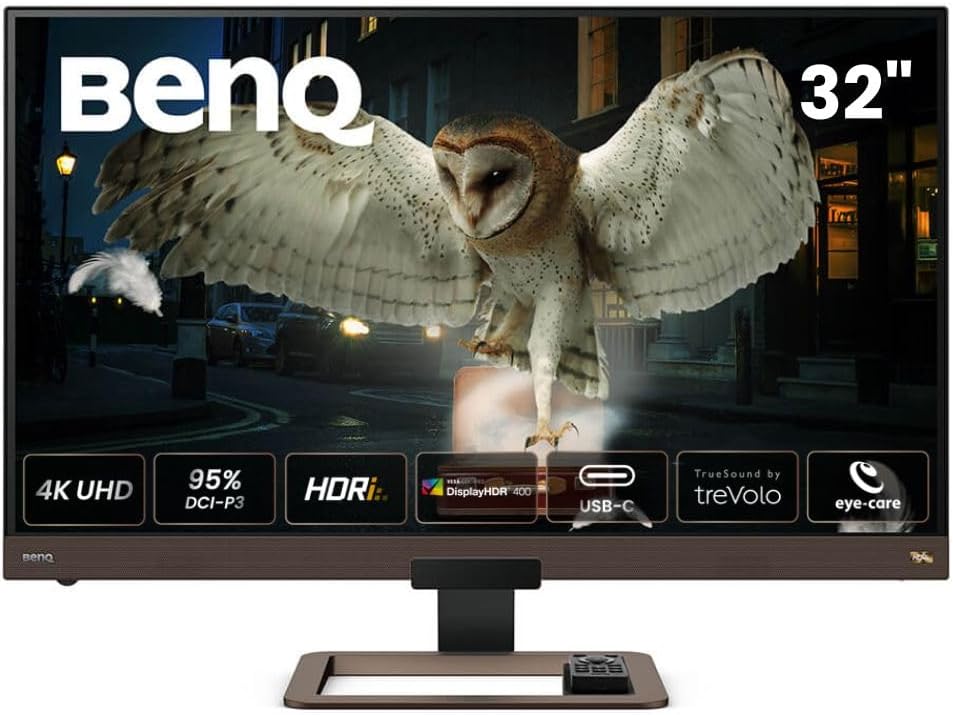
🚀 Elevate your workspace with BenQ’s 4K powerhouse—where stunning visuals meet immersive sound and effortless connectivity.
The BenQ EW3280U is a 32-inch 4K UHD IPS monitor featuring 95% P3 wide color gamut and HDRi technology for enhanced image quality. It integrates a premium 2.1 channel speaker system with a built-in woofer for rich audio, supports USB-C connectivity with 60W power delivery for streamlined device charging and video, and includes advanced eye-care technologies to reduce fatigue during extended use. Designed with a sleek metallic grey finish and remote control, it blends high-end entertainment and professional productivity in one elegant display.


| ASIN | B082P93LSQ |
| Are Batteries Included | No |
| Batteries | 1 Lithium Ion batteries required. |
| Best Sellers Rank | 56,459 in Computers & Accessories ( See Top 100 in Computers & Accessories ) 959 in Monitors |
| Brand | BenQ |
| Colour | Metallic Grey |
| Customer Reviews | 4.2 4.2 out of 5 stars (394) |
| Date First Available | 12 Dec. 2019 |
| Delivery information | We cannot deliver certain products outside mainland UK ( Details ). We will only be able to confirm if this product can be delivered to your chosen address when you enter your delivery address at checkout. |
| Guaranteed software updates until | unknown |
| Item Weight | 8.12 kg |
| Item model number | EW3280U |
| Lithium Battery Energy Content | 3 Watt Hours |
| Lithium Battery Packaging | Batteries only |
| Lithium Battery Weight | 9 Grams |
| Manufacturer | BenQ |
| Number of HDMI Ports | 2 |
| Product Dimensions | 52.4 x 72.68 x 25.38 cm; 8.12 kg |
| Resolution | 3840 x 2160 Pixels |
| Screen Resolution | 3840x2160 |
| Series | EW3280U |
| Standing screen display size | 32 Inches |
| Voltage | 220 Volts |
| Wattage | 148 watts |
I**N
EW3280U - Great Monitor - Need to work with settings a bit to get best out of HDRi
I'm really happy with this monitor having had it a few months. Though around £700 is a lot you'll struggle to get a 32 inch display with 4K, HDR, good brightness for HDR (400+ nits), no PWM, eye care, Freesync and Gsync compatibility, and ideally IPS panel, USB-C video and power, good speakers, and a remote. I looked around a lot and the monitors were either a lot more or missed some features but weren't that much cheaper. 32 inch 4K has been really good for working with Unreal Engine and that was one of my main drivers. I also wanted to use it as a TV with a Humax box and this has also been great - the REC.709 setting looks lovely and the remote helps, (and I've been able to add the monitor to my Harmony One remote as well). The speakers are good and provide a fair bit of bass - I didn't find them disappointing like I have with some flatscreens. I can also with a laptop just use the usb-c cable for power and picture and it works great at 4K. 4K HDR gaming has also been great - no stuttering or tearing using the gsync with an Nvidia RTX 2070 super. The pictures look fantastic on games like Shadow of the tombraider, metro exodus - the pictures, especially for the former, often look real. I'm not a competitive gamer but I debated a bit about getting a higher refresh rate monitor - to say this this feels totally smooth with no issues for gameplay at 60Hz eve on racing games like forza horizon 4. 4K HDR from Netflix (note the windows app seems poor - and I use the browser which seems better) and discs has also been great though it has needed a bit of trial and error with settings. HDR 400 is the one that immediately appeals as the contrast can be altered and this enables you to set the HDR intensity to suit your own equipment and content. This was great but then I started to notice on Netflix HDR content and to a lesser extent in Metro Exodus the whole brightness of the screen would change quite frequently for some programmes. Whether this is Windows or the monitor not sure - though I'm not sure it happened with the Xbox One X but don't have that connected to the monitor right now. I think it's reading the HDR singal and implementing global dimming. However, the HDRi modes don't do this and I've been able to get a really good picture using these modes. I've seen reports HDRi varies the brightness a lot but I haven't found that to be the case at all. The thing is initially compared to HDR400 the whole picture looks dimmer and the HDR effect isn't so strong. It's like you've put sunglasses on. The contrast can't be changed for the HDRi modes. What I did is set the RTX 2070 super to use nvidia settings rather than windows settings (which seems to vastly improve the picture anyway) and then and then alter the brightness and contrast there. I've then been able to get great pictures across the board. I realise that in comparison to and HDR600 or 1000 TV this might not be so good but it's really good in comparison to non HDR video. If the screen shows the sun it makes you squint, torches look very bright, light flashes off metal etc - it all looks more realistic. What HDRi also does is manage the darker scenes better - it seems to keep better contrast and make them less washed out. Game HDRi seems to lift the brightness in the darker scenes a bit more which can be better in some circumstances but can make it look too flat and I generally prefer cinema HDRi. I'm pretty picky about picture quality and have a very good projector for films and I am very happy with the Benq. I would say check the HDRi super resolution and sharpness settings as I found the sharpness was turned right up to 10 and it made things look grainy or slightly odd / unrealistic at times until I turned it down a bit. I debated a lot on VA or IPS and ultimately it seems they both have pros and cons. VA has better contrast but less realistic colours and brightness and colour temperature can vary across the screen, especially if you're at an angle or close to the screen. IPS has accurate colours, better viewing angles, but in darker scenes can be more prone to IPS bloom - screen being brighter in one or more corners. I took the view I'd rather have the hit of IPS bloom - which is minimal on this even with HDR on and in the dark with a black screen or dark image - for darker material than issues that potentially occur all the time to varying extents but it's a personal choice. The only downside has been some quality issues. The first monitor had terrible bleed as well as a lot of brightness variations across the screen. The main bleed was a spot to right of middle and it looked like someone was always holding a little torch at the top of the screen. This was returned (got a replacement delivery next day after raising the issue, before sending off the faulty one - really impressed) and a new one was much better in terms of overall consistency of brightness across dark scenes, though had a similar bleed issue at the bottom to the right. Less severe but I returned this as well, also prompted by a price reduction. This latest monitor that I've kept had minimal bloom and no bleed. I have noticed an issue whereby the honeycomb material stuck across the bottom bezel is lifting up slightly in a couple of places and I periodically need to push it down. not ideal but given the screen itself is good I'm living with this. I went for 5 stars but would have probably done 4.5 if possible to account for the returns and the bezel but I am very pleased with the performance and picture quality of this monitor and it looks very nice - it doesn't shout out computer monitor or look like an office item; it feels more like a nice TV. Hope this helps - I deliberated a long time about what monitor to get and whether this one would be OK so hopefully this give some good insight to anyone in a similar position.
R**O
Much better than the VA version
I had the 32 inch VA version of this and had ro return it as it has the typical VA glow and dirty screen effect, also the colours were washed out. So, I like Benq monitors a lot so decided to spend more and get the IPS version, which has much better colour and zero dirty screen effect. Its the most uniform panel I've seen (had dozens of monitors) grey or black. The HDR is ok but I found customised User mode with HDR off to have a better image for gaming etc. Its IPS so you get great contrast and colour anyway without. I bought it to go with Ps5 and its great paired with that, low response time and set the AMA to premium for great motion effects. Really good for console where on PC I prefer 1440p 144hz Asus Rogers but I'd imagine this Benq would be great for Pc too, and photo editing. It does what it suggests, an all round entertainment monitor and even comes with a remote and way above average built in speakers. Was surprised how high end it feels and unlike other manufacturers, Benq have very high standards for their expensive monitors like this and it shows. Get one while it's black Friday sale and for your Ps5!
T**R
Good all rounder - don't expect too much from the built in speakers
Good points... - Picture quality is great both for work and movies (though I'm no expert). HD does make a noticeable difference for movies. - The remote control is convenient for switching between modes, especially HDR. It's much easier than grubbing around behind the screen for a small switch. - On screen menus are easy to navigate (especially with the remote). Neither good nor bad... - With my Mac I had to turn on scaling as the native resolution is far too small to see menus. - I haven't tried it with a games console so can't comment here. - The speakers are better than average but not a patch on external speakers or a sound bar and have limited volume. They may be adequate if you are short on space and only need them for light viewing and office work. However, I wouldn't expect much from built in speakers so this isn't a negative. Less good... - Parts of the housings (like the speaker grilles) are coloured brown. I would have preferred a neutral colour but you get used to it. - The included USB-C cable doesn't work with my 2018 Mac Mini. Works fine if you use an Apple-branded Thunderbolt cable. - There's no useful height adjustment. If you want this, buy a VESA mount but be aware the monitor is pretty heavy so make sure the one you buy is specced for the weight. However, you may only need on if you need extra space to fit something under the monitor - I needed to accommodate a sound bar which wouldn't fit with the default stand (see picture).
S**N
A great all rounder
With all the working from home I decided I needed a second monitor - after a fair amount of research I settled on this as providing for all my needs. It was initially supposed to be my secondary monitor (primary being an ASUS ROG) but after sitting side by side for some time I have actually started preferring to use this as the colour is superb and the refresh rate at 60hz is fine (ROG has 144hz) and only in certain situations would you notice the difference. Also while not officially supported, I have found that that G-sync works fine with it as well. My biggest surprise was how good the sound was...so while working I have great audio (crisp and clear with a nice bass). Really happy with it. Only negative is the stand is not very flexible, prefer the ASUS one.
R**.
Muy buen monitor. Un detalle negativo no muy importante es que cuando cambio de entrada con el mando a distancia, a veces tengo que volver a intentarlo por segunda vez porque no cambia, y también es un poco lento en ejecutar lo que se le pide; al encenderlo, o al cambiar de entrada... Pero como en todo lo demás es estupendo: calidad de colores, y todas las tecnologías que lo caracterizan, esas minucias casi no me importan. BENQ es una gran marca...
A**N
Really great monitor for both entertainment and productivity. The built in sound is great for a built in sound system. It won’t replace dedicated sound systems but will get the job done for casual video watching and other stuff. Color and picture quality it top notch at the price. I would definitely recommend if you’re in the market for a great 4K monitor. It’s one of the best 4K monitor in its category.
I**.
Je ne vais pas parler de ses qualités, il y a la présentation pour cela. Je lis que plusieurs ont été déçus de la HDR parce que les images étaient délavées. Il y a une explication à cela. Il ne suffit pas de passer en mode HDR sur l'écran pour que cela fonctionne. Il faut plusieurs choses: - un contenu HDR. - une carte graphique qui supporte HDR. - activer le HDR. Vous verrez sûrement lorsque vous activerez l'HDR de l'écran, un message qui dit "HDR: emulated" cad "HDR: émulé". Tant que vous ne voyez pas le message "HDR: on" cad "HDR: allumé/ok", vous n'êtes pas en mode HDR et vous ne profiterez pas de la qualité d'image. D'abord pour votre tests, trouvez sur Youtube un vidéo 4K HDR, par exemple avec la recherche "The World in HDR in 4K (ULTRA HD)". Vous devez voir "HDR" dans l'icône de qualité vidéo dans la barre à droite. Ensuite, il faut une carte graphique qui supporte le HDR. La mienne, une Geforce 1050 ti, déjà plus toute jeune, le supporte très bien. Puis dans windows 10, il faut se rendre à "Paramètres -> Système -> Affichage". De là, il faut cocher la case HDR, ça y est ! Maintenant vous pouvez profiter de vos contenus HDR! Autre chose, mon ordi est à environ 5m de l'écran. Ici attention, avec certains câbles bon marché vous ne pourrez pas obtenir un 4K@60Hz sans artefacts (pixels lumineux ou autre). Dans ce cas il faut revenir à 30 Hz ou acheter un bon câble qui supporte au-delà de 4k@60Hz (perso j'ai pris un câble qui supporte la 8k). Alors là, l'image à 60 Hz est parfaite.
J**L
I found the Monitor great for my Xbox gaming and also for general internet use. I have used it for some retro gaming with old Gog games like MYST And URU it was really good.
P**A
Lo compré de segunda mano con "unos píxeles defectuosos. Resultaros ser 4 píxeles que en el uso diario no afectan y estoy muy contento con mi adquisición.buen sonido sin ser espectacularbuen angulo de visión y compatibilidad de uso con varios ordenadores al mismo modo usando HDMI y USB-c
Trustpilot
1 week ago
3 weeks ago