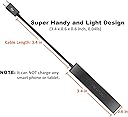


🔗 Unlock your device’s full potential—connect more, do more, be more.
The AuviPal 3-Port Micro USB OTG Hub Adapter transforms your micro USB device by adding three USB ports plus a dedicated power port, enabling connection of multiple peripherals simultaneously. Engineered for durability with over 10,000 plug cycles, it supports a wide range of devices including Fire Stick 4K, PlayStation Classic, and Raspberry Pi Zero. Its plug-and-play design requires no drivers, making it the perfect compact solution to expand your device’s functionality effortlessly.


| ASIN | B083WML1XB |
| Best Sellers Rank | #454 in USB Hubs |
| Customer Reviews | 4.4 4.4 out of 5 stars (2,033) |
| Date First Available | January 15, 2020 |
| Item Weight | 0.704 ounces |
| Item model number | 3USB |
| Manufacturer | AuviPal |
| Product Dimensions | 3.4 x 0.6 x 0.6 inches |
R**7
Inexpensive and gets the job done
I bought this to go with an Onn streaming stick which uses the older micro-USB for power. Makes it possible to plug in up to four USB devices including a flash drive loaded with video files.
R**Z
Great USB ports extender for Raspi Zero
Very compact and performance is great. Recommended for Raspi Zero.
K**!
Great for a Lenovo Yoga Book that only has microUSB
This is a super-niche use-case, but if you have an old Lenovo Yoga Book (the thin one with the Intel Atom processor, Halo keyboard), then this could be useful! I wish this would charge it while within Windows, but at least it gives me more USB-A ports. Interestingly enough, I learned that if you leave it connected to power, it will charge while the tiny laptop is shut down! I finished my task (moving stuff from USB flash drive to the device) and shut it down while leaving it connected at about 70% battery. After a few seconds, I saw the charging light flashing next to the plugged in microUSB port. I left it there for a few hours and came back to see the light was no longer flashing. I turned on the Yoga Book and it was at 100% battery! Nice. I don't use this little guy often, because it's slow and a bit inconvenient with no other expansion ports, but this little hub really helps. I suppose the best option would be the official Lenovo T-hub they used to sell, but that's hard to find at a reasonable price.
N**M
Use multiple USB devices - including ethernet - with a Fire TV 4k Max
...or to be more specific, Fire TV 4k Max 2nd Generation (2024 release) which supports external USB storage. Was already using a wired ethernet adapter with my Fire TV Stick but the existing adapter would not allow for adding other USB devices. For more flexibility, purchased this three port USB hub and a separate wired ethernet USB adapter instead of the integrated two port USB/ethernet adapter. Installed everything six months ago, and other than an unrelated error message (see below) have had no issues. 1. Connect Fire TV Stick to HDMI port 2. Connect this three port USB hub to the Fire TV's micro-USB port 3. Connect the Fire TV's power cable to the hub's micro-USB port 4. Connect USB devices to hub - ethernet adapter, flash drives, mouse, etc. (see picture) Note: There is an unrelated error message if you choose to format a flash drive for conventional storage instead of allowing the Fire TV Stick to format the flash drive For Applications. If the Fire TV stick does NOT format the flash drive For Applications, then you will always-and-forever see an error message pop up that your Fire TV device cannot store applications on your flash drive, since it is not formatted For Applications. This error message is considered normal and should be ignored.
M**J
OTG USB works with Firestick 4K Max....
OTG USB works with Firestick 4K Max....without issues. (After using a singular hub version for awhile bought from Amazon I bought this multi Port OTG Hub to expand different functionality which this review is very much like with a few changes but covers all the bases. My changes to my original review will be noted in these brackets) It just adds to the awesomeness of the (FS4M) Firestick 4K Max, sure the FS4M has limited storage (it would be great to have expanded storage options) but this little device helps with that. Rather than load files into the FS4M limited space, easily run/open them on the FS4M using this USB OTG hub. Simple load up your files onto a formatted FAT32 USB (I use a SanDisk): video, pictures. Connect the USB OTG hub to the FS4M power connector inlet, connect the FS4M power cord into the USB hub inlet (you'll then have power to the hub and FS4M), insert the USB into the OTG hub, use an app like Xplore on the FS4M, a file viewer - there are many, to view/run/open your files. (As well as using a USB thumb drive for extra storage, I've used a mini keyboard with a mouse track pad on it. It works well specially for typing long strings of text, the trackpad mouse only shows up in some apps but keyboard control keys for navigation work well all over. I've also heard about but haven't tested yet, a USB ethernet female connector that can be connected to this hub - keep in mind - ethernet cable speed is always better and runs faster than Wi-Fi - like Gigabit faster - if you have a Gigabit port on your router - imagine clean your FS4M would run. If I get one and test/use it I'll update this review with my results) I hope you found this helpful, this is my opinion of the device and mine alone - I'm not paid for this review, if you purchase and mirror my usage you'll have the same experience. Enjoy, Marc.
S**M
Worked great with Amazon fire stick
This worked great with our Amazon fire stick so that I could use a keyboard and mouse
M**R
Allows connection of firestick to Internet (hardwired) and tv, and also extra memory stick added.
D**A
Funcióna excelente en mi fire tv4k
L**Y
funktioniert tadellos
A**.
Entgegen anderer Negativen Bewertungen, funktioniert der Adapter mit dem FireTV Stick MAX 2gen ohne Probleme. Schön ist vorallem, das kein weiterer USB adapter dazwischen genutzt werden muss. Einfach zwischen die Stromverbindung einbauen und fertig. Bei der LAN Geschwindigkeit kann ich keinen Unterschied zum LAN Adapter von Amazon erkennen. Grundsätzlich sollte man jedoch wissen, das fast alle FireTV Geräte die Formate NTFS exFAT etc. nicht unterstützen. Von daher funktioniert nur das eingeschränkte FAT32 und entsprechende USB Medien mit diesem Format. Tolles Produkt und würde es wieder kaufen ....
D**Y
Vraiment pratique, fonctionne meme sur un vieux tel de 2014 !
Trustpilot
2 weeks ago
1 month ago