
🎨 Draw Your Dreams into Reality!
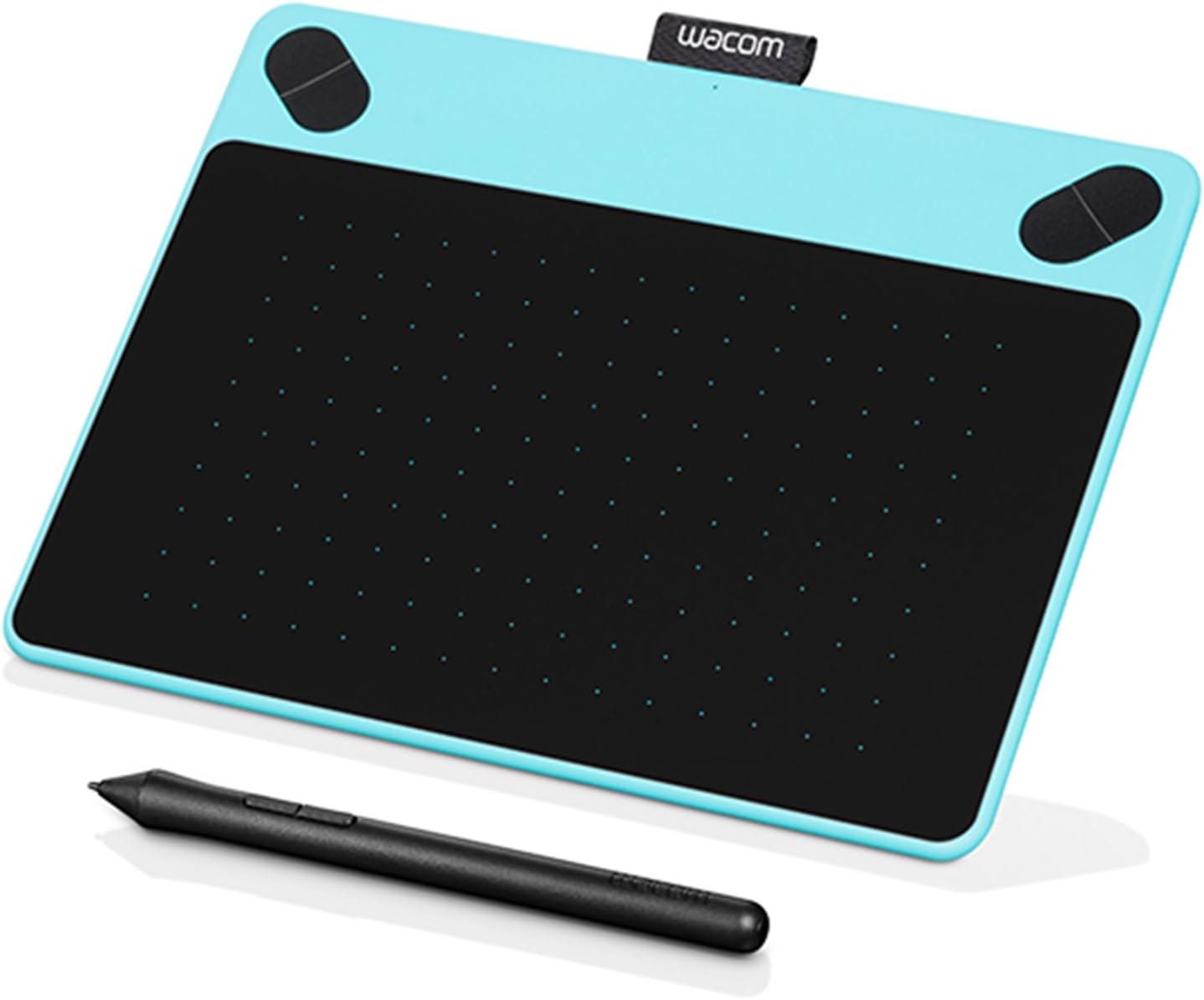
The Wacom Intuos Draw (Old Version) in Blue is a compact and portable drawing tablet designed for artists and professionals alike. With precise dimensions and a user-friendly interface, it allows for effortless creativity and seamless integration with various software, making it an essential tool for digital art enthusiasts.
| ASIN | B010LHRFWW |
| Active Surface Area | 100-150 square centimeters (estimated) |
| Additional Features | Pen |
| Brand | Wacom |
| Built-In Media | 1 x Wacom Intuos Draw (Old Version), Blue Graphic Tablet |
| Color | Blue |
| Compatible Devices | iPad Pro |
| Connectivity Technology | wireless |
| Customer Reviews | 4.4 4.4 out of 5 stars (1,177) |
| Global Trade Identification Number | 00753218989383 |
| Manufacturer | Wacom, Inc |
| Mfr Part Number | CTL490DB |
| Model Name | CTL490 |
| Model Number | CTL490DB |
| Native Resolution | 800x600 |
| Operating System | Windows or macOS |
| Specific Uses For Product | Drawing, Sketching |
| Target Audience | Teacher |
| UPC | 753218989383 |
| Unit Count | 1 Count |
| Warranty Description | Warranty for intuos pen tabletswacom warrants the product, to the original consumer purchaser, except for the software and consumable items such as the pen nibs, to be free from defects in materials and workmanship under normal use and service for a period of one (1) year, from the date of original retail purchase, as evidenced by a copy of the receipt and registration with wacom by mail or online… |
K**E
Great drawing tablet for beginning digital art
I did a lot of reading and comparing to pick out which drawing tablet I wanted to get. This is my very first, so I wanted to make sure I found something that would be easy to use. This tablet is great! I've tried using it with a few different low-end drawing programs (GIMP, Inkscape, Windows Sketchpad), and it worked just fine on all of them. I'm using Windows 10, and my drawing program of choice is DrawPlus currently. I haven't really tried the program that comes in the bundle, but I've downloaded it and looked at the layout. It seems fairly simplistic, which would be great for someone who isn't used to a more advanced program. I've had some issues programing the buttons at the top of the tablet. It seems that every time I close DrawPlus, the settings go back to default. But I suspect that this is more a problem with the program rather than the tablet itself. Getting used to using a tablet rather than a pencil and sketchpad is kind of strange. You'll have to play around with it and just draw some basic shapes and doodles before diving into a project. But this Intuos tablet really does help to make the transition easier. The tablet is incredibly lightweight, much lighter than I was expecting. Keep in mind that you won't be using this pad exactly like a piece of paper, specifically when it comes to the pen. Repetitive strokes will wear down the nub, so be mindful of that. You won't need to use much pressure to get the pad to respond to the pen. I had some difficulty in receiving the extra downloads for this product as the Wacom website was updating the store page. It was several days before the page was accessible. I found this to be poor planning on Wacom's part, because I picked this tablet for someone to give me as a Christmas gift. I'm sure I wasn't the only person who found they couldn't download the rest of their present on Christmas day. It was okay for me, though, because I already had other drawing programs on hand, so I could still play with my new toy. Ultimately though, Wacom's website isn't the easiest to navigate; most of the links are misleading and will take your either to a page trying to get you to buy on of their drawing tablets, or it will take you to their store page. I found it very difficult to find anything that I was looking for. I doubt you'll be able to find much in the way of helpful information on your Wacom product through their website. I really liked the packaging this product came it. The box is nicely organized and is designed to use as a safe place to store your tablet. The manual is pretty helpful; it's a basic Quick Start guide. There's also an included driver disk, just in case you can't connect to the internet to download the necessary drivers.
A**R
Perfect for Beginners and Hobbyists
I purchased the Wacom Intuos Draw tablet in blue for $79.95 on May 19, 2016 and received it on May 21. It was shipped by Carolinas. As of the current date and time, the tablet is available on WACOM.COM for the same price and features. (I chose to buy here for free two-day shipping.) My purchase arrived in the traditional Amazon box, nicely sealed with no damage. Upon opening it, the tablet box was inside. Undamaged as well, it hadn't even been opened - as I purchased it new, it better not have been! But, sadly, I've bought items before that were "New" and had already been opened. So when it says "New" it actually means straight from warehouse, it seems! This item does not require batters in either the pen or tablet. Instead, the tablet is paired to the main device via a USB cable. It took me a moment to figure out where the micro-USB end plugged in but, aside from that, it was a seamless connection. The download went flawlessly and I've already been using it with Elements 11 and Paint SAI. I've had no issues so far while I've been playing around with the tablet for about three and a half hours. From the outside working in, the outside box is a shell holding the main interior box. There is one sticker holding everything together on the outside. A quick pick off or a shear with scissors and you're given a big black box with "INTUOS" printed on the face. Once you pull out the tabs and lift it up, the tablet and pen come into display as well as the Software Code you will need to redeem your items. Both the pen and tablet are sealed in tight plastic. Beneath the tablet are the instruction booklets, the USB and the installation CD. The booklets and CD are all stored in a smaller black box marked, again, with "INTUOS." The USB is hidden beneath a small piece of cardboard that says "SOFTWARE BUNDLE DOWNLOAD" and points you to the location of the key code. The pen is light weight and comfortable for the duration I've used it. I have small hands so that does factor in. The weight and grip are all personally sensitive but as someone who is a novelist that suffers from carpal tunnel and arthritis, it hadn't caused me an issue for the three and a half hour duration. On another note, the tablet itself is also light weight and portable. I had no issues connecting it from my laptop to my desktop so it is convenient at the least. Personally, I wish the entire thing was black but the blue is a nice touch to keep me from going off the screen entirely (because I'm terrible at that when it comes to tablets). The tablet has four buttons at the top with the left two being "shift" and "alt" keys, respectively, and the right two being "control" and a key for the start menu, respectively. I've not found much use for them yet as I can just grab my mouse but I'm sure they are handy for some people! Overall, this is a fantastic device that works splendidly. If any problems arise, I'll update my post. But until then, I'm going to enjoy using this tablet!
D**A
Purchased as a gift so my time spent with it was minimal. However, I was the one to do the initial set-up etc... Install was easy, Wacom includes a right angle Micro-USB cable which is an okay length for a laptop, I'd prefer if they included a longer cable however as I actually gave the receiver of this gift a USB extension cable for it. Driver side of things was easy as well, just went to their site and downloaded the "Current Intuos" Drivers installed the package and it was all set up and functional! As for the physical devices, it feels solid, well built as is the pen. I know some users complain the lack of an eraser side of the pen however I for new users that shouldn't be much of an issue.
L**A
It works, but I miss bamboo tablets sooo much. I dropped this one from a few inches off the ground a few days after getting it, and the back broke off and will not snap back on. It's still usable, but incredibly annoying. I'm not a fan of the texture and the pen is very cheap and basic. I think it's great if you're in a bind financially or don't draw a lot, but if you're like me and draw every day for work, I would suggest saving up and opting for a better tablet. I plan to do that as soon as I can. But on the bright side, the drawing on the front is by Loish who is a fantastic artist and I kept the box just to look at it. EDIT/ Don't waste your money. Bought this in September, it's already ruined. The micro USB is VERY difficult to replace (obviously by design) and it is a stubborn cord that will get twisted and ruined. I've lost all pen sensitivity because of it and now cannot work. The back is still popped off and progressively straying from the rent of the tablet.
A**R
I've had a drawing tablet before, but I needed something that was easier to set up and more portable. The Intuos tablet was the first thing I found, plus I'd seen a lot of people praising it, so I decided to give it a try. Of course, by no means is it a professional drawing tablet, but it is definitely amazing for the price and audience it is targeting (which is beginners or hobby artists). The texture of the drawing pad feels surprisingly natural - not too plastic, as it sometimes is with tablets, and I find that can distract from doing work. The four top buttons, plus the two on the pen are customizable, and Wacom have done a good job of making the software super user-friendly - a minute into configuring buttons and I was already scribbling away on my tablet. The only downside of the product is that the tag at the top is a bit misleading - you would think it is for holding the pen, but the pen does not go in it comfortably, at least for me. Perhaps it's just a brand tag. Overall, I'm beyond satisfied with my Intuos tablet though and would recommend it to any of my friends who want to get into drawing but do not know where to start.
A**R
It's okay - does what it is supposed to. I was using a first edition ET tablet and pen until I upgraded my OSX and found it would not work any more. I mainly use it to replace a mouse - especially good when going back and forth between my cintiq and displays. I liked my old tablet better because it fit the screen better and it had a handy pen holder built in, whereas with this one the pen holder is a cheap roll of material that I don't use (not convenient, unless for travelling I suppose). So I find I have too many pens in hand now - a minor bump in workflow. Being a professional artist I would not use this device to draw, since the material on the trackpad of the tablet is slightly sticky to the pen's touch and I prefer my cintiq. I would not recommend these devices over cintiqs for pros, but they are fine for mouse replacement.
K**A
I bought this years ago and it's still working just fine. If I ever have an issue, I just google how to adjust it and it's always and easy fix (like exiting out of the program or unplugging the device). The surface is a little scratched up but that's to be expected, I suppose. I replaced the nib for the first time a few months ago because I only just started using it a lot more, but the replacements probably last for a while! I do wish I had gotten a larger one, but that's a personal preference. Definitely a good buy!
Trustpilot
3 weeks ago
2 weeks ago