🚀 Upgrade your 3D printing game with BIGTREETECH’s smartest display yet!
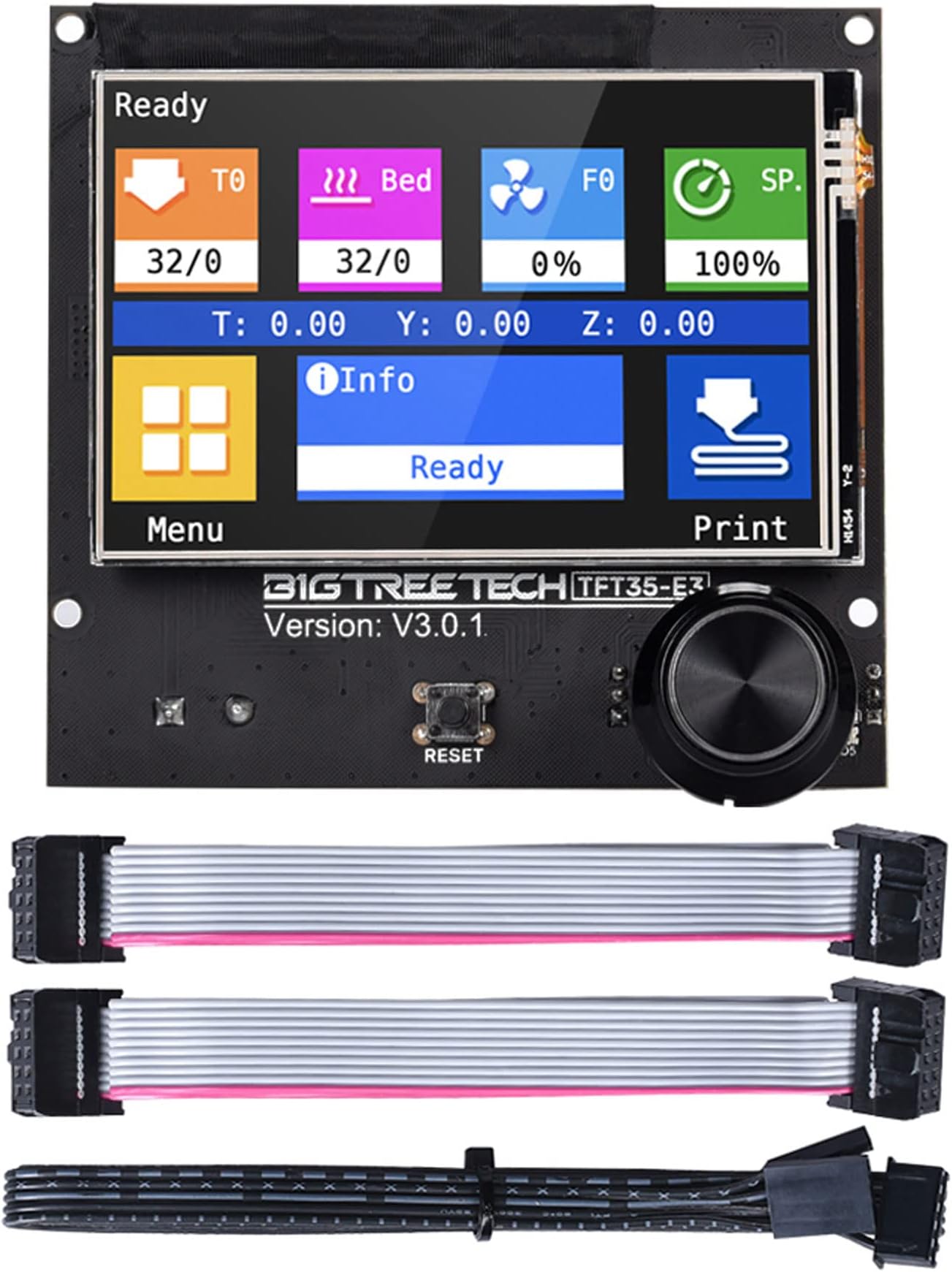
The BIGTREETECH TFT35 E3 V3.0.1 is a high-performance 3.5-inch graphic smart display panel designed for Ender-3 and compatible with a wide range of SKR control boards. Powered by a 120MHz 32-bit ARM Cortex-M3 CPU, it offers dual work modes (UART serial touch and 12864 LCD), easy firmware upgrades via SD card, and reserved ports for WiFi, filament detection, and power control. Its sleek touchscreen interface and broad compatibility make it a top-tier upgrade for professional and enthusiast 3D printer users.
| ASIN | B08182XHZZ |
| Best Sellers Rank | #113,757 in Industrial & Scientific ( See Top 100 in Industrial & Scientific ) #2,156 in 3D Printer Accessories |
| Brand | BIGTREETECH |
| Brand Name | BIGTREETECH |
| Color | black |
| Customer Reviews | 4.3 out of 5 stars 1,165 Reviews |
| Display Type | TFT |
| Included Components | BIGTREETECH TFT35 E3 V3.0.1 Touch Screen |
| Item Dimensions L x W x H | 3.68"L x 3.43"W x 3.43"H |
| Manufacturer | BIGTREETECH |
| Material | PCB |
| Material Type | PCB |
| Operating Temperature | 20 Degrees Celsius |
| Product Dimensions | 3.68"L x 3.43"W x 3.43"H |
| UPC | 778601688131 |
| Voltage | 5 Volts |
B**E
Great upgrade!
I upgraded my old Anet AM8 printer with an SKR Mini E3 V3 mainboard. Knowing that the old display is not readily compatible with the new board, I purchased the TFT 35 display. Compared to the problems I had to work through with the mainboard, the install of this was pretty straight forward. After installation, I updated the firmware to the Round Miracle Theme. It looks great. I like that you have the option to switch back to the LCD mode if you so desire. This was a great upgrade from the stock display.
M**Y
Nice big display
Exactly what i wanted for my 3D Printer nice big display
J**S
Old school, new school, pretty cool
So cool. I can use the old fashioned mode to access calibration and tuning, and have available the advanced touchscreen features as well. In Marlin, set LCD screen type to REPRAP_DISCOUNT_FULL_GRAPHIC_CONTROLLER Note: connection to a bigtreetech tango 1.0 worked properly when EXP1/EXP2 cables were plugged according to the keying on the ribbon cable. TFT mode is not possible to the Tango. Connection to a makerbase mks gen L required the removal of the keying on one end of each cable and one end of each cable must be rotated. You know it needs to be swapped when screen stays blank and rotating the encoder reboots the display For TFT mode, use the tft header (5v/gnd/tx/rx) and run reset to the rst pin on icsp header.
T**Y
Features and Navigation is great just be careful...
Features and navigation is great. It really adds quality to the 3d printing experience with your Ender 3. Mine is paired with an SKR Mini E3 v2. It is a great upgrade because of the added features once paired with the SKR. I do run into a problem with the print speed randomly changing after I preheat the unit. Before you select the file you want to print be sure to press the Speed icon in the top right and make sure that speed shows 100% or you can just press "Normal" and it will bring it to 100%. While in the Speed menu, be sure to press the Icon in the low left corner so it can toggle between the Print Speed and Flow Rate. If not you can set your first layer to 40mm/s in Cura and it print at a snail's pace or stupid crazy fast.
S**I
It just works perfectly
I use this with a BTT SKR MINI E3 V1.2 controler board which allows me to use either the touch screen or the Marlin screen. I don't think you could use both screen modes on the Creality control board but I'm not sure. Most of the time, I use the Marlin scroll menu but having the touch screen is great for things like homing it. For the price point, I think it is well worth it for the convenience. Updating it is easy too, just follow the instructions on the bigtreetech/BIGTREETECH-TouchScreenFirmware github site.
K**T
Trashed my mother board and bl touch
Works great for two months till it bricks your mother board and fry's your bl touch. And the next time you try to rehome your printer it smashes your nozzle into your brand new glass bed and strips your drive belt. and when you try to replace your motherboard because it won't read sd cards the tft 70 comes in clutch with a white screen of death and burns up leaving a distinct smell of failure in the air. After a 200$ loss and countless hours of troubleshooting. You will think maybe I should of just got the duet.
D**E
Perfect upgrade
I love this screen for my Ender 3. It’s easy to navigate, responsive to touch, colorful and best of all you can switch between the touch screen interface or back to the old Marlin interface at anytime. I haven’t tried using the sd card slot or anything on it but you do get those plus two expansion ports on the board!
G**D
Love/Hate Relationship with this one.
Paired with a BIGTREETECH SKR 2 Rev B mainboard in a Tronxy X5SA Pro (Core XY) in order to add sorely needed auto Z-align capability. There are plenty of features, including the ability to swap between the graphic interface and the old classic (from which I generally would rather stay away). I particularly like the fact that when updating the TFT firmware, you have the option of choosing from a variety of themes, and I really like the "Round" theme (very nicely done!). However, I am forced to rely on the classic interface when it matters most because of the variability of the "touching". Sometimes you have to press several times to get an action, then, sometime one press gives you one, two or three of the desired action!!! Imaging watching Home XYZ take place three times in a row!!! OR, even worse, imaging manually adjusting Z to determine offset and getting 3 10mm moves!!! I have hit the power switch two or three times to save the grinding. Now, when doing a delicate Z maneuver, I switch to the Classic interface and use the encoder knob (which hasn't failed me so far). Alas, it is also possible to press "A" and get "B", but, this seemed to improve after updating the firmware. These are a major failing for me, and other than this, it is an easy 4 stars. Oh yes, not a single piece of paper in the box to tell you the github location to find out about the firmware updates, and there is not manual, per se, but a useful ReadMe. When you find it, be sure to read the section about Marlin compile options to maximize usefulness of this device. Well, I've got to have something, so it might as well be this. Would I buy it again? What other choice is there for a 5" graphics interface with a SKR 2?
Trustpilot
3 weeks ago
3 days ago