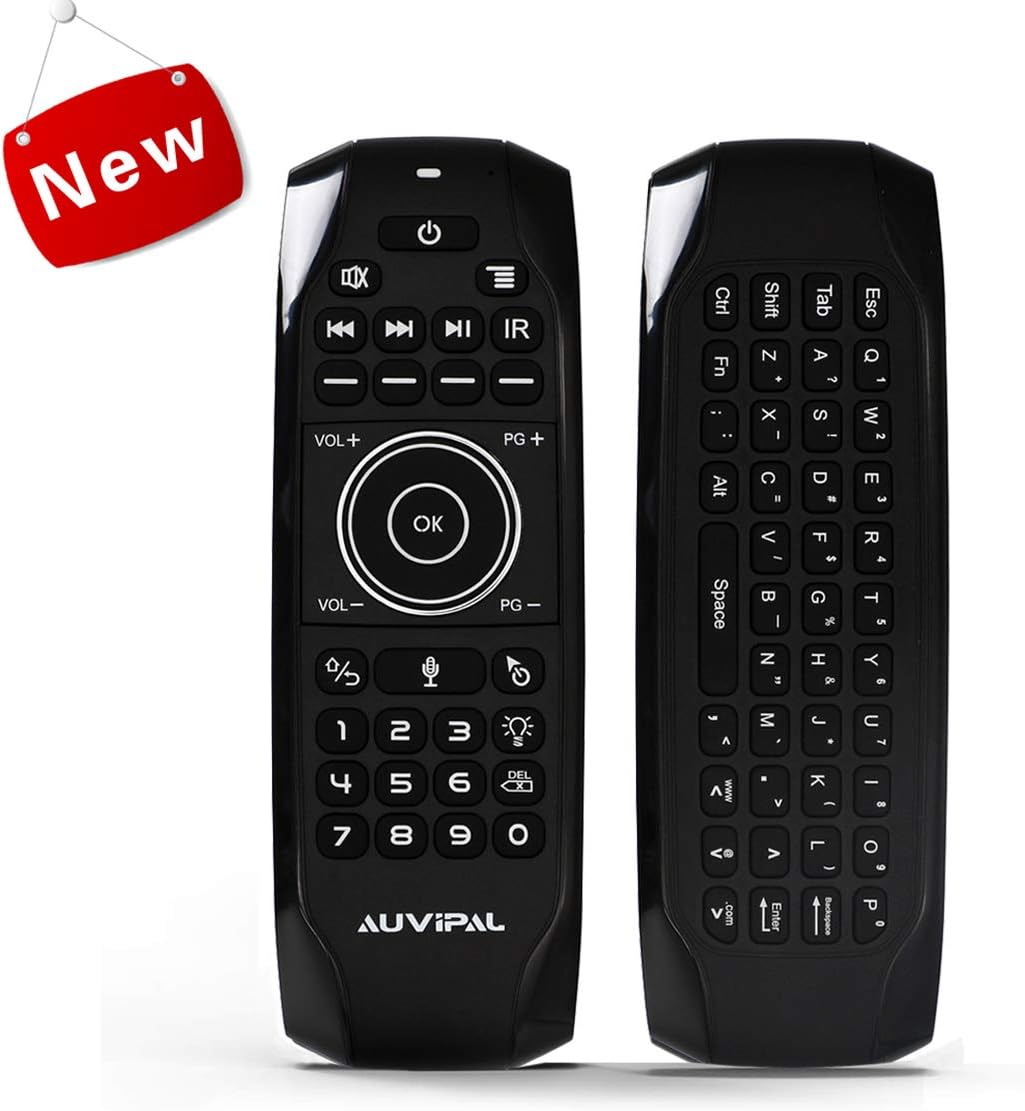


Product description All-in-one AuviPal G9 Pro voice air mouse remote gives you a fire-new experience when you are enjoying TV, Sound Bar, A/V receiver and Android TV Box etc simultaneously, It is easier than ever to control multiple devices in just one remote which has plenty powerful features - Backlit, Google Voice Assistant, 5 IR learning keys, 2.4Ghz QWERTY mini Keyboard, Motion sensing air mouse and 200mAh Rechargeable battery. Smarter Than Ever! Matters Need Attention Only work with Android TV Box, Does not work for Roku, Nvidia Shield, Firestick or any other devices. Ensure the battery power is sufficient since low voltage will affect the stability of the cursor. Ensure the signal receiving end is not covered by metal objects since the control range will be affected by the electromagnetic field. Perfect Combination of the Technology Powerful, seamless home entertainment control AuviPal G9 Pro Air Mouse Remote is the perfect combination of IR (Infrared Ray) and 2.4GHz RF (Radio Frequency) wireless technology, Integrate Air mouse, Keyboard and Voice Remote in one. No matter what you watch, listen to, or play, AuviPal G9 Pro will always meet your expectation. IR and 2.4Ghz RF wireless technology combination. Integrate Remote, Keyboard and Mouse in one. Google Voice Assistant Control. 3-axis gyroscope, 3-axis gravity acceleration motion sensor and 3-level adjustment of mouse speed. Up to 33 feet control range. Backlit function makes it can be used even in the dark, Seamless and effortless control media content. 200mAh actual capacity built-in rechargeable Cobalt Li-ion battery. Package Included: 1 x Air Remote, 1 x USB Dongle, 1 x USB Charging Cable, 1 x User Manual Detail Features 5 Programmable Keys 5 Programmable Keys are specially designed for learning original remote's basic functions (Power, Channel, volume, and mute etc) of your TV, sound bar, and A/V receiver etc. Groups your devices into one remote activities instead of only controlling one device at a time. Easy to program and much nicer button layout & response. Google Voice Assistance A revolutionary way to use your voice to find, launch, and control content with brand new AuviPal G9 Pro. PLEASE NOTE: Your device must support one-click access to Google voice assistant, If not, we need to use the remote to click the voice start button first, then we can speak on voice remote. Only for Android TV Box Only compatible with Ordinary Android TV Box, such pendoo android tv box, android 9.0 tv box, android 10.0 tv box, Xiaomi Mi Box S etc. Please do NOT buy it for any other devices. Built-in Rechargeable Battery 200mAh actual capacity built-in rechargeable Cobalt Li-ion battery which is more longevity. Thanks to the advanced unique rechargeable battery which can last for over 12 hours uninterrupted work, the standby time is about 1000 x 12 hours when the battery is charged in full! No need to turn on or turn off any more, Take it and enjoy it anytime anywhere! How to Program 5 IR Learning Keys Let's take the "Power Button" for example Position AuviPal and your TV remote head-to-head on a flat surface with 1 inch apart. Put AuviPal in pairing mode by pressing and holding the "IR" button, and LED indicator will change from fast blink to slow blink which indicates its in pairing mode. Press the power button of your TV remote, LED light will change from blink to solid, then press the programmable button on AuviPal, LED light will turn to slow blink which indicates a successful programming. After programming successfully, press "IR" key to exit the pairing mode. You can repeat above steps to program other 4 Blank keys. NOTE: The 5 IR learning keys can work with many popular TVs, soundbars, and A/V receivers after programmed, it is just NOT compatible with all brands or models. Easy Install Take out USB dongle from the package and insert it into a standard USB interface of your device. Please wait for about 20 ~ 60 seconds at the first time using, To install the USB receiver drive automatically. Wave the remote, It will match successfully when you see the cursor is moving on the screen. If not success, please press and hold the "OK" button, then press the "IR" button, and the green indicator will start flashing. When the green indicator stops flashing, It will match successfully. You are ready to use! Review: Remote feels good behaves well then has a few programmable keys. - This remote is very comfortable in your hand which is very important but you do have to get used to the feel of the okay button and the navigation buttons because sometimes you can hit them together and I don't know why but they put the menu button which I use regularly all the way up at the top next to the power button which is a very awkward spot for it and you need two hands. So I was not crazy about that but once you get used to it it's not difficult to use and the infrared picks up really well because my Android box is 25 feet away from my television set and no matter where I am it picks up the commands in a very strong way so that's good. I would definitely recommend this for people looking for a universal remote with a few programmable keys. Review: Nearly Perfect Air Mouse ! 4.5 STARS - Pros: Due to it being infrared technology it actually WORKS over the distance of 30ft or so with no problems. Also due to IR you do not need to point it at the dongle. It can be pointed in any direction and still works. Air mouse makes it so much easier to navigate the Web on the Android TV box, and through stored files. Love the keyboard on the back, which also works flawlessly. Whichever side of the remote you're using, the opposite side is auto-disabled to avoid unintended key presses. Has a button to turn on LED (db-click it) so the keys light up... flip it over and _that_ side lights up. Doesn't take long to charge and a charge lasts a reasonable amount of time (for me, a few days). If you have a USB extension cord, can use it while it's charging. Every button I have tried on it works as it should, no wrong inputs. Even the power button actually turns my Android TV box off/on. Air mouse movement is smooth and accurate. (When it starts to lag it's time to charge it.) Has made using my Android TV Box an absolute delight, when it was an absolute PITA before I had this remote. Cons: No right-click mouse button in Android!! (Only in Windows, according to manual, which is a key-combo press). If this remote had a right-click mouse button for Android, it would be absolutely perfect. I don't need it often, but when I do there is no other way to access a RC menu, so you're stuck. So had to take 1/2 star off for that. But I cannot rave enough about this Air Mouse. I have wasted so much money on wireless mini-keyboards that are wifi and are supposed communicate over 15 feet but they won't work unless I am literally standing 2-3 feet from the TV Box, pointing the thing directly at it. Then so many of the keys don't do what they're supposed to... you press ENTER and get a backslash or something. You program the key to be correct, and later it's doing the same wrong thing... NOT SO WITH THIS AIR MOUSE! Every key is mapped perfectly to its function, and every press of a button gets relayed no matter where you're pointing it. No need to baby it or fuss with it. IT JUST WORKS. I liked it so much I got another as a spare. If you've been frustrated using mini keyboards trying to find something that actually works, you've finally found the answer. I can't believe anyone would be sorry for purchasing this, especially for Android TV. (I should qualify that by saying I use a generic Android TV box and don't know if the remote is compatible with some of the pickier TV Boxes like NVIDIA or whatever, so check that out first if applicable.)


| ASIN | B07Y5BWL98 |
| Additional Features | Backlit, Rechargeable |
| Battery Type | Lithium-Ion |
| Brand | AuviPal |
| Button Quantity | 8 |
| Compatible Devices | Laptop |
| Connectivity Technology | Radio Frequency |
| Controller Type | Button Control, Google Assistant |
| Customer Reviews | 4.2 out of 5 stars 118 Reviews |
| Item Weight | 0.1 Kilograms |
| Manufacturer | AuviPal |
| Mfr Part Number | G9 Pro |
| Model Number | G9 Pro |
| Number of Buttons | 8 |
| Special Feature | Backlit, Rechargeable |
P**Y
Remote feels good behaves well then has a few programmable keys.
This remote is very comfortable in your hand which is very important but you do have to get used to the feel of the okay button and the navigation buttons because sometimes you can hit them together and I don't know why but they put the menu button which I use regularly all the way up at the top next to the power button which is a very awkward spot for it and you need two hands. So I was not crazy about that but once you get used to it it's not difficult to use and the infrared picks up really well because my Android box is 25 feet away from my television set and no matter where I am it picks up the commands in a very strong way so that's good. I would definitely recommend this for people looking for a universal remote with a few programmable keys.
C**S
Nearly Perfect Air Mouse ! 4.5 STARS
Pros: Due to it being infrared technology it actually WORKS over the distance of 30ft or so with no problems. Also due to IR you do not need to point it at the dongle. It can be pointed in any direction and still works. Air mouse makes it so much easier to navigate the Web on the Android TV box, and through stored files. Love the keyboard on the back, which also works flawlessly. Whichever side of the remote you're using, the opposite side is auto-disabled to avoid unintended key presses. Has a button to turn on LED (db-click it) so the keys light up... flip it over and _that_ side lights up. Doesn't take long to charge and a charge lasts a reasonable amount of time (for me, a few days). If you have a USB extension cord, can use it while it's charging. Every button I have tried on it works as it should, no wrong inputs. Even the power button actually turns my Android TV box off/on. Air mouse movement is smooth and accurate. (When it starts to lag it's time to charge it.) Has made using my Android TV Box an absolute delight, when it was an absolute PITA before I had this remote. Cons: No right-click mouse button in Android!! (Only in Windows, according to manual, which is a key-combo press). If this remote had a right-click mouse button for Android, it would be absolutely perfect. I don't need it often, but when I do there is no other way to access a RC menu, so you're stuck. So had to take 1/2 star off for that. But I cannot rave enough about this Air Mouse. I have wasted so much money on wireless mini-keyboards that are wifi and are supposed communicate over 15 feet but they won't work unless I am literally standing 2-3 feet from the TV Box, pointing the thing directly at it. Then so many of the keys don't do what they're supposed to... you press ENTER and get a backslash or something. You program the key to be correct, and later it's doing the same wrong thing... NOT SO WITH THIS AIR MOUSE! Every key is mapped perfectly to its function, and every press of a button gets relayed no matter where you're pointing it. No need to baby it or fuss with it. IT JUST WORKS. I liked it so much I got another as a spare. If you've been frustrated using mini keyboards trying to find something that actually works, you've finally found the answer. I can't believe anyone would be sorry for purchasing this, especially for Android TV. (I should qualify that by saying I use a generic Android TV box and don't know if the remote is compatible with some of the pickier TV Boxes like NVIDIA or whatever, so check that out first if applicable.)
B**H
Great build quality, fast shipping
Ordered the G9 Pro for the voice, keyboard, and backlight. G9 Pro came in super quick and everything worked amazingly except for the keyboard on my Nvidia Shield 2017. Contacted customer service about my issues and they offered to send me the G9 to see if it worked and the keyboard works on the G9 so I just use that one for a keyboard when I need it! Build quality is the best Iโve seen from all of the 5+ shield remotes Iโve tried (WeChip G20, Rii MX9, etc). Backlight is great, especially in a dark room! Voice function works better than the remote that came with the shield. IR function works great for anything that takes IR (Fan, Projector, Home theater receiver, etc)
J**I
Great replacement for non Bluetooth remotes
Can't believe how impressed I am about this remote lol. It just feels good. I use it on Android tv and have been having issues with other remote. This one is great. The only gripe is no dedicated home button. It tells you to hold the back button but on Android TV that eliminates some home button features. All in all its great
K**A
Useage
Was in hope that this unit would 'learn' my Android Stereo controls ... but no luck. It will NOT learn the on/off and volume controls. NO luck. The small controller for my android radio ONLY works at very close range which is not what we need for our room. I am in search for a remote control that supports more 'learning' options.
B**N
No windows key, delete key or apostrophe
No windows key, delete key or apostrophe. Makes for a pretty junk windows pc remote. Other than that the build quality and rechargeable battery are great. These remotes go through AAAs like no other and even with rechargable AAAs youre always swapping batteries and futzing with a charger. No such trouble when you can just plug it in when youre not using it. It would also be really nice to be able to assign more buttons with IR functions. Not much you can do with four whole IR commands...
R**S
Program keys single function
AVERAGE SCORE: 2.75 Got this to replace android tv remote. It works good for this, even though a little pricey for this function. IR learning is ok. The programmable keys are close to useless. Normally you program a device and the volume key, channel keys etc work when you select the device. Not this one. Each programmable key is for one function only and not a device selector. Nowhere is this clear. So you could program the power key to turn on/off your TV and one of the four dashed keys to turn the volume of your soundbar up and another dashed key to turn the volume of your soundbar down, and another to turn your soundbar off/on. It was a good replacement for use with my Beelink GT1 Ultimate android tv box. Runs Kodi well and moves around the Beelink well. Definitely much better than the original remote and the bluetooth keyboard I was using. Instruction manual is minimal and tiny. Have a magnifying glass handy. Website offers no additional information nor the manuals. Instructions are accurate for prgramming. My Scoring, 4 is good, 4.5 - spectacular, 5.0 - blew me away, great value, really does the job and then some. Product meeting advertisement: 2.0 - Not clear that programmable buttons are single function. You can program different device functions to individual buttons but only singularly. One could be volume up and another volume down for example. Ease of programming: 4.0 - I've programmed easier and harder remotes. Working with android tv box: 4.0 - Loads better than original remote, works with Kodi, keyboard is nice. Backlight: 4.0 - Works, easy to turn on/off. Instruction manual: 1.0 - really the manual and advertising don't explain the functionality or operation philosophy. I would not have bought if it was clear the programmable buttons are per function and not device selectors. Price vs functionality and other options: 1.5 - there are other similar and more function devices at a lower price to try.
B**N
Truly a Universal Remote
No more having to point your remote at your device. It operates on 2.4 freq much like other WIFI devices. I keep my electronic devices in a small room behind a curtain in my media room. I can sit anywhere in the room and have full control over my movie box. I love it!!
Trustpilot
2 months ago
2 days ago