We remain fully operational. Our teams are working around the clock to ensure your deliveries continue safely.

DOWNLOAD THE APP


Copyright © 2025 Desertcart Holdings Limited
DOWNLOAD THE APP




Buy anything from 5,000+ international stores. One checkout price. No surprise fees. Join 2M+ shoppers on Desertcart.
Desertcart purchases this item on your behalf and handles shipping, customs, and support to Italy.
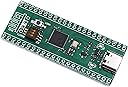
desertcart.com: Songhe STM32F401 Board STM32F401CCU6 STM32F4 Board Learning Board for Arduino 3 Pack : Electronics Review: Good construction, good price, and work very well for me. Less memory than WeAct. - The construction of the boards I got look very good, components seem to be good quality (crystal, button, deep switches, etc), the MCU seems to be genuine ST and works with Cube MX and an original STLink2, and I like having the C type USB. Works well with VSCode and platformio which makes programming a fun. I am programming it with STLink2 (faster and easier) so can't comment about the DFU or Arduino bootloader and the switches to select them. Edit: apparently this board has different pinout and less memory than the common WeAct based design which is based on STM32F401CEU6. I plan to switch the other design which seems to have a few sources, both actual WeAct and clones. I switched to this board, from the more common bluepill because of the larger ROM/RAM but also like what seems to me as a better quality board than the common bluepills. Review: 256K flash F401 works with Arduino and STM32CubeProgrammer - These work fine for experienced users wanting F401 with 256k flash. It is recognized by STM32 software as such; but do note that there are other F401 out there with different specs -- they are not all the same. To use this with USB/dfu mode you will need to push the jumper switch closest to the button while it is plugged into USB port. Open Device Manager if on Windows and go to Universal Serial Bus Devices. Hit the Button and the list will refresh. You will find STM32 BOOTLOADER in the list. At that point you are ready to flash. After flashing it will likely auto re-enumerate as another device and boot your code. I have only used with Arduino and not with anything based on the HAL.
| ASIN | B07XBWGF9M |
| Customer Reviews | 4.2 4.2 out of 5 stars (53) |
| Date First Available | September 3, 2019 |
| Item Weight | 0.81 ounces |
| Item model number | STM32F401CCU6 |
| Manufacturer | Songhe |
C**E
Good construction, good price, and work very well for me. Less memory than WeAct.
The construction of the boards I got look very good, components seem to be good quality (crystal, button, deep switches, etc), the MCU seems to be genuine ST and works with Cube MX and an original STLink2, and I like having the C type USB. Works well with VSCode and platformio which makes programming a fun. I am programming it with STLink2 (faster and easier) so can't comment about the DFU or Arduino bootloader and the switches to select them. Edit: apparently this board has different pinout and less memory than the common WeAct based design which is based on STM32F401CEU6. I plan to switch the other design which seems to have a few sources, both actual WeAct and clones. I switched to this board, from the more common bluepill because of the larger ROM/RAM but also like what seems to me as a better quality board than the common bluepills.
E**I
256K flash F401 works with Arduino and STM32CubeProgrammer
These work fine for experienced users wanting F401 with 256k flash. It is recognized by STM32 software as such; but do note that there are other F401 out there with different specs -- they are not all the same. To use this with USB/dfu mode you will need to push the jumper switch closest to the button while it is plugged into USB port. Open Device Manager if on Windows and go to Universal Serial Bus Devices. Hit the Button and the list will refresh. You will find STM32 BOOTLOADER in the list. At that point you are ready to flash. After flashing it will likely auto re-enumerate as another device and boot your code. I have only used with Arduino and not with anything based on the HAL.
B**R
Issue for me no serial monitor on Adruino 1.18.13 serial monitor. 50% of my units.
The STM32F401 CCU6 GH210 VQ CHN 609 ST e23 Z as marked on chip itself. I received two of these units per the Amazon listing. Of the two, one worked with the manufacture installed bootloader, I did not try any other bootloaders. Issue with the second unit, It refuses to work with the Ardruino IDE 1.18.13 serial monitor. I tried many different attempts without luck. Sent them back for a replacement, which I recieved quickly, I can get one to work, but the second unit same issue, no serial monitor function. Correct Com ports selected, same data rate. One that works comes up on Com port 4, the other on Com7 and does not work, same sketch/hardware setup with short sketch, blink a led on a breadboard, and print a simple "hello" in the serial monitor. Opened and closed programs, computer rebooted. I have attached photo's of the two replacement boards, as you can see, they have not completed the manufacturing process, each has a .25 in extra PCB board which has not been trimmed off. I am somewhat concerned it I take a razor knife to them to remove the extra pcb board, I might ruin some of the pin outs. They cover up additional breadboard pins. The sketches work on both, but just an issue with the Serial Monitor. I tried changing the USB com ports (changed from Com7 to Com 10)selection in windows but did not change anything. The quality of the boards pcb/soldering/printing is good and they will work, just may have issues with Serial Monitor.
J**G
Works great with stm32duino official core
Remove tape and close dip switch closest to the reset button. In the Arduino environment, set the upload method to STM32CubeProgrammer(DFU). Set board to Generic STM32F4 and the part number to Black Pill F401CC. LED is on PC13. USB Serial, Real Time Clock, Timers, and the LED all work as expected. To upload another Arduino sketch, press the reset button and upload. Once you are finished tinkering, open the dip switch to make your program load on power up.
B**E
Great value
Started off with the Teensy 3.2, and it's a nice board. This has very similar specs, but is only a quarter of the cost, and it also has hardware floating point and can do dual channel I²S (thinking of an improved ornament & crime module). Given that I plan to buy a bunch more in the near future, the choice is simple.
J**E
they kinda work
they all have the same problem. if I close the switch closest to the reset button leave it closed flash it with arduino blink example, as soon as it finishes loading it flashes blue led. if I disconnect it and power it from another power source it wont flash no matter what I try with boot switches or reset button. I got it to serial print if I have "while(!serial)" after serial.begin. I got a small oled display to work with it only if I use arduino serial monitor to reset it when it first launches. I tried every other way I can think of to reset the blackpill and switch config and nothing. they all behave the same way.
A**1
Good deal
The board work. Was able to down load and program with a simple program on the first attempt. Yah!.
N**S
Only one of the two has a functional USB port
The one board that works is great. Seems to be a genuine STMicro. Unfortunately, one of the boards has a non-functional USB port, meaning it can't be programmed via USB even though the chip itself is fine. If you get two working boards they're a decent value.
Trustpilot
2 months ago
1 month ago