We remain fully operational. Our teams are working around the clock to ensure your deliveries continue safely.

DOWNLOAD THE APP


Customer Services
Copyright © 2025 Desertcart Holdings Limited
DOWNLOAD THE APP
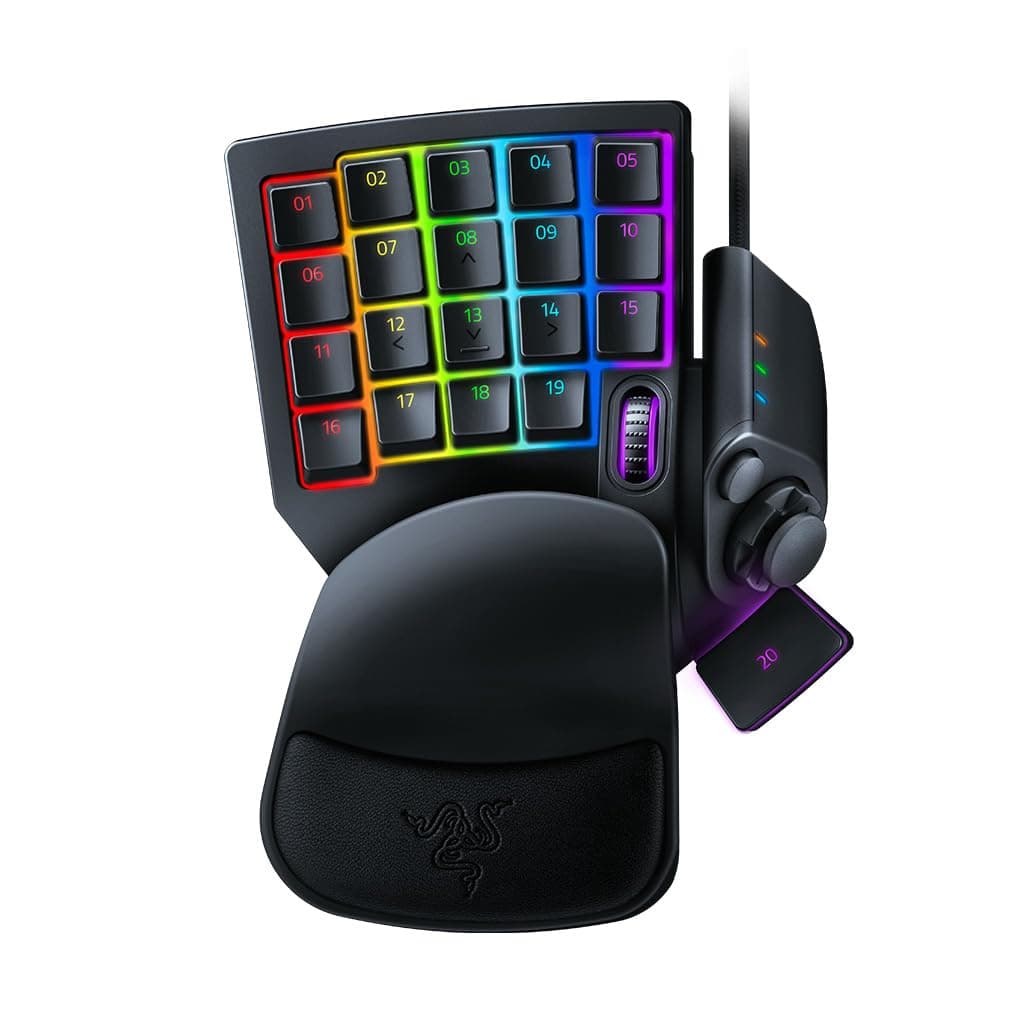
⚡ Dominate every move with speed and style — the ultimate pro gaming keypad!
The Razer Tartarus Pro is a cutting-edge gaming keypad featuring ultra-fast analog-optical switches with adjustable actuation and rapid trigger reset at 0.1mm. It offers 32 programmable keys and an 8-way thumbpad for versatile control, enhanced by fully customizable Chroma RGB lighting that syncs across multiple devices. Ergonomically designed with a wrist rest and ambidextrous layout, it’s built to elevate both competitive gaming and creative workflows.


| ASIN | B07YQKS4B5 |
| Additional Features | Backlit, Ergonomic, Programmable Keys, Volume Roller, Wrist Rest |
| Antenna Location | Gaming |
| Best Sellers Rank | #303 in Video Games ( See Top 100 in Video Games ) #12 in PC Gamepads & Standard Controllers |
| Brand | Razer |
| Built-In Media | Keyboard |
| Button Quantity | 32 |
| Color | Classic Black |
| Compatible Devices | Gaming Console |
| Connectivity Technology | USB |
| Customer Reviews | 4.2 4.2 out of 5 stars (4,473) |
| Enclosure Material | Plastic |
| Generation | 2 |
| Global Trade Identification Number | 00811659035318 |
| Hand Orientation | Ambidextrous |
| Item Dimensions L x W x H | 5.95"L x 7.96"W x 2.5"H |
| Item Weight | 0.8 Pounds |
| Keyboard Backlighting Color Support | RGB |
| Keyboard Description | Gaming |
| Keyboard Layout | QWERTY |
| Manufacturer | Razer |
| Model Name | Tartarus Pro |
| Model Number | RZ07-03110100-R3U1 |
| Number of Keys | 32 |
| Number of Sections | 32 |
| Power Source | Corded Electric |
| Style Name | Tartarus Pro - Optical Switches |
| Switch Type | Razer Analog Optical Switch |
| Theme | gaming |
| UPC | 811659035318 |
| Unit Count | 1.0 Count |
| Warranty Description | 2 year manufacturer |
C**R
Works GREAT with small hands! Records double modifiers! +6m, +1year, +2.5 year updates
I have small hands, 6.5 inches from palm to middle finger tip and ring sizes 4.5-6. I'm able to use this but I did need to shift my hand position to the right so I could use the thumb buttons. I swaped the directional keys to correspond and added some textured gaming keycap stickers to help me learn the new keybinds. I am able to use all of the buttons easily except the top row which requires a little stretch to reach but that's fine with me, I just make those the seldom used keybinds. I needed more pinky modifier buttons as well as thumb accessible modifier buttons (the D-pad is perfect for that). I use this for gaming along with a G600 mouse, it works wonderfully and solved the problem I was having with needing more modifiers and being able to hit binds faster/more reliably. You can record double modifiers with this such as Alt+Shift, I needed that feature specifically. It looks amazing matching my mercury huntsman mini and I love having a separate keypad for gaming rather than using my keyboard. It allows me to have crazy re-mapped keybinds without losing the ability to type normally. I use W A,S D,Q, and E; all the rest of the keys are re-mapped to numpad or modifiers. The space bar key (20) is a bit low and the distance makes it unreliable for me to use quickly so its in the seldom used keybind category. I re-mapped the circular button above the D-pad to map, the D-pad is space bar and 3 modifiers. The little D-pad thumbstick attachment is really great, too! <> - 6 month update- I absolutely love this thing. I've adjusted to using it all the time for gaming and it is so incredibly comfortable. The wrist rest is my favorite part in regards to comfort and the hand positioning in general is relaxing, the shorter keycaps help with this. I found some better gripy texture tape for my most used keys. The joy stick for the D-pad has become pivitol for my gameplay. I love this thing so much that I got a second one for couch gaming. Synapse 3 doesn't support 2 of the same device running at once so I had to get a USB splitter. I purchased both devices "Used like new" and they have been wonderful. Both arrived in perfect condition with no blemishes or malfunction. - 6 mo th update on the second I purchased in "Like New" Condition. One of the keys broke out of nowhere while I was using it. The device had not been damaged while in my care. Razer does not sell replacement keys for this item and refuses to provide them. Keys are not covered in the warranty, so if they break you are out of luck. However, I was able to find these keys on Amazon that replace the low profile Tartarus keys perfectly -amd they are very affordable: X-keys Keycap Cherry MX Compatible -2.5 year update: STILL AWESOME lol. No issues whatsoever. I have 3 now, send help. I made the #20 thumb usable by making a booster seat for it. Took off they key and traced it on firm 1/4 inch thick foam, cut out the exact shape (took a little notch out to keave room for the D-pad thumb stick to clear it), then doubleside taping it to the key- works like a charm now. I use the Tartarus for every game ( FPS, MMO, Competitive) and will never go back to using a keyboard for gaming.
S**N
The Good The Bad & Fixes
Ok so starting off, i switched from using logitechs gamepad for 15 years. Their decision to remove support and start charhing subscriptions for software just rubbed me wrong so now its time to change after my joystick started to die. So i'll go over good first then the bad as well as solutions for some of the bad. Good: Functions great. The sensitivity settings for button presses is amazing! Rly ups my in game reflexes being able to barely touch buttons to use them. I also love the idea of the scroll wheel on the gamepad, great for if a mouse scroll wheel is acting up. Additionally the silent button presses is great for me.. clicky clack drives me nuts when gaming as i feel like im disturbing others. I also love the size of the joystick as i have big thumbs and the cushion is great for my wrists. Bad: So some of this is just user error and preference but i did find solutions for most of it which i will go into detail on. Almost all of my issues involve the joystick. So i use mine for movement not hotkeys as it frees up three fingers that way. When using it for movement dont change it to 8 directional as theres a bug where it cant do 360 movement as it wont read the diagonals. If you are like me and curiously thought to check it out but went back to 4 directional you will need to restart your computer after switching back to 4 direectional as without the computer restart the bug on the diagonals will still be there. So tldr: 4 directional allows 360 movement but 8 does not and if you switch to 8 and then back to 4 it needs a pc restart to read properly again. point 2 is the joysyick is slippery as hell, so my solution was getting a ps5 grip cap warming it up a bit and stretching it to fit. 3rd point is the clicking. everything else on the gamepad is silent i wish the joystick was too, even an option to adjust the clicking would be nice, much like what some of their mice can do. when i first got it buttons were a little stiff so took some muscle memory adjustment and a bit of use to loosen em up. not an issue long term just a point to keep in mind when u first get it. with the sensitivity setting anyways it only affected me ehen holding buttons down til they loosened up. Having used logitech's for years i do miss the screen with the performance monitor on it as well, but i have other eays of doing that so not a huge loss. ok final point is the scroll wheel. its location is terrible, it sits right under the joint between the thumb and pointer which is not easy to reach. Putting it to the left of the 09 or 10 button would be a better spot making it easier to use as frankly my pointer finger and thumb dont bend that way for the current placement. all in all amazing gamepad just needs some minor tweaks to make it perfect.
W**O
- This feels more useful for productivity than gaming. - Macro heaven for all your shortcuts with a single key press such as Ctrl+Shift+J - Save frequent key press sequence such as "Ctrl+Shift+P -> secretplan.com -> enter". This will open a private browser, type in the address and launch the website, with a single keypress. - Numpad for 60% keyboard users - Key switches' actuation force is towards the heavier side. Might need getting used to if you're comfortable with light switches. Does require effort for initial set up, and a learning curve to remember and get used to the set up. But when you do, you'll be a efficient machine with minimal effort. Note: You MUST install the Razer software and have it running in the background. It doesn't have onboard memory. Overall, highly recommend but please do your research before diving in.
D**E
really comfortable
G**T
For its price this gaming keypad is awesome. Quality materials, comfy hand rest, ergonomic key placement and shapes. The little joystick isn't quite like a controllers, but if you add a couple little washers and raise the joystick up, the joystick becomes far less finicky in its sensitivity, and although the joystick basically just becomes remapped WASD if you use it for movement, it feels very natural after a bit of gameplay. I use the joystick for movement, and I play everything from fantasy action RPGs, to highly tactical shooters and this joystick feels 1000x better then WASD ever did. But I do highly recommend a few washers under the joystick. It changes the feel dramatically, if you found it to be too sensitive anways. As I was used to the large axis of movement on a console controller, modding the joystick made a big differences on comfort and feel to me.
R**N
it's very comfortable to use, but I can't use the wrist rest that comes with the keyboard because otherwise I wouldn't be able to reach all of the keys I need to
P**K
Great product, easy to setup and start using straight away. Feels great to use, very comfortable on the hand.
Trustpilot
3 weeks ago
1 month ago