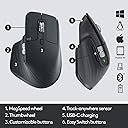
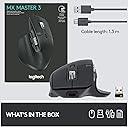
🖱️ Master your workflow with the MX Master 3 — where speed meets comfort and control.
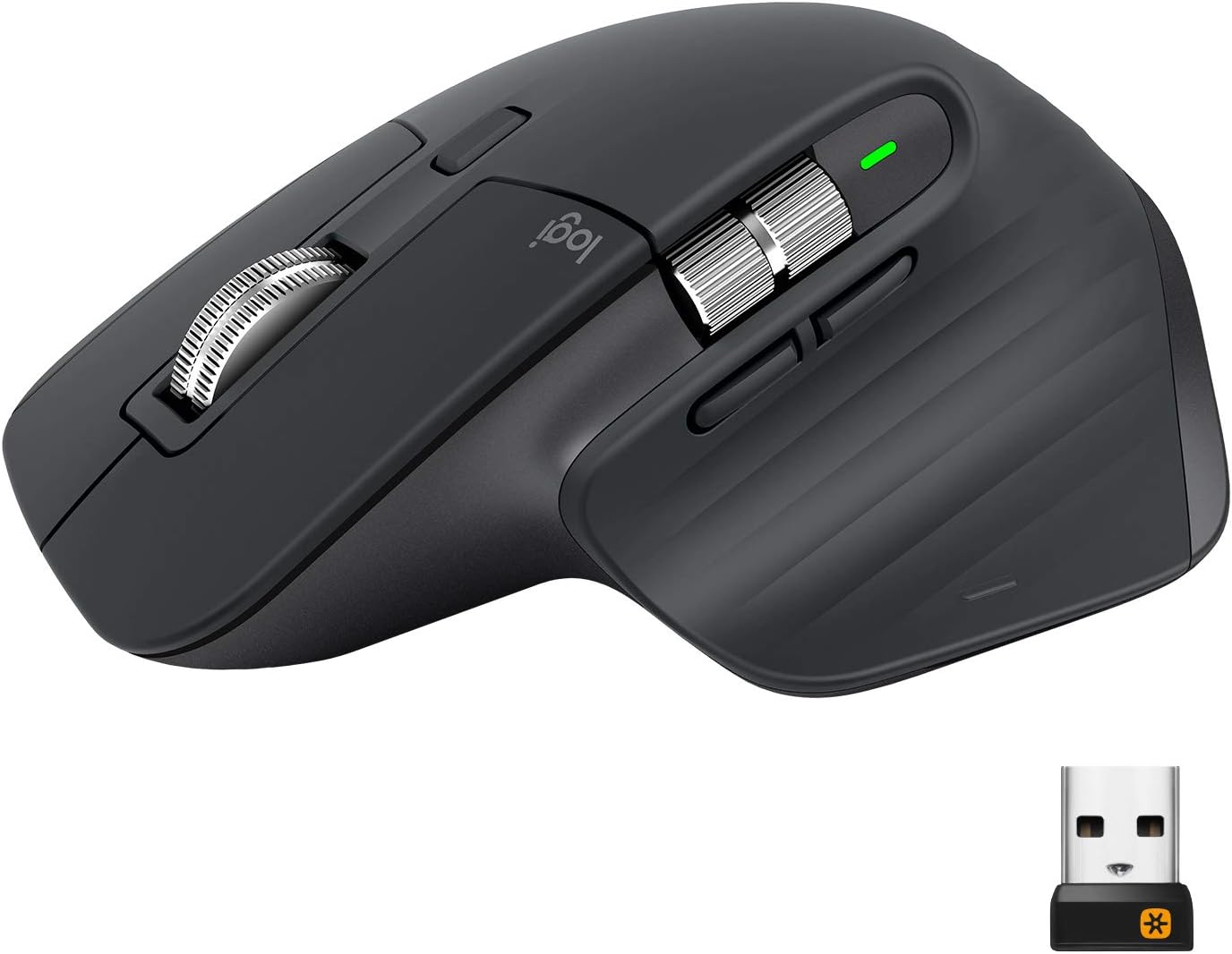
The Logitech MX Master 3 Advanced Wireless Mouse is a premium, ergonomically designed input device compatible with Windows, Mac, and Linux. Featuring MagSpeed scrolling that’s 90% faster and 87% more precise, it offers ultra-quiet navigation and up to 70 days of battery life. Customizable buttons and app-specific profiles via Logi Options+ software enhance productivity, while seamless switching between three Bluetooth devices keeps multitasking effortless. Ideal for professionals demanding comfort, speed, and precision in their daily workflow.


| ASIN | B07W6JG6Z7 |
| Antenna Location | Office |
| Are Batteries Included? | Yes |
| Are Batteries Required | Yes |
| Battery Average Life | 70 days |
| Best Sellers Rank | 56,360 in Computers & Accessories ( See Top 100 in Computers & Accessories ) 1,183 in Mice |
| Box Contents | USB receiver, charging cable |
| Brand | Logitech |
| Brand Name | Logitech |
| Button Quantity | 7 |
| Colour | Black |
| Compatible Devices | Personal Computer |
| Connectivity technology | Bluetooth, Unifying |
| Country of Origin | China |
| Customer Reviews | 4.7 out of 5 stars 16,114 Reviews |
| EU Spare Part Availability Duration | 2 Years |
| Embellishment Feature | Logo |
| Enclosure Material | Plastic |
| Global Trade Identification Number | 05099206085800 |
| Hand Orientation | Right |
| Hardware Platform | Linux, Mac, PC |
| Item Dimensions L x W | 12.5L x 8.4W centimetres |
| Item Type Name | Mouse |
| Item Weight | 4.94 Ounces |
| Manufacturer | Logitech |
| Manufacturer Part Number | 910-005694 |
| Model Name | Logitech MX Master 3 Advanced Wireless Mouse |
| Model Number | 910-005694 |
| Mouse Maximum Sensitivity | 4000 Dots per Inch |
| Movement Detection | Laser |
| Movement detection technology | Laser |
| Network Connectivity Technology | Bluetooth, Unifying |
| Number of Batteries | 1 Lithium Polymer batteries required. (included) |
| Number of buttons | 7 |
| Operating System | Android, Linux, MAC, Windows, iOS |
| Pattern | MX Master 3 |
| Power Source | Battery Powered |
| Product Features | 4K DPI, Flow - Cross computer control, Magspeed scrolling, Tracks on glass |
| Product Finish Type | Matte |
| Product Warranty | 2 year manufacturer |
| Range | 10 meters |
| Special feature | 4K DPI , Flow - Cross computer control, Magspeed scrolling , Tracks on glass |
| Style Name | MX Master 3 |
| Theme | Computer Accessory |
| Unit Count | 1.0 count |
D**D
Expensive but worth every penny
I’ve never spent more than £15 tops on a mouse before, usually putting up with whatever generic off-brand one came with my computer or was at my workstation in the office, so I was naturally quite hesitant to spend this much on a device I hadn’t actually felt in the hand before and that differed slightly from the standard “puck” form factor I was used to. Upon getting a new MacBook and being absolutely underwhelmed by Apple’s own Magic Mouse, which is probably the only Apple product I’ve ever actively disliked, I decided to go for this one. This mouse surpassed all my expectations, and I do not regret a single penny of the relatively high cost! It feels great in the hand, has a massive amount of customisation via the Logitech software, stores 3 preset devices to attach to, seamlessly can work between multiple devices via the Logitech software, can even assist in copying and pasting between different devices, has fantastic build quality with a nice rubberised feeling to the body and a reassuring weight in the hand. The scroll wheel feels amazing in use in both its free wheeling mode and in its measured by-the-click scroll, which can be toggled between very easily. Plenty of buttons and configurable in Logitech software with a wonderful multi use side button by the thumb, which allows 4 different actions to be set to a push then direction move on the mouse (eg press and mouse up can be set to ‘copy’, press and mouse down can be set to ‘paste’ etc). Side scroll wheel works perfectly too, which is handy navigating around artboards in the Adobe Suite or horizontally wide Excel spreadsheets. Battery life is excellent and I haven’t had to charge it once since its first charge, and this is with daily use from 9-5 every day, and I’ve had it a month or so now. With such a slow drain rate and no strain that comes with having to repeatedly charge the battery, I have every faith the battery lifespan of this over time will also be very good. I had a quick search online as when researching this to see if I could easily replace the battery myself in future should the need ever arise, and it looks fairly easy to do and currently very cheap to replace, which is reassuring given the cost of the mouse. I purchased the “PC version”, rather than the “made for Mac” branded one, purely because at that time this was cheaper. There is absolutely no difference in the mouse itself, it’s the same product and I’ve used this seamlessly between PC, MacBook and iPad without any issue. The only difference I can see is the Mac boxed version comes with a USB-C to USB-C cable for charging rather than the USB-A to USB-C one this came with, however I have a multitude of USB-C to C cables anyway and also a dock with USB-A. With the pricing as it was, even if I’d bought the PC one over the Mac one, I’d still have had enough to buy a cheap USB-C to C cable and still have saved money, but as mentioned this wasn’t necessary in my case. Beautifully packaged with the unified receiver dongle, which I haven’t had call to use really as it worked out the box just fine with Bluetooth on all of my devices. Could not rate this any more highly, and the ergonomic feel in the hand is fantastic. I guess I never missed what I’d never had before, but the quality of life improvements of having a good mouse when I spend all day using one is something that I now absolutely appreciate, and I don’t regret a single penny of the cost. In fact I was so impressed I only went on to spend more money on Logitech; buying the Master keyboard and wrist rest too!
K**N
Perfect for Productivity
This mouse is no ordinary mouse, as you might have guessed based on its price, but the fact you're reading this proves that you're interested in it. Check the reviews on YouTube - this is the King of Productivity. And for a reason. The ergonomics is superb, no matter your gripping technique. The build quality is beyond that of any cheap mouse, feeling sturdy and premium. The software it comes with allows for full customizability of all the buttons, which are not too many, yet just enough for you to actually use them. I personally prefer the media control layout in which I can play, pause, forward, previous and control volume of the songs playing. It comes with in-app specific commands, so if you use something like Photoshop you will be able to, say, adjust brush size with the side scroll wheel, which while you can do with a macro, it's just more satisfying using the scroll wheel. Talking about which - they feel premium af. The scrolling is as smooth as silk and the magspeed scroll wheel is... hit and miss sometimes. Not optimal for gaming, but darn is it fun to flick it. The infinite scroll option seems to be a bit too much for my laptop at times so if you have a relatively weak PC/laptop it may stagger a bit (but if you do then what are you doing eyeballing this mouse?!). I personally find myself using all the buttons on the daily, so they are no gimmic. But if you think you don't need so many buttons, it's worth looking at other options, like previous models. Overall, if you know howe to use such a mouse, there's a reason it's critically acclaimed. Worth the hunger the few weeks after purchase. P.S. The picture is just me playing around with product photoshoots, shot and edited on iPhone 7 Plus.
M**.
5 Star Windows - 1 Star Linux
This mouse is brilliant - as most other reviews will say. On windows, with the logitech software, it's great. *HOWEVER*, and this is a huge problem for anyone wanting to use this mouse on Linux, there is no Logitech software for Linux., only Windows & Mac. So what do you get for the 'Linux compatible Mx 3 Master'? - a 1000dpi mouse, with non-configurable buttons. There is no way on the mouse to increase the dpi from the default 1000dpi to its full 4000dpi, or to change what any of the buttons do. However, if you are willing to install, configure, and play with 'ratbagd' and 'piper', you can change the dpi, and change the button configuration. My first day with both of these has been hit and miss, sometimes after the machine sleeps, it doesn't detect that there's a device connected, and I'm back at 1000dpi, and I've not had success yet with changing the button actions. Logitech should be ashamed at putting 'linux compatible' on the product description, as it simply isn't correct, given their advertising of the features of this mouse. Oh, and if you were looking at the 'Flow' feature to copy & paste across machines? Forget it. Please don't just believe me in this review. Have a search online for 'logitech mx master 3 linux', there's plenty of information out there regarding Logitech & Linux woes. I will update this review, and decide if I'm keeping this lovely little rodent after more testing on Linux. The mouse is gorgeous, the software, and the company stating 'linux compatibility' isn't. *Update* - After a few days of playing with this, I have decided to keep it. The Piper GUI for Ratbagd isn't great and will frequently lose connection to the daemon, so you need to close and re-open it. If your PC/Laptop/Tablet goes to sleep, then you'll be back at 1000dpi again when you wake it. I have created a little script which runs 'ratbagctl "Logitech Wireless Mouse MX Master 3" dpi set 4000' which I run when I wake my Laptop. Also, if you are running OpenSUSE, then you will need to add your user to the group 'games', and restart after installing Ratbagd & Piper, otherwise Piper will never be able to communicate with Ratbagd, and will just give a vague error that doesn't indicate the solution above. It's a bit of a hassle, and if I had known about these issues beforehand, I would have opted for the cheaper MX 2S, as that's 4000dpi and as 'Linux Compatible' as the MX 3. The actual mouse is fantastic, the scroll wheel is brilliant (in free & ratchet mode), side scrolling works, and it tracks on glass. The shape fits my hand like a glove, and I don't randomly right-click as with other mice.
S**N
This is a SUPERB Mouse.
I bought this for gaming. I spent a lot of money on a Logitech mouse, back in 2000, and I still have it and it still works perfectly. I wanted to buy the updated version with the new features and extra buttons. The mouse is perfect as long as you are right handed, thats its only fault, its not built for universal use. Other than that its a superb product. The bluetooth worked straight away in windows 11 and picked up the mouse the second it was charged and switched on. It then asked me if I wanted the Logi software installed, and went and sourced it all and set it up flawlessly. I use it in games on a media pc and I sit on a sofa across the room from the pc and the wireless range is amazing. Its precise, the scroll wheel is metal and weighted and the whole thing feels robust and strong as its a quality product. Its comfortable to use, has a long life battery and all the buttons and features you could ever need. I almost bought a Razor gaming mouse, but the price was just insane. This is not a cheap mouse either but its cheaper than the Razor mice, with the bonus of working well as a desktop mouse for artwork, internet browsing as well as gaming. Its worth the money, because most people forget, or seem to ignore the fact that a pc needs a mouse as the interface device and its the one thing you use constantly all the time you are using a pc. Its not worth buying a cheap mouse as it will break, and work badly from the very start. Spend some money on a good mouse, its worth the investment.
N**Y
Time to upgrade!
I bought the first MX Master roughly 4 year ago, it was my daily driver in the office with an average of 30+ hours a week usage. I had to charge it once a month, it was a fantastic mouse. The free moving centre wheel is the best feature ever when you have large spreadsheets or documents the scroll through. I'd still be using it and only upgraded as the my original died in a weird way. At first i thought it the Bluetooth on my laptop, but after reconnection the mouse I noticed the the button were working, but the cursor no longer moved, so I can only assume the something happened to the Darfield Laser, as unlike normal mice it does not glow red, you can't see it under normal operation. So it decided it was time to upgrade, I did consider buying the another of the same model as it lasted be 4 years, but took the leap and decided to buy the MX Master 3, and honestly I am happy I did, they have changed the design, it fits better in my hand, the magnetic centre wheel is far better the first editions clicky one! The buttons are easily programable, just plug in the dongle and it will ask if you want to install the software for the mouse. I have the mouse hooked up to my Work laptop, my home Desktop, and my iPad Pro, and at the press of a button it instantly switches between those 3 devices. All in all, these are the best mice I have ever owned. The MX Master is awesome, lasted years with daily use, battery life is amazing even after all that time. MX Master 3, although I have not had a great deal of time with it to write a detailed 100% honest review, I can already feel the improvement over it predecessor!
I**S
Great mouse (although I'm not a fan of the rubberised handgrip)
Really like the ergonomics of this mouse - I would say I have a medium-to-large hand and it's quite comfortable to rest my whole hand on the mouse. The ability to use this mouse with up to 3 different devices is very useful as well. The only downside of this mouse - for me at least - is the rubberised surface of the handgrip. It's fine to start off with, but over time if you have clamy/sweaty hands (perhaps as a result of a particularly intense gaming session or you're sitting at your computer for long periods of time) then you might find the feel of the rubber becomes a little 'tacky' over time - it doesn't make the mouse unusable by any means - and its probably not fair to say it is unpleasant to hold after a while - but it definitely has a less than optimal feeling - in my view at least. This isn't an issue which is unique to Logitech per se, but any mouse which has a rubberised grip - I think I'll be sticking to standard plastic mice from now on.
J**E
I will buyt it over and over again, worth every penny
Amazing mouse, I have been using this for almost two years now. As a forex trader and UI designer, I use this mouse for almost 20 hours a day and it has not disappointed. Pros: 1. Battery life is superb 2. Exceptionally comfortable for extended usage periods. 3. Customizable buttons which makes work fun. 4. The infinity and side scroll features are perfect for navigating through large documents. 4. Outstanding build quality. 5. Easy switch betwwen different 3 different PC's Cons: 1. Expensive Worth buying if it fits within your budget.
J**K
A High Quality All-Rounder; Suitable for Work, Gaming, Linux
I'm a computer engineer who was looking for a professional-looking but functional mouse for both work and gaming. The mouse feels great to use, fits my desired style as modern and professional, and has shown to be a very functional and capable mouse over these past few days. I've been a wired mouse user pretty much all my life, and was hesitant to make the move to wireless out of habbit but this mouse finally convinced me to do it. As someone does regular programming and other technical work, the wheels and navigation buttons are very useful. I was slightly concerned the mouse would be unsuitable for gaming given the wireless and professional aspect but, while many better alternatives exist, this mouse performs a lot better than I was expecting. The extra buttons help, the button on the thumb rest is not prone to accidental pressing, the mouse wheel design can be useful in many situations, and more importantly is accurate and low in latency (I didn't notice any lag after switching from my wired mid-tier gaming mouse - the Roccat Lua). I run a dual-boot setup running Windows 10 and Linux (Ubuntu 20.04), so Linux support was also important. The mouse obviously works well on Windows and the companion app (for the extra features etc.) is handy as well; I like that the driver and app download prompt came directly from the mouse. There's no companion app for Linux, but the extra features are not necessary for a good experience - the mouse is still accurate with functioning buttons and all the other basics work as intended. I haven't yet looked to see if the Linux community has made an alternative to the companion app nor looked at whether WINE can emulate the app, I'm happy with the configuration out of the box. Linux gaming was also a priority; I game in Linux just as much as Windows, so I was happy to see that the mouse and its buttons are all fully functional without issues.
M**N
Great product, Original
The MX master is a great mouse the product is original and certified from logitech thanks for the seller
V**2
Mysz
Mysz działa poprawnie
C**S
Mí mouse favorito
Llevo más de dos años con el, busqué este modelo particularmente por el color ya que la serie S solo tiene blanco, negro y grafito. Me ha funcionado excelente para trabajar en diseño 3D, documentos, diseño gráfico, y gaming. También ha sobrevivido a una ocasión en la que mi perro lo mordió (lamentable) y sigue funcionando como el primer día.
Y**K
Acheté pour être ma dernière souris
J'ai jusqu'alors utilisé des souris bas de gamme pas chère/offerte. Je passe beaucoup de temps à l'ordinateur et avais régulièrement mal au poignet. Depuis que j'utilise cette souris je n'ai plus de douleur. Ce qui la différencie des souris sans fil plus bas de gamme que j'ai pu essayer : - Le dongle fournis est plus réactif qu'une connexion Bluetooth, la souris est immédiatement accessible en sortie de veille - Possibilité de sortir la souris de veille en la secouant, pas besoin d'appuyer sur un bouton - Macro facilement paramétrable - Charge par USB C - Association à plusieurs appareils et bascule entre eux facile La souris est très bien faite, et le logiciel pour la personnaliser est efficace et régulièrement mis à jour. Je trouve la molette très satisfaisante : elle est à la fois crantée pour un déplacement précis sur des petites distances, et tourne librement lors d'un geste plus rapide. Dure à décrire mais très agréable, je me retrouve souvent à défiler des pages juste pour le plaisir du geste quand je suis dans mes pensées... Je n'utilise pas la personnalisation des touches par logiciel juste une personnalisation globale, avec accessible depuis la souris : réglage du son, pause/play, capture d'écran, sauvegarde du document en cours, ouverture de mes documents Le négatif : - quand je fais utiliser mon ordi à qqn qui est gaucher il faut que je sorte une souris plus classique, celle ci n'est utilisable confortablement qu'avec la main droite. - Les paramètres de la souris sont stockés sur l'ordinateur et pas la souris même, le niveau de personnalisation n'est donc pas aussi bon quand je la connecte au pc du boulot sur lequel je n'ai pas les droits admin pour installer le logiciel.
G**A
Comodità, precisione e autonomia al top
Uso questo mouse ogni giorno per produzione musicale, video editing e fotoritocco: è davvero impeccabile. Comodissimo, preciso, con un’ergonomia eccellente e un’autonomia che dura settimane. Si abbina perfettamente con la tastiera Logitech della stessa serie e funziona senza problemi con il mio Mac Studio. Molto utile anche la possibilità di personalizzare ogni tasto per ciascuna applicazione tramite il software Logitech: una vera marcia in più per chi lavora in modo professionale. Un prodotto solido, affidabile e ben pensato.
Trustpilot
2 weeks ago
3 days ago