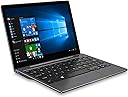
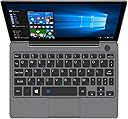
![GPD P2 Max [CPU M3-8100Y] 8.9 Inches Portable Mini pc Notebook Laptop Touch Screen Tablet Win 11 Home OS 16GB RAM/512B ROM,Amber Black](https://m.media-amazon.com/images/I/71H1yAgUIqL._AC_SL3840_.jpg)



Buy anything from 5,000+ international stores. One checkout price. No surprise fees. Join 2M+ shoppers on Desertcart.
Desertcart purchases this item on your behalf and handles shipping, customs, and support to Italy.
🚀 Pocket-Sized Powerhouse: Work, Create, and Conquer On-The-Go!
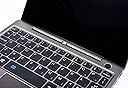
The GPD P2 Max is an ultra-portable 8.9-inch mini laptop featuring an Intel Core m3-8100Y dual-core processor clocked up to 2.6GHz, 16GB LPDDR4X RAM, and a 512GB SSD. Its 2.5K retina touchscreen delivers crisp 2560x1600 resolution with full sRGB coverage, perfect for color-accurate work. Weighing only 650g and equipped with a 9200mAh battery offering around 7 hours of use, it combines powerful performance with exceptional portability. Additional features include fingerprint login, a chocolate island-style keyboard, and a robust liquid cooling system, making it ideal for professionals who demand real PC capabilities in a compact form factor.


| ASIN | B07W8MW2ZR |
| Audio Output Type | Headphones |
| Automatic Backup Software Included | Windows 11 Home |
| Battery Cell Type | Lithium Polymer |
| Battery Life | 7 Hours |
| Biometric Security Feature | Fingerprint Recognition |
| Bluetooth support? | Yes |
| Brand | LANRUO |
| Built-In Media | packaging box, charger, USB C Cable |
| CPU Codename | Amber Lake-Y |
| CPU Model | core_m |
| CPU Model Generation | 8th Gen |
| CPU Model Number | m3-8100y |
| CPU Model Speed Maximum | 2.6 GHz |
| Color | Black with Amber Accent |
| Compatible Devices | External displays via HDMI, USB devices, wireless devices via Wi-Fi |
| Connectivity Technology | USB |
| Control Method | Touch |
| Customer Reviews | 4.0 out of 5 stars 49 Reviews |
| Display Resolution Maximum | 2560x1600 |
| Display Technology | LCD |
| Display Type | Touchscreen |
| Form Factor | Notebook |
| Graphics Coprocessor | Intel UHD Graphics 32EUs |
| Graphics Description | Integrated |
| Hard Disk Description | SSD |
| Hard Disk Size | 512 GB |
| Hard-Drive Size | 512 GB |
| Hardware Interface | USB |
| Has Color Screen | Yes |
| Human-Interface Input | Keyboard |
| Item Dimensions L x W x Thickness | 8.39"L x 5.89"W x 0.56"Th |
| Item Weight | 465 Grams |
| Keyboard Layout | QWERTY |
| Lithium-Battery Energy Content | 12 Watt Hours |
| Manufacturer | GPD |
| Memory Slots Available | 1 |
| Model Name | GPDP2 MAX1 |
| Model Number | GPDP2 MAX1 |
| Model Year | 2022 |
| Native Resolution | 2560 x 1600 pixels |
| Notebook Pointing Device Description | Touchscreen with cursor and mouse button functionality |
| Number of Ports | 1 |
| Operating System | Windows 11 Home |
| Other Special Features of the Product | Fingerprint Reader |
| Processor Brand | Intel |
| Processor Count | 2 |
| Processor Series | core_m |
| Processor Speed | 2.6 |
| RAM Memory Installed | 16 GB |
| RAM Memory Technology | LPDDR4X |
| RAM Type | DDR3 SDRAM |
| Ram Memory Maximum Size | 16 GB |
| Resolution | 2560x1600 |
| Screen Finish | Glossy |
| Screen Size | 8.9 Inches |
| Specific Uses For Product | Gaming, Multimedia |
| Total Usb Ports | 1 |
| Touch Screen Type | Capacitive |
| Touchpad Feature | true |
| UPC | 608803463024 |
| Video Output | HDMI |
| Voltage | 12 Volts |
| Warranty Description | 1 year warranty |
| Webcam Capability | No |
| Wi-Fi Generation | 802.11ax |
| Wireless Compability | 802.11n |
C**O
Very impressive machine. More powerful than a 2010 i5.
I travel, mostly for work. I also like to take photos. Like many photographers, I like to carry my camera everywhere and I like to work on my images when I have some quiet time. This means I have to have a computer that can run image editing software. But travel also means compromise. For me, the biggest hassle is laptops through security. I refuse to put personal stuff on my company machine, so I need to carry something else for my personal use. Two full size laptops means two security bins. Plus the bin for my carry-on and it gets to be a hassle in the security line. I found that my 9" tablet fits with my laptop and camera in a single bin nicely. Even in Paris, Denver, or Mumbai, I could get through security easily with all my electronics in a single bin with those items. Except I can't edit photos as I'd like on my tablet. I need a real PC. I built a cardboard mockup of a security bin and tried a bunch of configurations to get two laptops to fit. Even a fairly small 13" model was just too large. I even tried to overlap the 13" with my work PC and the very first TSA checkpoint nixed that idea. I've cut cardboard models for a bunch of different machines and I simply could not find a size that worked with the more mainstream offerings. Thus, I needed to look more to niche offerings. So, I made my requirements as follows: 1) MUST run Phase One's Capture One software without excessive pauses. 2) MUST be roughly the size of my Samsung Galaxy Tab S2 at 8"x5.5" 3) Should have a decent battery or ability to run on USB. 4) Had to have a decent screen resolution to have a large enough edit area for photos. 4) Has to not suck to use. Far too many machines I looked at were either too large, had terrible performance, or like the GPD Pocket 2, were just too many compromises. Long story short, I looked at a host of different machines, many from Asian companies I'd never heard of. I'd heard of GPD from a couple friends who bought their gaming rigs. Initially I'd dismissed them as their products were simply too small. And then I saw an early review of a prototype of the P2Max. it looked very promising. Ultimately, I ordered the machine with the expectation I would have to wipe it and return it. I simply could not believe it was a truly usable laptop. You know what? It's not bad at all. I am quite pleasantly surprised just how good it is. Yes, it is slightly larger than my tablet, but it's still small enough to fit in a security bin with a tiny bit of room to spare. It runs Capture One without any problems at all. Every function works fine. When I do a white balance update, there is a slight pause as it completes the 20 megapixel image and then renders the result. By slight, you notice it, but nothing serious. My i7 based machine is practically instant in this operation, but earlier machines all used to have delays. Compared to those, this machine is top notch. When I render jpgs from RAW files in a batch process, it is noticable slower than the i7 machine as you would expect, but not as slow as I might have expected. In fact, processing the same 21 images, the i7 finished about 4 images ahead of the GPD P2 Max. That's not bad. I recall that when I first started using the i7 machine I noticed a significant improvement over the previous i5 based machine. So, I pulled the old 2010 i5 machine out and ran a test. To be fair, I made sure the software and OS on the older machine were up to date. I then ran the same 21 images and the P2Max finished about 2.5-3 images FASTER than the older i5. And that i5 was considered a fairly powerful machine back then. The boot time on the P2 Max is very quick. Battery life is more than usable. Doing photo editing and conversion I was seeing about 5 hours. When I hooked up an Anker battery, the machine continued to charge while running until I ran a batch process that really taxed the system. In other words, I can easily use a simple USB battery to extend my work time significantly. Using a full power USB C power source easily charges and run the machine. An 8% to full charge while turned off took about 3 hours on the included charger. The fingerprint login is a real joy to use. I rarely get an error. If I need to step away from the machine for a few moments I can just close the lid to sleep and when I get back, I can open it, touch the fingerprint reader and be right back where I was in seconds. Battery draw when sleeping is not bad. If you are not going away for more than an hour, it isn't worth shutting down completely. Using the machine is fairly simple. Typing is no worse than many laptops and with the exception of some of the punctuation I don't feel cramped. the trackpad is small but very usable. As a first test, I went out and took photos of an indoor soccer game that my son was playing. This location is terrible for photos as you have various light from sunlight in the narrow windows to poor florescent bulbs. Typically it takes a lot of post processing to pull out details and fix the color differences. I had no issues at all doing this work on the GPD P2 Max. At no time did I feel I was waiting for the machine to catch up with me. the trackpad offered enough control to target specific areas for work and to crop shots. In the end, I also used the machine to run a software package called IrfanView to generate web sized images and automatically build a series of webpages to display them. I even emailed the web link to the parents from the tiny laptop. Other than hitting the return key when I was trying to type an apostrophe, I really can't say I had any issues at all. I did load up Microsoft Word and Excel and found no issues editing files in those packages. All in all, this is a very usable machine. I have a couple issues which should be considered minor: 1) Power button requires a firm push to turn on. Since there is no instant indicator that lets you know it is stating, I found myself several times staring at a dark screen. Not sure if this is normal or just my unit. Either way, if I give it a solid press, no problems. 2) Right click on the touchpad is not reliable. When I was resizing the icons on the start screen I kept launching the applications. For the most part this isn't an issue, but can be annoying at times. 3) The lid is tight. Really need two hands to open. I understand why, but it should be considered. 4) Windows authentication key did not register automatically. Both the company and vendor were quick to respond and provide the proper steps to manually get the registration complete, but it could have been a three line entry in a trouble shooting section of the manual. The display is awesome. The colors are very close to being perfect sRGB. Enough so that I don't worry about doing color corrections on the little laptop. The touch response is as good as any I've tried. The only real issue is that the screen elements are so small that it is easy to tap the wrong one. I caused a couple windows to go full screen when I wanted to close them. But for scrolling and more gross actions, it works just fine. My only caveat is that if you are over 40, chances are you are going to need your reading glasses. All that resolution packed into such a small screen does not make for easy reading in older eyes. That said, with glasses, or when viewed by my teen son, the screen is bright, crisp, and very very good. You can see in my attached photo, the side angle of the display is even better than that of my primary laptop. Build quality is top notch. No flex in the keyboard, solid feel, and even the ports are solid. Nothing feels cheap or 'budget'. Yes, you are paying a lot for such a small machine, but it really feels worth the money. I do not find the fan a problem at all. Yes, you can hear it at time, but I never find any annoying noise. If you have bad vision, large gorilla hands, need precise control of the cursor, or some other issue with the physical size, this might not be the machine for you. But, if you have the need for a small and ultra-portable windows machine that can run real productive software, this is a very competitive choice.
J**S
Win 8.1 (and) Win 7 works quite well on it
Update 9/2021 - Native Intel HD 630 Graphics Device Driver works under Windows 7. I didn't think it possible.. but the m8100-Y "Amber Lake" does not have as advertised an Intel HD 615 GT2, it seems to have an Intel HD 630 GT2 and the Windows 7 device driver for that does work and installs all of the Intel support applications. It just took adding the Dev ID of 591C to the INF file and acknowledging that breaks the drive signing at install time. Windows Experience Rating of 6.8 Video Playback is silky smooth and never gets hot. (I assume this means the GPD P2 will also run Windows 7 since the have the same CPU-GPU) --- I didn't like the Windows 10 that came on it so I installed Windows 8.1 Professional x64. It works quite well. The touchscreen and wifi, ssd and touchpad were no problem at all, but did take hunting down a few drivers. The Touchscreen is very sensitive and quite accurate. The Touchpad is also likewise ver sensitive and quite accurate. The keyboard does a good job of eliminating keys that aren't used very much and freeing up space around keys like the arrow keys to reduce errors when using them. The "semicolon" was the only key I wish were easier to get to but its been turned into a two keystroke key, which you get used to fairly quickly. The keys on the keyboard are 'island style' like on a Mac book pro, with a recessed well from the surrounding keyboard bezel. It plays back video very well. But the video GPU and the Chipset don't have an official supported device driver from Intel so it defaults to the Windows built-in generic, which means you can't select alternate denser or lower resolutions. But its so fast in default mode this is really not noticeable. Windows 8.1 pro is still supported for a few more years, so its secure, but it doesn't get annoying broken updates every two weeks like Windows 10, so its much more stable. Windows 7 actually does install on it and runs quite well. The trick was the recent Retro invention of a GOP with Bios graphics support which fully enabled its installation without a legacy BIOS. It works even after install for things like error message screens and dumps which require the legacy BIOS support. The native NVMe universal driver for Windows 7 also made it possible to install direct to the SSD without needing to hack any load on demand third party drivers. And the twirly primary colored balls work in the Win7 start up screen. There is no touchscreen driver that I'm aware of but the touch pad works quite well, its very sensitive. Its not fully gesture enabled, but a two finger tap substitutes for a right click as opposed to a left click of the mouse page. All in all its supports Window 7 quite well for running older applications and using an OS with a 'completely' functional Start button.. with no ads or app store.
C**R
Is it true the posted information ?
The information on Amazon says it comes with windows 10. Now it is requesting me to activate windows and a link to pay for an activation key. How come ? After paying a substantial amount of money, windows on the PC is not activated ? Cannot find how to contact the seller. Must provide with activation key. After exhausting internet search I managed to activate windows 10 that came on the unit. According to reviews, other buyers have gone through same problem. Recommend manufacture to be specific on the enclosed instructions with process to activate. Otherwise, the mini pc is a good solution for travel. Thanks.
A**L
Buena portabilidad y desempeño pero baja batería, calienta mucho y teclado incompleto
Puntos positivos: excelente portabilidad. Es más compacto que imagine. Tiene todas las funciones de una notebook. Compre un hub usb tipo c y funciona de maravilla. Es muy liviano y excelente para trabajar. Desempeño veloz y estable. Inicio ultra rápido y ejecución de programas perfectos Puntos negativos: la batería dura muchísimo menos de lo esperado. En el modo económico dura como dos horas. Calienta mucho pero mucho. Cuando está cargando da para freír un huevo. ATENCIÓN PARA HISPANOHABLANTES: el teclado NO ES COMPLETO. Viene con menos teclas. Las teclas de la letra “ñ” y el acento “ ‘ “ no existen. Tuve que instalar un software para mapear la asignación de las teclas y así a alterar para que otras cumplan esas funciones. En resumen: buena portabilidad, desempeño pero baja batería, muy caliente y teclado mutilado. Por casi 900 dólares yo no volvería a comprar
C**R
Touchpad Died on Day One!
I rated this a "2" due to the failure of the touchpad which flamed out on day one! Otherwise ir would have been a "5". I even did a Windows restore hoping that would correct the problem but no luck. So, I shipped it back for a refund. It's a real shame because the laptop was otherwise just about perfect. The keyboard layout is a bit wonky but easy enough to adapt to. I would have ordered a replacement but this is the 2nd GPD mini laptop that I've had issues with in the past year. My GPD Pocket 2 will not charge and I am trying to deal with that issue as well. I just don't have a lot of confidence in the reliability of GPD products, particularly since you have to deal with support via email.
L**P
Does not charge!!!
Out the box, this unit did not charge. I read the only other review and they had a similar issue, so I played around. I come to find out each and every time I need to charge it I had to play with it.....thanks but no thanks, its going back. I did not like the constant fan running either, even when no apps were running. This one needs a bit of work.
S**R
Best in class
I give this little notebook 5 stars not because it's a flawless computer, but because it's the best TINY computer I've ever used. If you need a light-weight 13" laptop there are plenty of great options. But if you need a sub-compact computer this is the one! The Max 2 is absurdly small. About the size of an iPad Mini. In fact, it feels like an Apple product. The unibody constructions is very solid, and the keyboard is familiar to any MacBook user. The screen is bright, sharp, with excellent viewing angle. The trackpad is usable, and I find myself switching between it and the touch screen about equally. I'm 45 so I don't have the best eyesight, but the default screen scaling of 200% works fine for me. I've opened several browser tabs, managed emails, and done some command prompt work. Occasionally I tap on something and miss it (this is where the trackpad's precision comes in handy). Occasionally I have to hunt for a key - and I dearly wish the keyboard was backlit. Selecting text for cut and paste can be pretty fiddly. But all told, the machine is surprisingly useful for note taking, web browsing, and lite productivity work. With an external keyboard / mouse / monitor, it could be your only machine. Battery life seems OK so far. 4 - 5 hours of web browsing, dropping to 2 - 3 hours if the CPU is totally maxed. This is acceptable to me, since I can easily charge the device from a USB power bank. I'm really glad I bought the more powerful version. Chrome is memory hungry and 8GB just won't do it. Paying a little more for double the RAM, double the SSD, and significantly better CPU is a no-brainer. Also the gun metal finish is smart looking. I bought this computer for ultra-light travel where weight / size are at a premium (backpacking), so it filled a niche that a 13" laptop couldn't. But it will also replace my iPad whenever I travel, and will be fantastic for conferences and meetings. For the price, I think it is a lot of machine. My only negatives: . No backlit keyboard . No status LEDs. When you touch the power button / finger print sensor, there is no indication that it worked until the screen lights up. This is a few seconds if waking from power-off. But wake from sleep is very fast. . The fan runs pretty much constantly. It's soft and I don't hear it in a normal environment, but this is not ideal for web surfing in bed while your partner sleeps. iPad still wins there. . The keyboard is a compromise.
C**D
It is a multi powerhouse so much more than what I expected!
I cannot say enough about this product I absolutely love it it is something that I have been looking for four years the size is great it’s not too small and not too big fits perfectly in my purse I’m looking forward to using it when I go out of the country. I’ve always needed something with a Windows however did not want to carry a large laptop I am able to do those things from work without having to carry the large laptop and able to carry a nice iPad mini all in my purse without the extra weight. This computer packs a punch it is also very quick no Internet lag I plan to get a Wi-Fi stick to use with it if I don’t want to use the Internet at a resort. I get many compliments on it and people wanting to see it the silver case is strong yet not heavy it’s a miniature laptop I would order it again it has so many features that I have not even tapped into yet and not to mention the fact that it is a touchscreen what more can you ask for. If you’re looking for a mini laptop that you can actually see and trust me I do have multiple visual issuesBut I have been able to utilize this wonderfully great laptop to be able to lay in bed crank out that last email or report for work pull up some things from XL or different programs I love it!
Trustpilot
1 week ago
2 weeks ago