Buy anything from 5,000+ international stores. One checkout price. No surprise fees. Join 2M+ shoppers on Desertcart.
Desertcart purchases this item on your behalf and handles shipping, customs, and support to Italy.
🔥 Elevate your game, protect your wrist, and never miss a beat!
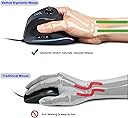
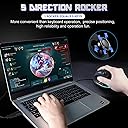
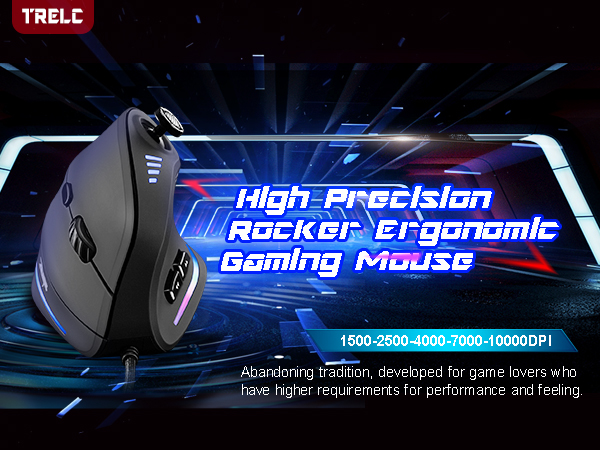
The TRELC Gaming Mouse combines ergonomic vertical design with a powerful 5D rocker and 11 programmable buttons, delivering up to 10,000 DPI precision. Engineered to reduce wrist strain and enhance gameplay, it features customizable RGB lighting and onboard memory for seamless profile switching—ideal for professional gamers and multitasking pros alike.


| ASIN | B07THFMNQ2 |
| Additional Features | 5D Rocker, Ergonomic Design, LED Lights, Programmable Buttons |
| Antenna Location | Gaming, Office |
| Are Batteries Included | No |
| Are Batteries Required | No |
| Best Sellers Rank | #2,917 in Video Games ( See Top 100 in Video Games ) #156 in PC Gaming Mice |
| Brand | TRELC |
| Built-In Media | 1 Ergonomic Mouse, 1 Instruction Manual, 1 Foot Mat |
| Button Quantity | 11 |
| Color | Wired (10000 DPI) |
| Compatible Devices | Laptop, Personal Computer, Tablet |
| Connectivity Technology | Wired, 10000 DPI |
| Customer Reviews | 4.2 out of 5 stars 2,015 Reviews |
| Embellishment Feature | LED |
| Enclosure Material | Plastic |
| Hand Orientation | Right |
| Hardware Platform | PC |
| Item Dimensions L x W | 4.33"L x 2.83"W |
| Item Weight | 5.76 ounces |
| Manufacturer | TRELC |
| Mfr Part Number | ff-maus |
| Minimum Required Operating System Version | Mac OS X 10.4 Tiger, Windows 7 |
| Model Number | ffa9f2bc-df4c-43d8-b09b-b9ba1c59d13a |
| Mouse Maximum Sensitivity | 10000 Dots per Inch |
| Movement Detection | Optical |
| Movement Detection Technology | Optical |
| Number of Batteries | 1 AAA batteries required. |
| Number of Buttons | 11 |
| Operating System | Windows/Mac/Linux |
| Power Source | Corded Electric |
| Range | 5.0 meters |
| Special Feature | 5D Rocker, Ergonomic Design, LED Lights, Programmable Buttons |
| Style Name | Modern |
| UPC | 787446991061 |
| Unit Count | 1.0 Count |
| Warranty Description | 1 Year Manufacturer |
K**N
Worth it!
Honestly a great mouse! The joystick is good to keep a character walking while using only the one hand however you can’t exactly spin around in circles with it like you can on a controller as it’s very one directional so no 360 no scopes with the joystick specifically lol. Still good for what it is though! Haven’t had any issues with it and the weight of it is decent! Not too heavy but not super light. My carpal tunnel hasn’t had any issues with it! No more numb hand! Lol overall I definitely recommend it!
A**I
Budget Ergonomic Mouse that doesn't compromise on quality.
Vertical mice saved my wrists. As someone who works on a computer all day, I was getting severe wrist pain. Made the jump a few years ago and just reordered same product after four years and have only positive things to say. First, the ergonomics. I can use this all day without tiring or pain. I even use the vertical mouse for some casual gaming (hence also prefer wired so no latency delays), and it works great. You get used to it very quickly and the customization between DPI is great! Turns out the extra buttons are also a great feature as well, often using it to go back and forth between history (or even custom mapping in games). All in all, great product if you care about your health while not spending $50+
S**N
Surprisingly Great Vertical Gaming Mouse
UPDATE: 2/20/2022 Tried this mouse with Hell Let Loose (HLL) and remapping the buttons does work. However, the thumbstick does not work well for driving tanks. Also, the software is limited in that it does not allow for multiple buttons to be pressed at the same time. i.e. squad talk was set to joystick right and marking targets to wheel click. I cannot figure out how to hold squad talk and mark targets at the same time, you get one or the other but not both, with my G502 I can be talking and marking with no issue on mapped buttons. This mouse is almost perfect for my use. I bought it to play Fishing Planet in hopes to one-hand game with limited use of the keyboard while also hoping to avoid wrist pain I have been experiencing with my G502 Hero SE. I still have to rely on the keyboard, because 11 programable buttons doesn't cover the commonly used keys for me. However, the thumbstick is great for driving the boat and trolling motor, because it is mapped as WASD, and this is outstanding! The software to create macros and reassign keys is functional, but by no means as robust as the major gaming accessory companies. For instance, you cannot record mouse clicks in a macro. So far, I have only used the mouse on Fishing Planet but I plan to test this on Hell Let Loose and other FPS to see how it function. Overall this is an excellent mouse and provided strain relief, but I would like to humbly suggest a couple improvements: 1. Relocate the joystick to the side of the mouse above the forward and back side buttons. (Image highlights the area in red). This is a more natural position for the thumb. 2. The joystick click (not the directions) requires to much force to activate. 3. Add 2 or 3 more buttons for the thumb side or even one for the ring or pinky finger, or just add a button to allow secondary mapping of all the other buttons (Like G-shift). 4. Add a pinky finger and palm rest so they do not have to slide across the mouse pad or whatever is being used for a mouse surface.
K**S
Awesome Mouse for Smaller Hands
This Zelotes vertical mouse is 4.5” long, 3.25” high, 3” wide. It has a colorful light strip at the bottom when active and comes with preset function defaults. It is advertised to have 11 programmable settings, but it is really 9 since most people will maintain the left-click and right-click button defaults. It comes with a Zelotes CD that allows you to customize each function. I have a small hand (3.25” inch from bottom of thumb to bottom of palm) with thick, stubby fingers so this mouse felt extremely comfortable compared to other vertical mice I had previously used. I liked the fact that the joystick was easily accessible and could serve as 5 functions. My fat thumb found it easier to utilize the joystick with better accuracy than other mice that have a number “keypad” on the left side of the mouse. All of the functions were easy to activate except for the “forward button” which I have to stretch my thumb to reach. The vertical mouse construction is easier on my wrist compared to the traditional mouse. This is the best vertical mouse I have come across for a smaller hand. Pros: Easy to install and set up Well constructed with quality materials Smaller product frame was excellent for my small hands The joystick provided 5 functions that were easily accessible The vertical nature was easier on my wrist for long-term use Improved my gaming skill activation time Snazzy colorful light strip at the bottom Cons: People with bigger hands might not like this function layout or size Made only for right-handed people
N**T
Neither Fish Nor Fowl
3 stars — I returned it. It does only an okay job at being a mouse or being a controller. That said, if I had cramps or other mobility issues, I would add a star. The biggest dealbreaker for me is that the software doesn't allow you to auto-swap profiles. You have to manually swap between e.g. Excel and Blender or your browser. Pros: I find this a really comfortable mouse, for moving it around, for accessing (most) of the buttons, and when "at rest." It looks funky, but now I wish more manufacturers tries this "upright" style. The joystick is programmable, so it can be used for moving the cursor, for movement in a video game, for running video software (e.g. ffwd, rewind, etc). Cons: Unfortunately, there are a lot of cons. First, the "joystick" only registers four directs (→↑←↓) and nothing in between. So it's more of a "four-button stick" than a joystick. Second, there aren't many other buttons, so it's not useful enough as a gaming or programming or artist mouse. Worse, the software for programming the buttons is too "20th century" and comes without instruction. It's also convoluted. The best I can say about it: it's not the worst I've seen. There's also no wheel-tilt, which is unfortunate, since that alone would provide two more functions. As I mentioned above, one has to manually swap profiles. That's a dealbreaker for me, because it makes having profiles 10 times less useful. A couple of tips: The software interface is poorly translated. When you want to "apply" changes to a profile, you press the "Application" button. (There's another button to tie for connecting to a program.) It's branded on Amazon as TRELC, but the packaging says "Zelotes". Near as I can tell from internet reviews, this isn't anything to worry about; it's just odd. Finally, it was pretty clear that this mouse was no longer "new". It was pretty obvious that the package had been previously opened and resealed. Again, I didn't see anything worrying about this mouse. It's just something to look out for if you want a pristine mouse.
R**Y
I Ran Mine Into The Ground, Here's Everything You Need To Know
TLDR: It's better than mediocre, but it isn't amazing. I'll be purchasing it again because there's no other vertical mouse with lots of programmable buttons. IDK what "TRELC" is, this is a Zelotes C-18. It even says so on the mouse in the pictures. I use my computer A LOT and this lasted me 2 years 8 months. My issue with it is minor (unnoticeable to some) and I could probably keep using it for another 6 months if I wanted. I'd say the lifespan is a bit below average, but most people would replace it long before faults occur. I'm not a stickler for weight or sensors, and I think most of the people who are have skill issues. It's good enough, I promise. Pros: It's a vertical mouse. I like it 8 extra programmable keys (You can reprogram right left and middle click if you want and make it 11) Putting 5 programmable keys into a joystick format is great. It's intuitive and stops this from being a key monstrosity while having as many programmable keys as one. That being said it's a bit misleading. The forwards and back keys on the side are nice I like them while browsing the internet and like rebinding them for games. The lighting strip can be controlled or disabled (NOT THE "DPI" LIGHTS ON TOP) The Zelotes C-18 Program is capable of everything I could possibly need from it and is extremely lightweight. Once you apply changes you don't need it running in the background, but even if you leave it open it has no significant impact on performance, which puts most big name mouse bloatware to shame. Cons: The joystick is not a joystick and shouldn't be treated as such. The joystick is 5 buttons in a trench-coat. It can't even do 8 way, just 4 way, making WASD/Arrow keys superior at being a joystick. The forwards and back key on the side are too far away, the back key is in a very natural spot, but you'll probably have to change your grip to push the forward key The "DPI" Lighting on top is blue and only blue, and cannot be entirely disabled. I hate it, and removed the LEDs from the PCB. The Zelotes C-18 Program is at times non-intuitive. They did not have a native english speaker double check it, but it's never too far off. It's limited to only 2 profiles that must be manually switched between. It's less convenient than the bloatware most big name mouse companies have. Overall: It's better than average, but not by a lot. My main selling point, and why I'll be buying it again, is that it's a vertical mouse with 8 extra buttons on it. The highest that I can find elsewhere on a vertical mouse is 3 extra buttons, and the highest I can find on a standard mouse that doesn't have a panel of keys on the side is 6. There's probably better ergonomic solutions out there, and there's definitely mice with more buttons. It's a good compromise of everything I like, and although it feels like there's a lot of room for improvement, I'm not buying something else.
Z**E
Very nice...
This review is after purchasing my second one of these; one for work, one for home. I have been using this for about six months: The Good: *My wrist is not aching, my fingers aren't going numb... anymore. The configuration of this mouse makes a world of difference in my day to day use of my work and home computers in regards to my carpal tunnel issues with my wrist. *The LED band around the bottom of the mouse is an addressable RBG strip, so you can set it to do all sorts of color effects. *The Sensitivity of this mouse is adjustable. *Every button is programable. The Bad: I really have nothing bad to say, so I will dig deep for criticisms... * The sensitivity could have a bit more range... maybe? * the LED indicators for the sensitivity setting are not aRGB, so you are stuck with the color they are (mine are blue...) The Ugly: *Nope. I have nothing to say that is Ugly about this mouse! Bottom line: If you use a mouse, and you have wrist pain, or finger numbness from it's use, this mouse, or one like it, is for you! If you don't suffer from those symptoms, you might consider getting one of these anyway, the difference is really that good. Not a paid endorsement, no quid pro quo. I really do love this mouse without having had any contact with the vendor or manufacturer.
Q**A
Analog Stick is Just a D-Pad on a Stick
This is my first vertical mouse and I'm surprised at how quickly I was able to adapt to odd shape. I was in the market for a new gaming mouse and this interested me greatly because of the inclusion of the analog stick. It was very comfortable to hold compared to traditional horizontal mice and I don't think I can ever go back to using horizontal mice again. However when I got this mouse, I had to look for the website to download the mouse drivers to fully utilize it. Unfortunately the drivers are in bad English and it was very confusing to navigate through. Figuring what everything did was trial and error as nothing is explained well. For example: "Application" in the bottom right corner of the program actually means "Apply" but I originally thought it meant launch a certain profile with a certain program. I later found out that to do that, there's a check mark box that's called "Correlation program". The program is quite limited as well as you're stuck with only TWO profiles. I would've liked way more than this. I tried to make the analog stick and use it to move the mouse cursor but doing so took me about three hours of trial and error. And in the end it was all for nothing because the analog stick was a lie. It's actually not an analog stick. It's more like a D-pad with a stick. So you have to move the stick all the way in one of the 4 directions you want in order to trigger the key or macro. This made the mouse endeavor a complete waste of time and it also made using the default WASD configuration almost useless in FPS games as you have to take time to move the stick all the way for it to register your key. The analog stick was a really cool concept I just wish it could actually be used as an analog stick instead of a D- pad with a stick. The forward side button was also something I had a gripe with. It's a bit too far for my small hand to comfortably reach, so I have to shift the entire mouse just so my thumb can access it. RGB was something I didn't really care about. It's there and the program you download with the mouse has the basic options to change the colors. I also tried to use the "Armoury" feature which I had no idea what it was about since again, there is no documentation on it. Basically you use it in FPS games to make the mouse cancel out the recoil of the gun which sounds great but in actuality I tried and tried to get it to work. It just didn't work well for me. Some games probably detect that as a cheat or something and it flat out doens't do anything. In others it does move the mouse down, but since recoil pattern is sort of randomized and you have to individually "correct" every bullet, it just isn't worth using. Unless you play FPS games with guns that have the same recoil every time. All in all, it's a great vertical mouse with a gimmicky analog stick that doesn't really work well in games or at all. Note: i have Driver Ver 1.0 and there may be an updated version that fixes all of these issues I have with it.
B**B
Comfortable.
I was sceptical about this type of mouse but it is good. Works really well for general use and also for games like TTW or Starcraft
T**N
サイドボタンは押しにくい。
色々マクロ機能が豊富で良いが、サイドボタンは下過ぎて押しづらい、あと日本人や女性の手には奥側のサイドボタンが遠すぎて使い物にならない。もっと小ぶりなサイズで、サイドボタンは下側でなく中央付近のほうが使いやすいと思った
J**.
Buen producto, de buena calidad a buen precio.
Buen producto, de buena calidad a buen precio; sin embargo, no me gustó que el joystick no se puede configurar para mover el cursor, solamente te permite asignar teclas hacia las 4 direcciones, para un gamer podría ser útil por las teclas W, A, S, D que es como viene configurado. Creo que le faltó al menos uno o dos botones adicionales para funciones adicionales. También no me parece que sea más cómodo que un mouse común. La iluminación del mouse excelente.
A**R
Good product
Very comfortable High Material touch in hand feeling LED RGB very good The navigation button needs to be more stronger Material Overall very good comparison of price
P**N
'Vertical' mouse
Firstly, it takes a while to become accustomed to the different format. If you can get past this then the mouse is as easy to use as the normal configuration. The mini joystick may as well not be there. I never use it and it just feels clumsy. It is easy to program and set up. Is it 'better' than a normal mouse? Ultimately it comes down to personal preference. On the other hand, no one else is going to 'borrow' it so that's a plus!
Trustpilot
1 month ago
3 weeks ago