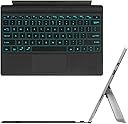
![FINTIE Type Cover for Microsoft Surface Pro 7/7 Plus, [7-Color Backlit] Wireless Bluetooth Keyboard with Rechargeable Battery/Trackpad, Compatible with Pro 6/5/4/3 (Black)](https://m.media-amazon.com/images/I/61OXD73BLFL._AC_SL3840_.jpg)
Buy anything from 5,000+ international stores. One checkout price. No surprise fees. Join 2M+ shoppers on Desertcart.
Desertcart purchases this item on your behalf and handles shipping, customs, and support to Italy.
⌨️ Light up your productivity with style and freedom!
The FINTIE Type Cover is a sleek, wireless Bluetooth keyboard designed exclusively for Microsoft Surface Pro models 3 through 7 Plus. Featuring a 7-color RGB backlit keyboard with adjustable brightness, a rechargeable 750mAh battery offering up to 200 hours of use without backlight, and Bluetooth 5.1 connectivity with a 33-foot range, it combines portability with high performance. Its built-in trackpad and laptop-style keys deliver a comfortable, efficient typing experience, perfect for professionals on the go.


| ASIN | B07KT3M68N |
| Additional Features | Lightweight |
| Antenna Location | Office |
| Best Sellers Rank | #409 in Tablet Keyboards |
| Brand | FINTIE |
| Built-In Media | USB Cable |
| Button Quantity | 7 |
| Color | Black |
| Compatible Devices | Microsoft Surface Pro 7 Plus, 7, 6, 5, 4, 3 |
| Compatible Operating System Family | Windows |
| Compatible Tablet Computer Models | Microsoft Surface Pro 3, Microsoft Surface Pro 4, Microsoft Surface Pro 6, Microsoft Surface Pro 7, Microsoft Surface Pro 7+ |
| Connectivity Technology | Bluetooth |
| Customer Reviews | 4.1 out of 5 stars 1,293 Reviews |
| Enclosure Material | Plastic |
| Hand Orientation | Ambidextrous |
| Item Dimensions L x W x H | 11.61"L x 8.5"W x 0.31"H |
| Keyboard Backlighting Color Support | RGB |
| Keyboard Description | Wireless |
| Keyboard Layout | QWERTY |
| Manufacturer | FINTIE |
| Minimum Required Operating System Version | Windows 10 |
| Model Name | Microsoft Surface Pro 7 Plus/Pro 7 / Pro 6 / Pro 5 / Pro 4 / Pro 3 |
| Model Number | 18ac4b1b-5138-4af8-980a-135ea68b11f4 |
| Number of Keys | 78 |
| Number of Sections | 1 |
| Power Source | Battery Powered |
| Recommended Uses For Product | Office |
| Series Number | 3 |
| Special Feature | Lightweight |
| Style Name | Classic |
| Switch Type | Tactile |
| Theme | Office, Classic |
| Unit Count | 1.0 Count |
B**S
BEST BACKLIT KEYBOARD!
I have a keyboard protector on my Fintie keyboard because I want to keep my keys from getting messed up but overall the key travels pretty good and I like the keys a lot as well as the keyboard itself. It's very adorable the magnets work very well and I would definitely recommend this keyboard for others for the surface Pro 7 or any of the other surface pro line products. Some keyboard for an amazing price, now I've never had the type cover but I did just buy this one because it was cheaper and has more colors available for the backlight keyboard. Great value for the price. I have to admit it was worth it over the type cover for me. I like the fact that it's soft in the back similar to the type color and that the keys are big and it's easy to type with I also like that as an indicator for the battery as well as an indicator for turning off the touchpad when not in use. Another great thing about this keyboard is that it's lightweight and easy to pull off of the device it also has great magnets that are really sturdy and really strong so you don't worry about it coming off you can actually use it while it's charging as well. Well it takes about 4 hours to charge however once it's charged it does last long I don't have to charge it for a few days I do use the back keys a lot so I tend to charge it when I see it's about halfway but most of the time I don't really have a problem with the battery life. I love all of the seven colors that it comes with the easiest on my eyes is either the white the yellow or the light blue. However recently I've been using the green color which is really fun. one of the reasons why I went with this one over the original type color for the service pro 7 is that it's Bluetooth which means that I can use it on more than just the surface Pro 7 I can use it on my phone on another laptop on another device that has a Bluetooth keyboard is an option. One of the great things about having a Bluetooth keyboard is that you don't have to worry about it being connected to the surface Pro to use it. you can have a disconnected while using the keyboard you can have a far away while using the keyboard and it's also something that use while moving around. I spent less on the type cover from Fintie and I would have from Microsoft I don't knock the type cover for Microsoft I'm sure it's really nice I do wish that Fintie had come out with three backlit keys settings but the two that has are perfectly fine. To me they're just so many more benefits with this keyboard than that with the type cover plus of course the price is a lot cheaper. There's a disclaimer that do have to look out for getting the right keyboard for the surface pro. Since there is a keyboard by this company that does not have backlit keys and that does they look very similar but it's stated on the product name for the keyboard that it is backlit for this version. I feel like I made the right choice by getting this one instead of the type cover for Microsoft I feel like it was a better choice economically for me. A very much good way recommend this keyboard to others who are looking for a cheaper option to the type cover by Microsoft but still have black like keys a soft to the touch material bigger keys and the same format as a type cover. Also my keyboard has a keyboard protector on top of the keys so honestly with that on there it has been a bit difficult to type but that's not due to keyboard it's due to the protector that's on there I haven't actually tried the keys without the protector but I'm sure that it would be perfectly fine with key travel. I would recommend getting a protector even if it's just for when you're not using the keyboard it keeps from having dust, dirt, or food going under the keys and it keeps keys from getting messy.
B**N
Excellent Keyboard
Easy to use. Works exceptionally well with my Surface Pro 7. It is superior to the Microsoft keyboard that came with it. Eventually, that stopped working. Even replacements from Microsoft would no longer work. I finally resorted to this keyboard and I'm exceptionally impressed. It is beyond expectation. It is well worth the price and considerably lower than what Microsoft keyboards cost. It snaps right into place and uses Bluetooth connection. For that reason, I can detach the keyboard, and it still works unlike a Microsoft keyboard that must be attached.
R**T
Great Keyboard but Annoying Double Clicking Issue
I had this keyboard for about keyboard for 10 months. I got it because my original Microsoft keyboard stop connecting to my surface pro 4. No major issues. This keyboard is exactly as described in the description. Even thouh powered by Bluetooth, I love how it still physically connects and can act as a type cover. Typing works perfectly fine and love the variety of backlight colors and the ability to dim them. Normally, I only need it for light typing and always have the backlight on when in use. Under these conditions, I only charge about once a month. Since the virus and working from home, I have been using this heavily (5-7 hours a day not including personal usage) with the backlight constantly one. I have only charged it twice in the past 3 weeks. I only have two issues with the keyboard. The Bluetooth connection can sometimes drop. This is only really happens when waking the keyboard up from sleep. It is connected but next a while to start working. However, I do suspect that the Bluetooth card on my Surface is malfunctiong. I just bought the new Surface so let's see if that continues. The other issue is that many times the touchpad double clicks when pressing it. This mostly happens when left clicking. This can be extremely annoying when the left click menu disappears and it takes a few tries not to double click. Despite those issues, I would recommend this keyboard. It's works perfectly fine, the battery life is good, and the added feature of wirelessly connecting makes it worth it. Considering buying a second for my new surface.
C**H
Great alternative to expensive Microsoft keyboard!
I have been using this keyboard for three years with zero issues. It’s a great alternative to spending a large sum on a Microsoft replacement. If there is one downfall, it’s having to charge it, but with the long battery life, it’s really no issue at all.
J**V
Stopped working out of nowhere - UPDATE - new one charge only lasts a single day
I got this because my original Type Cover started having that problem where it would randomly stop working and I'd have to disconnect and reconnect. Searching the internet shows this is a common problem with no solution. And for >$100 that's garbage. Not buying another one. So, after reading reviews, I got this Fintie replacement. It paired ok. But it would have to be reconnected to the Surface after every closure or restart and that's a pain. It wouldn't just automatically connect. I could live with that since I don't have to restart or close THAT often. But then, a couple months after I got it it just stopped working. My Surface (Pro 5) detects it and will connect to it. But none of the keys produce anything. It might as well be like my original cover that stops working. So, now I am back to the original with the reconnecting and disconnecting. The most unsatisfactory thing is this replacement isn't all that cheap either. So, I guess I will just get a cheap bluetooth keyboard and deal. UPDATE: 4/11/2022 I bought another one of these because I just like the way they feel. However, a full charge only lasts a single day. So, again, still one star.
K**S
Relieved it works on Surface Pro 4 (but google docs an issue)
UPDATE: I had to return within 30 days, but it was very easy to do so. It’s still a great keyboard. The problem we had was that the cursor wouldn’t show when my daughter worked in google docs, which is what she has to use for school. Things would highlight if you pointed at them, but no cursor to guide so became cumbersome. This was not a problem in Microsoft office programs, online searching, or anywhere else I tried, just google docs. Really a shame because it was perfect otherwise. INITIAL REVIEW: My daughter’s Surface Pro 4 keyboard suddenly died, and a visit to Microsoft revealed it to be a hardware issue with connecting to her computer. So the computer’s fine, but the Microsoft keyboards that go with it would no longer work. Ugh! The tech actually pointed this keyboard out to me on the amazon website, saying people had luck with it. So after a looot of follow-up research I ordered. Set up was a breeze and it practically looks and functions just like the Microsoft keyboard. Phew! I feel this touchpad actually works better too. It’s only been a week, so I’ll update if anything changes. But so far, great!!
D**A
Most expensive replacement for an original that Microsoft has stopped supplying
Microsoft could have designed a better keyboard AND could have made replacements available. The Fintie is the most expensive replacement available (and I subliminally assumed) so it must be the best. Unlike the original, It needs to be charged periodically with a USB cable. The advertisement states this clearly, but it can be an irritant after using the original that does not need separate charging. The first piece was defective and had to be replaced. It tended to stop working at random intervals and needed a re-boot before it worked again. This used to happen at least five to ten times a day. I must admit that the helpdesk and replacement process worked smoothly. I have now used the replacement for a few weeks and am happy that the zero key works and passwords and amounts can include zeros again. This one works as advertised.
A**R
Good substitute for Surface 3 Pro keyboard
When the keyboard I got with my Surface 3 stopped working with the tablet, I got this as a replacement. Now the original keyboard still works with a different surface, so the keyboard is functional. It's the Surface itself that has the problem. So I could not simply buy a new Surface keyboard. This Bluetooth keyboard seemed like a good alternative. Unfortunately I have to worry about charging it but that's not too big a deal; I just use the supplied cord to plug into the Surface power cord brick. Anyway, this version of the keyboard lights up and that works fine The keyboard types well and the touchpad works as expected. This Surface doesn't get a lot of use so I can't really comment on the battery longevity. All-in-all, I'd say this is a good alternative keyboard to the Surface keyboard.
K**T
Bluetooth changes everything
I complain about nearly everything I buy, and have terrible luck with tech, but this is a stellar product. It looks like a nearly perfect alcantara typecover clone (I have been using one heavily for over a year, and it has stopped responding intermittently recently, probably due to a broken connection somewhere). The typing experience is identical to the typecover, and is excellent. function keys for verifying battery life (1-4 flashes of the LED light set below the arrow keys) turning on and changing the backlight colours work well. the keyboard layout is nearly identical to the alcantara typecover, except for the addition of a power key for the keyboard that I never use, given the weeks long battery life in standby. At this point I've been using it daily for a week and the power level is still at 3 flashes (75%) although I've rarely used the backlight given I'm usually working during the day. The trackpad works well, but sometimes registers two clicks instead of one. I get around this by just tapping it instead of pressing it, which works well for left clicks. the double register hasn't ever happed with a right click. complaints: the trackpad scroll direction isn't reversible as the trackpad registers as a mouse with windows instead of a trackpad. weird. also, palm filtering doesn't work as well as the microsoft typecover and so occasionally I get erroneous trackpad inputs while typing. Not a big deal for me as I don't usually touch the pad as I type. Finally, the fact that this can be used from anywhere in the room makes this much better than the original typecover, given that I can leave my surface plugged into my large 4k display on my desk, and control it from anywhere in the room. Overall, this product is better than the MS original, and I would have happily paid the same price for it.
M**.
Good but not sturdy
Good but not sturdy. Touchpad keys get pressed if the keyboard is slightly bend.
S**G
Well built and works well
Well built and works well. Clicking the track pad is a bit stiff but otherwise functional.
A**A
Great value for money
I was so pleased to find this cheaper version of the Microsoft keyboard for my Surface Pro 6. This is the 3rd time I've had to replace the keyboard cover and it gets expensive. This keyboard is just as good
F**Z
Excelente teclado y cobre pantalla.
Material bueno, la sensación al tacto se podría mejorar... Se acopla físicamente muy bien al equipo, hasta el momento ningun problema con el teclado todo funciona muy bien.
Trustpilot
2 weeks ago
1 week ago