We remain fully operational. Our teams are working around the clock to ensure your deliveries continue safely.

DOWNLOAD THE APP


Copyright © 2025 Desertcart Holdings Limited
DOWNLOAD THE APP
Buy anything from 5,000+ international stores. One checkout price. No surprise fees. Join 2M+ shoppers on Desertcart.
Desertcart purchases this item on your behalf and handles shipping, customs, and support to Italy.
🚀 Upgrade your desktop to WiFi 6 speed and security — because buffering is so last decade!
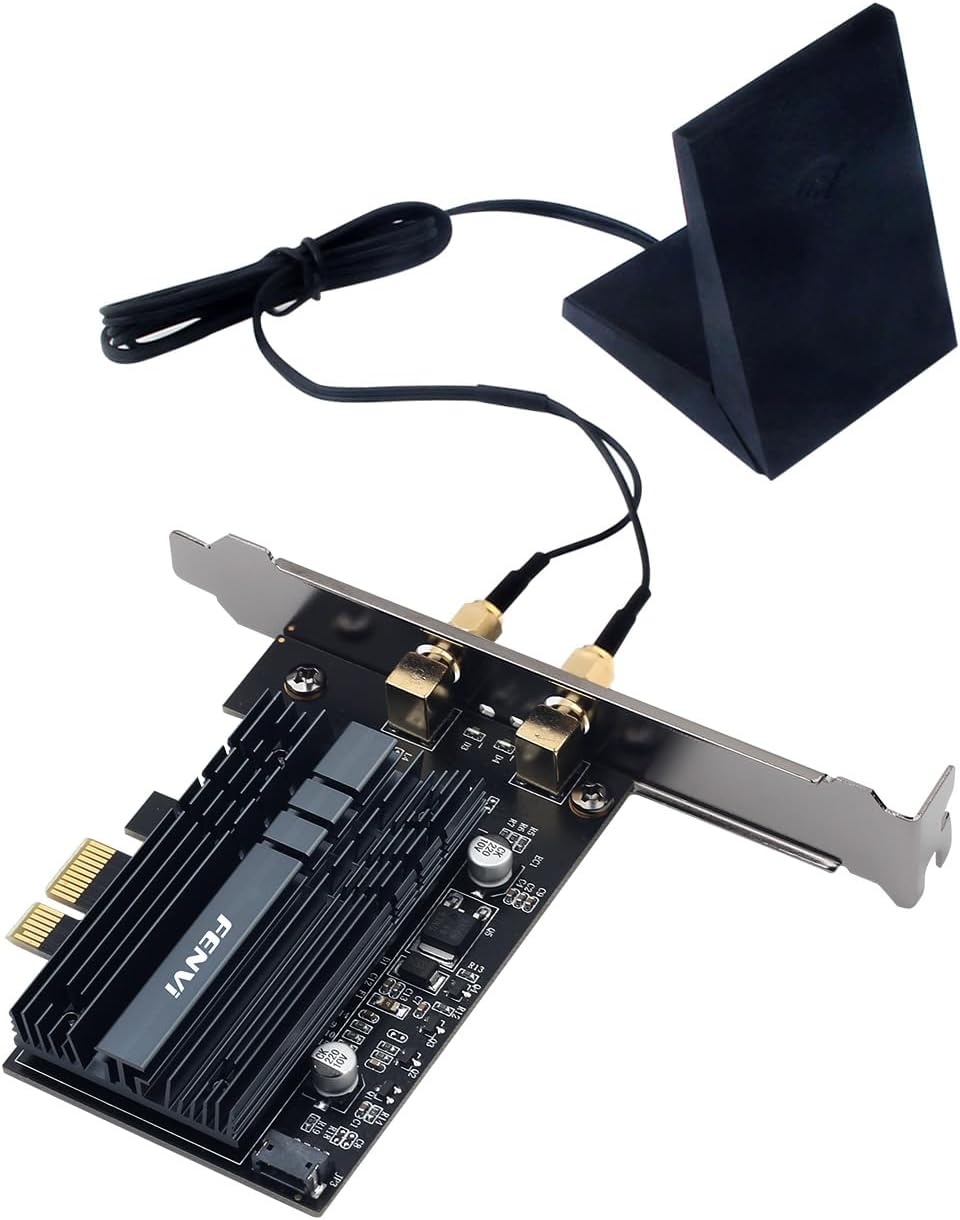
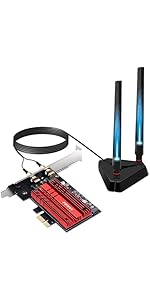
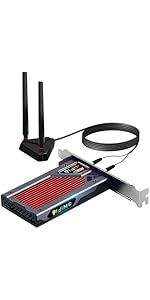
The FENVi FV-AX3000T is a high-performance PCIe WiFi 6 adapter featuring the Intel AX200 chipset, delivering dual-band speeds up to 3000Mbps. It supports Bluetooth 5.2 for stable wireless device connections and incorporates advanced WiFi 6 technologies like MU-MIMO, OFDMA, and WPA3 security. Designed for easy installation in Windows 10/11 desktops, it ensures faster, more secure, and efficient wireless networking for professional and home environments.




| ASIN | B07SPCL2FZ |
| Best Sellers Rank | #381 in Internal Computer Networking Cards |
| Brand | F FENVI |
| Built-In Media | bluetooth cable |
| Color | black |
| Compatible Devices | Desktop |
| Compatible Operating System Family | Windows |
| Customer Reviews | 4.4 out of 5 stars 577 Reviews |
| Data Link Protocol | 802.11AX, Bluetooth |
| Data Transfer Rate | 3000 Megabits Per Second |
| Hardware Interface | PCIE x 1, PCIE x 16, PCIE x 4, PCIE x 8 |
| Item Type Name | Fenvi WiFi 6 AX3000 PCIe WiFi Card |
| Item Weight | 0.25 Kilograms |
| Manufacturer | FENVi |
| Mfr Part Number | FV-AX3000T |
| Minimum Required Operating System Version | Windows 10 |
| Model Number | FV-AX30000T |
| UPC | 645195971881 |
P**G
Fast WiFi, Good Antenna, Tricky Setup
I live in a small two-story apartment. I have a decent ASUS Dual-Band 2x2 AC1300 router, and my main computer is upstairs. I want to use the 5GHz band because it is faster, and who doesn't want speed? I checked my Wi-Fi signal upstairs using a smartphone app, and I knew the signal was strong enough. However, after getting unsatisfactory results with a USB plug-in WiFi adapter, I decided to go the PCI route. I found this guy, and it runs like a dream. SpeedTest.net clocked my download speed at a blistering 118Mbps with my upload at 10.8Mbps (most internet providers have this 10:1 disparity between download and upload, and that is fine because that's what I paid for). Part of this good performance I can chalk up to the fact that both the Wi-Fi adapter and the Wi-Fi router are MU-MIMO so they can lock onto each other. But both devices have to work great to get the results I got. The magnetic antenna is a super nice touch, so you can attach it to any steel surface. It also comes with Bluetooth One caveat: The software comes on a CD, but it didn't work. It, in fact, caused my computer to seize up and I had to restart my computer manually! I ended up having to go to the Fenvi website, where I had to download a RAR file of the driver. Then, I had to download an extraction program that could unpack the RAR format. But, after all that, everything worked great.
R**S
Works with Debian 11 Bullseye (testing)
My personal WiFi odyssey was a progression of OS changes. Namely, the change from Windows 10 -> Manjaro Linux -> Debian stable -> buying this card -> Debian 11 Bullseye (testing.) TL;DR, this card has confirmed compatibility with Debian 11. I'm still using it on an A/B/G/N router, so the AC/AX protocols went untested. My prior WiFi adapter was an Intel chipset that had a few reliability issues in Windows 10 with the adapter simply ceasing communication several times per hour. Those issues disappeared eventually, so I presume there was a background firmware update. When I got fed up with Windows hijacking my computer and making all my decisions for me, I eventually set up a dual boot with Manjaro Linux. The change was very refreshing, except that all my old WiFi issues came back threefold and made it very difficult to perform all those system updates in Manjaro. I read everything I could find about tweaking the config of the iwlwifi driver, but could find no suitable solution. I tried an OS switch to Debian 10 Buster (stable branch) because it didn't need to be updated constantly, and I thought the broader user base might have led to better WiFi solutions. Sadly, the latter was not true, and I suffered through it for a few weeks before I sought a hardware solution and settled on this Fenvi adapter. The product description here states that the Linux 5.0 kernel is required, which the stable branch of Debian didn't use, so I edited my repository config to point toward the testing branch that runs the proper kernel. It took hours on the old WiFi adapter, but I got everything updated before the Fenvi card arrived. After installing the new card, I booted into Debian testing, and without touching any driver config my WiFi worked! Speeds were commensurate with the old card's performance in Windows, which is good enough. I've been very happy with it. It's been a weird journey, and now I'm back to doing multiple dist-upgrades each week on Debian testing, but at least I've got the connection fidelity to handle it.
A**N
Easy plug and play in Linux Mint
To qualify this, I am going to start by saying I have been a computer hobbyist since the early 1980's and am a network engineer for an ISP with 30 years experience in the industry, so take that how you will. We moved and don't have wired internet where my main computer is so I got one of these to get WiFi from the wireless AP... Easy installation, learned you can put a PCI-E 1x card into a 4x or 16x slot which worked out as my 1x slot was blocked by my video card. Antenna cable was shorter than I expected and didn't reach the shelf above my computer so I tried to use the magnet in the base to stick it to the file cabinet next to the computer but it wasn't strong enough to hold it so wound up just setting it on top of the computer case. The antenna seems very flimsy and I have some concerns about it's longevity, but only time will tell. I might actually get a better 3rd party antenna if I figure out a way to run cable to the location eventually. My Linux Mint PC with 5.3 kernel recognized the new WiFi adapter immediately (I am told you need a 5.1 or higher kernel for this to be recognized) and I had to do nothing except select the SSID of the network from the list of visible networks and enter the password and I was online. Signal and speeds were a little less than I expected being less than 20 feet from a Meraki MR33 access point. I didn't expect outrageous speeds since I don't have a 802.3ax access point but I expected better than 240Mb/s download since my router and ISP handle more than double that, and I expected better because my phone and laptop get close to 400Mb/s in the same location and show better signal strength in dBm levels. That said, the connection seems rock solid and unlike many "bargain" WiFi adapters this one comes online almost immediately in Linux when the PC is woke from suspend mode. I also dual boot into Windows 10 for some gaming... haven't set it up there yet but I expect to have no issues and will do some tests later and update my review if necessary. All in all it seems like a decent adapter and does the job I need it to. I only knocked off a star because of the slower than expected speeds, if I could I would have only knocked off half a star. I really think the weak point here is the antenna but without another one to test with I can't be sure. If anyone has any questions I am more than willing to answer any questions about the device.
M**N
Fast, works out-of-the-box with Ubuntu 20.04 LTS
I'm trying to set up an old desktop computer with Ubuntu to be an email/internet terminal, and don't have a wired network connection available. This fenvi card installed this easily in an older ASUS motherboard (M4A88TD-M/USB3). Ubuntu 20.04.1 LTS sees it from the installer, right out of the box. It was connected to our wlan before I'd even plugged in the antenna. Once I did plug in the antenna and ran a speedtest, I saw 294mbps bidirectional. Our service is 300mbps using AT&T's gateway, which is about 20' away through 2 plaster walls. By comparison, my phone w/ 802.11ac only gets 100mbps bidirectional, and my ancient laptop with 802.11n gets 70mbps up & 100mbps down. So I'd say the performance is there for sure. I've only had this working for a day. I haven't tried Bluetooth yet, nor any power features. The fenvi's already got me to my goal, so I'm pretty happy.
B**B
Awesome Card For Linux
This card is literally plug and play once you download the 5.1 or newer kernel. Minimal "nerd skills" needed. Install UKuu, run the program, update the kernel. I'm using Linux Mint (ubuntu based), but it should work with other distros also. My old TP-link 900 card only hit 3MB/s on the 5ghz band. I tried USB adapters, all were SLOWER than the TP-Link, if they worked at all, even though the USB adapters were advertised as higher speed. IMHO USB ports just don't provide enough power for true high-speed operation. Fenvi PCIe Wifi Card to the rescue, Now I'm at 13MB/sec on the 5ghz band. I have a Linksys Max-Stream AC4000 MU-MIMO Tri-Band Wireless Smart WiFi Router (EA9300). Built-in Bluetooth radio is a nice bonus, it's also plug and play. Yes, it's more than I wanted to spend on a WiFi card, but this is one case where you really do get what you pay for.
D**L
Solid card, no issues so far
TLDR: Been using it for a little over a week, card works great. Pros: - external antenna, able to put antenna on my desk while PC is under my desk - signal looks good for most part, getting expected download/upload speeds - Wifi 6 compatible (I don't actually have Wifi 6 so I'm not sure how well it handles that) Cons: - might need to install driver, I had to download Intel's driver onto a flash drive from another computer - sometimes signal strength isn't maximized, but that might be due to walls between PC and router
J**K
Fast and stable 5Ghz Wireless AC reception!!!
I installed these wireless cards in my two older PCs that have 11 year old Gigabyte EP-43UD3L Socket 775 motherboards. They work flawless in the PCIe v1.0 x1 slots despite the fact that someone in a review on here said that these cards require PCIe v2.0 x1 slots. I tested file transfer speeds on my network in windows explorer from my RT-AC68U wireless AC1900 router and I get real throughput of around 640Mbps/80MBps through one wall and 6 feet from router. The link speed shows 866.7Mbps with full bars at all times. This is as good as wifi gets right now and I am a happy camper! Please stay away from USB wifi adapters because they tend to drop all the time like my Asus USB-AC56 one did and they don't have the power for maximum throughput.
P**R
Some Installation Hiccups but Great
Hardware installation was pretty standard. Just make sure you have an open PCI-E x1 slot and a USB power plug available on your mobo. Software installation was a bit annoying at first, but i did eventually get it to work. I just bought my tower from a buddy and had a clean install of windows. I installed drivers from website, but for whatever reason, it wouldn't work. Mainly, i couldn't view the list of potential routers to connect to. Looked online everywhere to see if i was missing something with no success, then i decided to just plug it in via wire connection and it auto-updated itself at that point and started working. Not sure if this is the typical experience, but this was my experience. I am running windows 10 x64, i5 3.8ghz, gtx1060, 16gb ram, 512 ssd hdd Once i got it running, I've been very happy with it. I have the model where the antenna is that plastic thing that uses a magnet to stay put. The antenna is not omni-directional according to the amazon pictures. For me, i got better signal when i kept it flat against the metal side panel of my case as opposed to it standing-itself on the top of my tower. I did not have an opportunity to really test its limits (bottlenecked by my 802.11AC router and ISP). However, when i did run it, i was getting over 200mb/s down which i was very happy about. Once the price of routers that support 802.11AX and MU-MIMO go down, i definitely want to upgrade and will test the card again then.
Trustpilot
2 weeks ago
5 days ago