We remain fully operational. Our teams are working around the clock to ensure your deliveries continue safely.

DOWNLOAD THE APP


Customer Services
Copyright © 2025 Desertcart Holdings Limited
DOWNLOAD THE APP


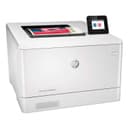
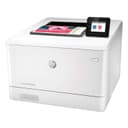


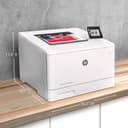
🚀 Elevate your office game with speed, security, and seamless wireless freedom!
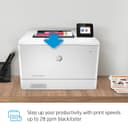
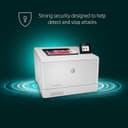
The HP Color LaserJet Pro M454dw is a wireless color laser printer designed for busy professionals who demand fast, high-quality prints at 28 ppm with crisp 600x600 dpi resolution. It features built-in HP Wolf Pro Security to protect sensitive data, Wi-Fi Direct for easy mobile printing without a network, and an intuitive 2.7" color touchscreen for streamlined control. With automatic duplex printing and energy-saving technology, it reduces paper waste and cuts energy use by up to 11%. Ideal for office environments, it supports various media types including cardstock and envelopes, and comes with a 250-sheet input tray plus USB walk-up printing for Microsoft Office files. Backed by a one-year limited warranty, it’s engineered to keep your business moving forward efficiently and securely.


| ASIN | B07RSHGBPJ |
| Additional Printer Functions | Copy |
| B&W Pages per Minute | 28 ppm |
| Best Sellers Rank | #118,386 in Office Products ( See Top 100 in Office Products ) #155 in Laser Computer Printers |
| Brand | HP |
| Built-In Media | 4 preinstalled Introductory HP LaserJet Toner cartridges (Black, Cyan, Magenta, Yellow: ~1200 pages), HP Color LaserJet Pro M454dw, In-box documentation (Getting Started Guide, Install Poster), Regulatory flyer, Warranty card |
| Color | White |
| Color Pages per Minute | 28 ppm |
| Compatible Devices | PC |
| Control Method | Voice |
| Controller Type | Android |
| Customer Reviews | 4.3 4.3 out of 5 stars (1,246) |
| Display Type | LCD |
| Dual-sided printing | Yes |
| Duplex | Automatic |
| Global Trade Identification Number | 00192018996182 |
| Hardware Interface | Ethernet, USB 2.0 |
| Ink Color | Black, Cyan, Magenta, Yellow |
| Item Dimensions D x W x H | 11.6"D x 16.2"W x 18.5"H |
| Item Type Name | Color Laser Printer |
| Item Weight | 48 Pounds |
| Manufacturer | HP |
| Maximum Copies Per Run | 100 |
| Maximum Copy Resolution Black and White | 600 dpi |
| Maximum Copy Resolution Color | 600 x 600 dpi |
| Maximum Copy Speed Black and White | 28 ppm |
| Maximum Media Size | 8.5 x 14 inch |
| Maximum Print Resolution Black and White | 600 dpi |
| Maximum Sheet Capacity | 300 |
| Maximum print Resolution Color | 600 x 600 dpi |
| Model Name | Old version |
| Model Number | M454dw |
| Model Series | M454 |
| Number of Trays | 1 |
| Other Special Features of the Product | 550-Sheet Optional Paper Tray, Auto-Duplex, Fast First Page Out, Network-Ready, Walk-Up USB Port for Microsoft Files |
| Paper Size | 3 x 5 to 8.5 x 14, Letter, Legal, Envelope |
| Power Consumption | 15 Watts |
| Print media | Card stock, Envelopes, Glossy photo paper, High-resolution paper, Labels |
| Printer Connectivity Type | Wi-Fi |
| Printer Output Type | Color |
| Printer Type | Laser |
| Processor Count | 1 |
| Resolution | 600 x 600 |
| Scanner Type | Document |
| Series Number | 454 |
| Specific Uses For Product | Office, business |
| Total USB 2.0 Ports | 1 |
| Total Usb Ports | 1 |
| UPC | 192545323116 192018996182 |
| Unit Count | 1.0 Count |
| Warranty Description | One-year Bench/Depot Repair warranty |
| Warranty Type | Limited Warranty |
| Wattage | 550 watts |
B**R
Excellent printer. Don't listen to the negative reviews.
First of all, the negative reviews for this product were left by people who din't rate the product, but rated the shipping or were mad because they can't read a product description and thought this was a multi-function printer, which it is clearly not. The lowest one-star review was from a reviewer who didn't know what they were doing. A simple google search produced an answer to solving the power saving issue, straight from HP's web site I'll explain that at the end of this review. This printer was purchased for use in an office environment running primarily macs with a few microsoft surface pros in the mix. Initial configuration is done via the touch screen on the printer itself. It's very simple and you can choose a setup wizard type scenario (self-managed) or more of a manual mode for IT people who want to set up a static IP. I chose the latter. After the quick initial setup on the printer touchscreen, the rest was done on a macbook pro and involved downloading the setup software from HP. The install wizard is as easy as it gets to connect via wifi or ethernet. If you want to access settings again at a later time or tweak specific options, you can access the printer in a web browser via its IP address/default url for the embedded web server in the instructions if you didn't set a static IP (which you always should). Adding the printer to other networked computers is as easy as going into your OS's control panel/system preferences printer settings and adding the printer which should show up on your network. Print quality is great. We replaced an old HP 4700dn color laser which cost significantly more at the time of purchase and see no different in quality. Print speed is also solid. The pull out paper tray is the only thing on this that feels a little cheap. Otherwise it's a hefty printer that seems well-built. To mitigate or eliminate the auto-shutdown mode, go to Network - Wired- IPv4 Configuration (if you did this already in the initial touch screen setup using the IT-managed option, skip to the next part.) Select Manual IP, and make it something like 192.168.2.109. Change the last 3 digits to suit your needs depending on IP addresses already in use. Then, go to Settings- Power Management - Shutdown Mode, set it to 8 hours just because and, most importantly, check the "Disable shutdown when ports are active" box. I can confirm that this will completely eliminate this issue when the printer is connected via ethernet and has a static IP, and possibly for USB connections as well. Feel free to comment if it works for wifi only connections.
T**C
A Little Difficult Configuring the Wireless, But Maybe the Best Printer I've Ever Used
I've used many different printers. This one was a bit difficult to connect wirelessly. I had to turn 5G off to connect one computer, but turn it on to connect another, and then turn it back off to use it. And some reviewer said they only got 30 pages from the black cartridge. I print two-sided booklets with almost full-page coverage, and I printed 1200 pages with the original black cartridge. And the good thing is, it kept printing even after it said it had no more pages to go. The black print got lighter, but I got to choose if I wanted to accept that or not. It didn't just shut down. And ... I installed after-market cartridges that were not HP, and it took them. It prompted me that they were not HP, but it still accepted them. That's a plus. I hope HP is listening. I don't think I'd buy a printer that forced me to buy their own supplies. I have other HP printers and I've used other brands. For the money, hands down, this is the best one I've experienced. It takes whatever I throw at it. Small envelopes, letter envelopes - it prints them without wrinkles! Cardstock? I routinely use 65 lb. with hardly any curl. I also use 110 lb. with less curl than I've ever seen with any other printer. I just put the printed 110 lb. cardstock aside with a little weight on it, and in a little while, there's no curl at all. It prints labels. I also like the custom templates that I can save to remember my settings for whatever job - booklets on plain paper - booklet covers on cardstock - two-sided that flips on the short edge - two-sided that flips on the long edge - I just save the template by my own custom name and there's no guessing next time. Oh, did I mention that the print quality is great? Graphics and pictures on plain paper look better than I've seen with other printers. This is a great printer ... after you get it to connect to the network.
B**T
Best Printer on the market
The HP Color LaserJet 454 is a robust and reliable printer that caters to both small businesses and home offices. It delivers high-quality color prints with impressive speed, making it suitable for environments that require efficient and frequent printing. The printer supports various paper sizes and types, enhancing its versatility. Its user-friendly interface and straightforward setup process make it accessible even for those who are not tech-savvy. The printer's wireless capabilities and mobile printing options add to its convenience. However, the cost of replacement toner cartridges can be high, which might be a drawback for budget-conscious users. Overall, the HP Color LaserJet 454 is a solid choice for those needing a dependable and versatile color laser printer.
ا**ن
سيئ به عيوب صناعه ولا يوجد توكيل
M**O
La impresora cumple plenamente con mis expectativas, su atención del vendedor es muy buena y eficiente siempre atentos en cada paso hasta la entrega del pedido, el equipo llegó mucho antes de lo que decía. Recomiendo esta impresora y a este vendedor ampliamente.
C**R
La calidad y velocidad de la impresión es muy buena, la configuración es sencilla y la impresión por WiFi es súper cómoda. La entrega fue mucho más rápida de lo que esperaba.
G**A
As described, delivered quickly, set up was quick and simple,
A**O
Excelente & Wireless
Trustpilot
1 week ago
1 month ago