Buy anything from 5,000+ international stores. One checkout price. No surprise fees. Join 2M+ shoppers on Desertcart.
Desertcart purchases this item on your behalf and handles shipping, customs, and support to Italy.
❄️ Cool your rig, not your vibe — silence and style in one sleek package!
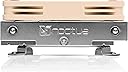
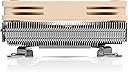
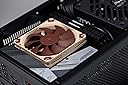
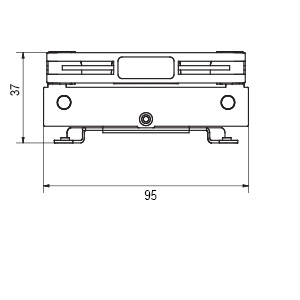
The Noctua NH-L9i is a premium ultra-compact CPU cooler designed for Intel LGA115x and LGA1200 sockets, boasting a 37mm low-profile height ideal for HTPCs and small form factor builds. Featuring a high-performance NF-A9x14 92mm fan with PWM control and ultra-quiet operation at just 23.6 dB, it ensures efficient cooling without noise distractions. Its 95x95mm footprint guarantees full RAM and PCIe slot compatibility, while the included SecuFirm2 mounting system and NT-H1 thermal paste simplify installation. Trusted by professionals and backed by a 6-year warranty, the NH-L9i is the go-to choice for stylish, silent, and space-conscious PC builds.


| ASIN | B009VCAJ7W |
| Air Flow Capacity | 57.5 Cubic Meters Per Hour |
| Best Sellers Rank | #113 in Computer CPU Cooling Fans |
| Brand | Noctua |
| Brand Name | Noctua |
| Compatible Devices | Desktop |
| Cooling Method | Air |
| Customer Reviews | 4.7 out of 5 stars 3,423 Reviews |
| Global Trade Identification Number | 00842431014269, 04716123314875, 07967907179310 |
| Included Components | Item |
| Item Dimensions L x W x H | 3.74"L x 3.74"W x 1.46"H |
| Item Weight | 443 Grams |
| Manufacturer | Noctua |
| Material Type | Copper (base and heat-pipes), aluminium (cooling fins), soldered joints & nickel plating |
| Maximum Rotational Speed | 2500 RPM |
| Model | NH-L9i |
| Noise Level | 23.6 Decibels |
| Number of Items | 1 |
| Part Number | NH-L9i |
| Power Connector Type | 4-Pin |
| Product Dimensions | 3.74"L x 3.74"W x 1.46"H |
| UPC | 842431014269 731215283291 039281014277 115970979550 739197641290 163120668250 803982961730 872182807933 807320189206 168141422058 |
| Unit Count | 1.0 Count |
| Voltage | 12 Volts |
| Warranty Description | 6 year manufacturer’s warranty |
J**A
Noctua NH-L9i CPU Cooler (LGA1200)
Awesome replacement for my stock cooler. Super quiet, much better cooling and significant performance from my CPU after overclocking temp checks. I only use/recommend Noctua cooling from this day forward. 🤘
G**S
Small Package With Quiet Cooling
I was building a custom NAS, I purchased a used mini ITX mobo. The fan that came with it worked, however it was extremely loud and I had to quiet it down. From my previous experience I knew I had to replace the drive caddy fan and the CPU cooler fan with Noctua versions. I was impressed with the massive change in the sound of the NAS currently. The loudest noises now come from the hard drives! I am currently using this to cool an i7-4790 that is generally running near idle unless I am running VMs. The fans barely move and yet the temperature never goes above 30°C. Pros: -Extremely low/no noise from fans -95x95 mm size allows for small dense mobos that have extrusions near the CPU. -37mm height means you can fit it in small cases and is really useful if you are designing/building your own case -Noise conscious; the fan has rubber feet, the fan is properly balanced, the fans have aero features to help limit noise -LNA cable if you really want it to be quiet, in multiple builds I have yet to find a need for this though -Good performance, putting this cooler on decreased my CPU temps by 2 to 5 degrees compared to the cheap one that came on my used mobo Cons: -Price is higher than other options, but this is a high quality cooler -The fan does bring in air from the top, which may make some use cases finicky Overall: I would recommend this cooler if you are in need of a low profile silent solution to keeping your temperatures in check.
B**N
Bought this for a "Gigabyte H77N-wifi"
First comment, this cooler kicks-ass!! I installed it into a "Cooler Master Elite 120 Advanced - Mini-ITX". The fit to most ITX motherboards will seem snug to many people, however the Noctua works very well. People who are new to the ITX world are going to have to get accustomed to a new way of doing computer builds. The Noctua does come very close to many parts on the mobo, however, that is a choice one has no control over if one wants to install a top of the line Processor with a High End video card,high end RAM and plans on having a proper power supply run it all inside an ITX container. I was thoroughly impressed with how well the product was shipped. All the parts are separated and snugly fit into a rubber/foam material. It also comes with a tube of thermal paste (The heatsink does not have any pre-applied thermal, awesome). This allows you to do a "dry" install to make sure the fan will fit properly for your motherboard. The ease of install is 10 out of 10. YES, It requires having access to the bottom of the mobo (like a proper heatsink does). What I liked the most is that there is NO pain in the ass rear mounting plate. You simply bring the screws up from the bottom and twist them into the heatsink. The fan is quiet and can ramp up quite well when needed. I have an Intel i5-2500K rated at 95W. I constantly run Handbrake and play games, I do not have any over heating issues! -Cons: The product was delayed in its shipping. However, Amazon did refund the shipping fee and the product was in perfect condition upon arrival. Great product so far!
J**E
Easily the best cooler for Micro ITX build.
Best low profile cooler I have ever brought. Firstly Noctua is known for there amazing products. I was going to buy the recommended Cooler Master 130 case suggestion then seen this. The design is pure gold for spacing in a micro itx case. You don't have to worry about ram size or hitting the GPU. It actually makes cable management easier with the saved space. I was confused by no brackets no brackets includeded for all the different cpu styles then realized this is strictly for the LGA 1151, which it fit like a glove. I coupled it with some ARCTIC MX-4 Thermal Paste, which I have been using in my builds for years, basically since it came out. Easiest paste to install and way better than many other brands. Noctua does include thermal paste, some quiet cable, some screws, and a badass little metal sticker in the box. The only thing I wish that they would do is have spacing around the fan corner for cable insert for better management. you can either run it under the heatsink since wire is thing or just up above tied off. Little grooves on corner to catch it would of been cool though. Temps wise I have yet to go over 54c on a single core, for gaming/benchmarking my GPU(Heaven/FurMark used). I haven't stress tested the CPU but I also have no reason to since this is primary for gaming. I am very happy to be anywhere under 60c while gaming.
N**.
Keeps an i7-9700K cool in SFF PC! (Dan A4-SFX)
I've had this heat sink for about 7 months, and it continues to blow me away! Originally, I was using it on an i5-9400F processor in my Dan A4-SFX small form factor case. I thought that was the perfect setup, since the CPU is only rated for 65W TDP. With some undervolting, it is more like a 45W processor, which the NH-L9i can easily handle. One thing that may help a lot, in this SFF case, the sides are perforated, so the CPU has direct access to fresh air. This is especially true with the 3D printed fan scoop (the black thing covering the brown fan in pic), which forces it to draw only air from outside the case. I rarely ever hear the fan from the CPU, and it keeps it plenty cool in the process. However, with AMD producing some really great CPUs, Intel was forced to slash prices on their 9th gen chips, and I got a huge deal on the 9700K... so I figured, let's see if my setup can handle it. To my huge surprise, the NH-L9i is up to the task! Of course, I am running the CPU at stock clocks and undervolting it by -0.08V, but even in these circumstances it's drawing about 100W during a heavy synthetic load (OCCT Large data set). The result? It's keeping the CPU in the low 80s Celsius. During some parts of the test, it ramped up to 120W, which did cause the CPU to hit mid-90s. So I would say that 120W is probably too much load for the NH-L9i to handle, but anything under that is doable if it has direct access to fresh air. Considering that the heat sink is only rated to 65W TDP, that's pretty amazing! Also, while its fan was running at full blast 2400 RPM, it was audible, but definitely not loud by any means.
X**X
Get this cooler for your mini-itx system! Beats stock Intel cooler by 30C at idle and 20C at load!
Configuration: CPU: Intel Core i7-4770K , M/B: Gigabyte GA-H87N Chassis: Chenbro SR30169T2-250 Cooling Performance: I'm very happy with the performance of this cooler! The stock Intel cooler saw >100C when loaded by stress on Linux (while stress --cpu 8 --io 4 --vm 2 --vm-bytes 128M --timeout 3600s; do sleep 10m; done --- in bash), and up to 80C at idle. While the specs say that is in range, I decided to try this cooler. What a difference! 40C to 60C at idle (no external load), and same stress load pattern rarely peaks to 80C. That's more than 30C off the low-end and more than 20C at the high-end. I've been cycling full load for 1 hr with 10 min breaks in between for 2 weeks to burn-in the system, and it is performing very well. The heat load from a 1 hr run can be dissipated fully in 3 min to 5 min, depending on how long the 120mm front case duct fan runs at peak speed (1400 RPM) before calming down to idle (1000 RPM). Ambient room temperature never fell below 75 F, and has gone as high as 87 F. The stock Intel cooler showed a disturbing secular trend of growing peak temperature during a 1 day of 1hr-10min cycle testing, which I stopped when peak hit 105C. Noctua's cooler does not display this trend, and 82C seems to be a sharp upper bound. I attribute the very small/rare excursion above 80C to ambient temperature swings and brief exposures of the chassis to direct sunlight. Fan Noise: It's no surprise that the fan makes noticeable noise above 60C, but that's to be expected with high thermal load. It's not the high-pitched whine of 1U rack server fans, but certainly noticeable. With the fan speed at 2400 RPM, I measure about 70 dB right at the side case vent next to the cooler (about 2" past the vent into the case) and roughly 55 dB about 1 ft away. The 120mm front case fan duct fan is also running at 1400 RPM, which adds to the noise floor. For comparison, if your central air system is on and blowing, noise right at the vent will likely be in the 65 dB to 75 dB. Note of caution on applying thermal paste: If it's your first rodeo, read some articles about how to apply thermal paste/grease to best effect. I used the paste that came with the cooler, and it is performing just as well as expensive 3rd party paste. If you mess up, make sure you have some >=98% isopropyl alcohol or 100% acetone to clean up and start over---Using powder free, nitrile gloves will save your fingers! Also, avoid residual cloth fibers which will interfere with the heat transfer.
E**B
Cooling is only adequate, but quietness is extremely good.
I used this to replace the stock Intel HSF on an LGA-1151 build with an i3-6100. The HSF is well-packaged and comes with a syringe of high-quality Noctua thermal paste. The syringe is more than adequate in size. Build quality is typically excellent for Noctua, and the heatsink base is cleanly milled and appears perfectly flat and polished. I'll make the following other notes: INSTALLATION: Very simple, with four thumbscrews that attach from underneath the motherboard. For this reason, if your case doesn't allow access to the underside of the motherboard, you should install the CPU and HSF before you put the board in the case. The screw-through design does work best if you can lay the board flat, put the HSF on top of the CPU (with thermal paste applied), and then put the screws through from underneath the board and sequentially screw them in. This can be a little bit of a balancing act, so I had to make some mini "sawhorses" out of cardboard boxes to allow the board to be flat and also allow me to access the underside to place the screws. The unit does precisely fit the boundaries of the LGA-1151 socket, so if your board is engineered to spec there should be no problems with fit. COOLING: About the same as the Intel stock HSF. Adequate for most of those who are not overclocking, but those who do probably will want a more robust cooling solution. NOISE: Extremely quiet, much more so than the stock Intel unit. Barely audible at baseline, and increases in speed are not very noticeable.
P**Y
Compact but Effective
I crammed an i7 4770K into a micro ATX set up, and saw about a 5 C difference (cooler) with the Noctua over the stock CPU fan. It seems the amount varies under different conditions (more at idle, less at load), but 5 C is what I'd say is an "average." It could be due to the limited space in the small case that is a contributing factor to the diminishing difference at load. There is one thing I did do differently than the instructions suggested, though. Rather than applying the thermal paste as a dot, I followed Arctic Silver (which I've used before) recommendations and applied the paste in a ribbon. I did this because the diagram in the Noctua instructions appeared to show a single core CPU rather than the multi-core depicted (and what I have) in the Arctic Silver instructions. I can't say this made a difference since I didn't try both ways for comparison, but just something to consider when you install the fan for yourself. Another thing to note is you will have to install this fan BEFORE you mount the motherboard in the case--unlike the stock fan which just snaps in. The Noctua screws in from the bottom. In my case, I had everything in when I switched the CPU cooler, and consequently had to disassemble everything--which was kind of a pain due to the restricted space. Otherwise, the Noctua cooler looks and "feels" like a high quality item. There is even an adapter to quiet the fan if your TDP is low enough (I'm guessing some sort of capacitor to limit power to the fan and thus slow/quiet it down). I left that out myself. The fan is quiet anyway, and since the Asus motherboard I have seems to have a mind of its own as to when to overclock (the AI suite settings keep resetting after a reboot), I thought best to leave maximum cooling capacity in place.
B**N
petit ventirad mais efficace
pour une petite config a base de i3 2100 ce petit ventirade est pas très haut , a la hauteur de une barrette ram température max avec ventirad d'origine intel 69 degrés et avec ce noctua 55 degrés dans les mêmes condition j'ai eu un peu peur que les composants de la carte mère touche pendant son installation ,et bien non , c'est parfait installation très facile qualité et présentation du matériel irréprochable , bruit du ventilateur a peine perceptible je recommande ce produit
M**O
CALIDAD TOP 🔝
📝 DESCRIPCIÓN Disipador de bajo perfil y alto rendimiento, ideal para cajas compactas con máxima compatibilidad y funcionamiento silencioso. También tienes en Amazon otro modelo de perfil bajo, pero con más metal de disipación: https://amzn.to/3OVQAoe 🧾 ESPECIFICACIONES - Dimensiones: 95 x 95 x 37 mm (con ventilador) - Peso: 380 g (con ventilador) - Material: Base y heat-pipes de cobre, aletas de aluminio, niquelado - Velocidad máxima del ventilador: 2500 RPM - Nivel de ruido: 23,6 dB - Caudal de aire: 57,5 m³/h - Compatibilidad: Intel LGA115x, LGA1200 - Garantía: 6 años 📦 CONTENIDO - Ventilador NF-A9x14 HS-PWM - Adaptador de reducción de ruido (L.N.A.) - Pasta térmica NT-H1 - Sistema de montaje SecuFirm2 - Tornillos para ventiladores adicionales - Case-Badge metálico de Noctua 💶 PRECIO - 9 de Diciembre de 2024: 46,25€ 🟢 PROS • Tamaño ultra compacto para HTPC y mini-ITX. • Compatible al 100% con RAM y ranuras PCIe. • Ventilador silencioso con control PWM. • Materiales de alta calidad y diseño robusto. • Instalación sencilla con sistema SecuFirm2. 8️⃣ VALORACIÓN Este disipador tieen un diseño compacto y eficiente. Tiene una altura de solo 37 mm, por lo que es ideal para configuraciones HTPC y sistemas mini-ITX donde el espacio es reducido. El tamaño es de 95 x 95 mm, por lo que no interfiere con los módulos RAM de gran tamaño ni bloquea las ranuras PCIe, algo que suele ser un problema con otros disipadores más grandes. El ventilador funciona de manera muy silenciosa, incluso a velocidades altas, y viene con soporte pwm para que el ventilador adapte la velocidad del ventilador según la temperatura. La calidad de construcción es impecable, como suele ser habitual en Noctua. Materiales como el cobre y aluminio, con muy buenos acabados, que garantizan una durabilidad excelente. En el pack viene un tubo de pasta térmica NT-H1 y el sistema de montaje SecuFirm2 para su instalación. ✅ CONCLUSIÓN Un disipador compacto y fiable, con materiales de primera y un funcionamiento silencioso. Ideal para sistemas pequeños y cargas térmicas moderadas. 👍 RECOMENDABLE. ✳️ Espero que mi comentario ✍️ te haya podido servir de ayuda 😃
D**T
Quiet and Effective
A really great cooler. Very quiet, very effective.
M**2
よく冷えます
うわさどおりの冷却性能です。 比較的高価ですが価格に見合う冷却能力でした。 PCはデスク上に設置していますがFANの音が気になることはありません。 取り付けはネジ止めするだけなので簡単です。
A**O
Dissipatore low profile
Qualità noctua ineccepibile. Montato su un i5 10400 in sostituzione del dissipatore originale, il noctua si comporta egregiamente. Normalmente è appena udibile, sotto sforzo si fa sentire abbastanza. Il test è avvenuto in piena estate con temperatura di esercizio media intorno ai 34 gradi. In idle tiene il processore intorno ai 45 gradi. Sotto sforzo mai superato i 67 gradi. Segnalo solo dei picchi di temperatura a 70° dovuti al processore. Sono rari ma li fa, il dissipatore fa un ottimo lavoro, sotto sforzo però si sente abbastanza. A me soddisfa pienamente, il pc è unicamente per lavoro (rarissime sessioni gaming). Straconsigliato.
Trustpilot
1 month ago
1 month ago