
🔧 Build Smart, Play Hard!
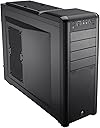
The Corsair Carbide Series Black 400R Mid Tower Computer Case is designed for gamers and professionals alike, offering extensive compatibility for SSDs, ample cooling options, and user-friendly features that make building and upgrading your PC a seamless experience.


| ASIN | B0055Q7BR4 |
| Antenna Location | Gaming |
| Brand | Corsair |
| Case Type | Midi Tower |
| Color | Black |
| Compatible Devices | Mini-ITX |
| Cooling Method | Water |
| Customer Reviews | 3.9 3.9 out of 5 stars (401) |
| Enclosure Material | Alloy Steel |
| Global Trade Identification Number | 00151903037935, 00843591013703 |
| Hard Disk Form Factor | 3.5 Inches |
| Internal Bays Quantity | 10 |
| Item Weight | 18.5 Pounds |
| Light Color | white |
| Manufacturer | Corsair |
| Model Name | 400R |
| Number of Fans | 2 |
| Other Special Features of the Product | LED Control Button |
| Power Supply Mounting Type | Front Mount |
| Supported Motherboard | Micro ATX |
| Total Expansion Slots Quantity | 8 |
| Total USB 3.0 Ports | 2 |
| Total Usb Ports | 2 |
| UPC | 809385171059 843591013703 828283407701 168141426698 088698867204 809185321821 808111659250 094922311917 803982736963 012302227825 115970980501 151903037935 163120480265 763615822435 724627248989 |
J**B
First Build. Love the case. Glad I went with it!
I was in need of a new computer after my 7 year old Dell began to slow a bit with photography editing software. I decided to do some research and put together my own system from scratch, and after the case research phase I decided on the Corsair Carbide 400R. It has worked well for my build. System Components: Asus P8Z77-v Motherbord (Mobo) (Only one onboard USB 3.0 20 pin adapter required PCI-E card for extra USB ports.) Intel 3770K i7 Chip Corsair AX750 Power Supply (Overkill, but will use in a future build at some point!) Cooler Master Hyper 212 Evo XFX ATI Radeon HD6950 (CDFC) Crucial M4 256GB SSD LG WH14NS40 G. Skill Ares 16GB 1600 DDR3 Memory Anker® Uspeed PCI-E to USB 3.0 2 Port Express Card for Front USB 3.0 Ports JacobsParts 2-Port PCI Express 1394a (Asus Motherboard does not have a firewire connection!) NZXT Aperture M Internal 5.25-Inch Mesh Card Reader with 2x USB 3.0 Putting it all together with my son was a great experience, and the 400R fit all of the 'pieces' very well. Cable management is very nice with very few visible wires on the motherboard side. Motherboard stand-offs were pre-installed in the case and were correct for the motherboard screw spacing. I have not added any additional fans, but temperatures on the motherboard and CPU are doing very well with the 212 Evo. I've only mildly overclocked to 4.2ghz. There is ample room for additional fans and motherboard cards. I've taken up two 3.5 inch drive slots, and they are extremely easy to remove and reinstall. Front access is easy, and installing the card reader (A great match with the black mesh front of the 400R) was painless. Powersupply installation was also easy, with the fan pulling in air from the rear of the case and blowing it down, out the bottom of the case. The black interior looks elegant. The front fans look good with the LED on, but it requires the fans be plugged into a molex connector from the power supply, which means no fan speed control from the motherboard. I may change this in the future and live with the LED's always being on. I should note that during shipping one of the side panels got a small dent. It wasn't very obvious, but was disappointing for a new case. An email to Corsair was replied to very quickly, and Corsair shipped me a new side panel using a fast shipping method. No cost and no questions asked! That's great service. I'll post images at a later date and update the review. Highly recommend the case if you want a good-looking PC that's easy to work with and comes with great customer service!
R**R
Very roomy, well-ventilated case - builder's dream.
Hi, folks, I just upgraded to this case from a smaller ATX Thermaltake case that I have been using since 2005; the Corsair 440R rocks, and I wish that I would have upgraded to a larger, more well-ventilated case years ago. First, there is a TON of room in this case to work around; the Motherboard has plenty of room to accomodate cables of all kinds, and nothing gets in the way. Speaking of cables, there is a TON of cable management options in this case (the back panel is actually "bulged out" - stylishly I might add - to accomodate cables run through the back of the case). When the front pannel is opened, all of the components not only look pretty, but are completely unobstructed to allow for minimal maintenance issues and maximum airflow. This case also facilitates a TON of cooling options; I mounted 5 Coolermaster 120mm fans (2 intake on the side door, 2 intake on the top, 1 exhaust on the bottom), and my system is running at extremely low idle and under load temps (due to the GPU and CPU having the two door fans nearby). The case moves air like crazy. LED lights on the front are unobtrusive, and can be toggled off completely if you do not want your machine to glow. I am extremely satisfied with this purchase, and recommend the case to anyone looking for a roomy, well-ventilated experience. -RLFiredancer
A**R
Solidly constructed, good-looking case
Excellent case... plenty of room inside, and it's got a unique cable management system l've never seen before on mass-produced computers. This was my second home build, so I wanted something special without breaking the bank. The only problem with the case they sent me is that the button activating the front fan LEDs doesn't work, even though everything is properly attached to the motherboard. This was something I didn't notice until after the machine was completed and the OS was installed. The rear exhaust fan is also a 3-pin variety, so if your motherboard supports 4-pin fans and you want the computer to automatically adjust the fan speed for optimal cooling, then you'll want to replace this (the two front fans weren't an issue, since they had their own special motherboard interface). I replaced the stock rear fan with two Noiseblocker NB eLoop fans. Installation of hard drives is literally a snap, and if you want to install various optical drives, it's convenient to do that as well. At this price (and due to the great design and good looks of this box) the Corsair 400R is worth what I paid, even considering the bad LED selector switch and having to change out the rear fan.
P**O
Case magnifico, ottimo prodotto. Comodissimo lavorarci dentro e "smanettare" con i cavi e i componenti. Molto utile lo scomparto posteriore dove far passare i cavi, numerosi alloggiamenti per Hard Disk, masterizzatori e quant'altro. Veramente spazioso all'interno, ma assicuratevi di prendere un alimentatore con dei cavi lunghi, io con il mio ho avuto qualche difficoltà a collegare il tutto dato che alcuni cavi non arrivavano bene a destinazione. La ventilazione e l'areazione sono fantastici, dal vecchio case a questo (senza modificare la configurazione hardware) sono riuscito a ridurre le temperature di ben 5 gradi! Consiglio a chiunque, magari tranne a chi vuole fare configurazioni con raffreddamento a liquido.
P**B
Good Cabinet Pros: Good quality Gaming Cabinet cabinet, look stunning, good airflow,u can install extra seven fans if u want or liquid coller at top good space Cons: To much prize because of doller value no dust filters on side panel Any way Feel Satisfied
E**S
Up to 10 fans. Great Space!!!. Be careful with the plastic tray does't look that will handle a lot of pressure everything else if just wonderful. Even for being a mid tower it is a huge tower. Heavy and well made. Really Happy with it. A bunch of screws comes with it as well.
M**U
取扱説明書が非常に簡素で自作初心者にはちょっと辛かったですが、無事組立できました。 メッシュが多くあり、冷却性能は十分だと思います。 CR-95Cを使ったファンレスで運用していますが、今のところ特に問題はありません。 デザインも気に入っています。 裏配線ができてケース内もスッキリです。
J**F
Excellent boîtier, bien pensé. Beaucoup de place, et grâce au système de passe-fils, excellente circulation d'air. Un réel plaisir ! Et très léger en plus. Point d'attention: l'alimentation est placée dans le bas du boîtier, donc attention à la longueur des cables pour alimenter la carte mère ...
Trustpilot
1 month ago
2 weeks ago