Buy anything from 5,000+ international stores. One checkout price. No surprise fees. Join 2M+ shoppers on Desertcart.
Desertcart purchases this item on your behalf and handles shipping, customs, and support to Italy.
🖥️ Elevate your PC cooling game with silence and power — because your rig deserves the best.
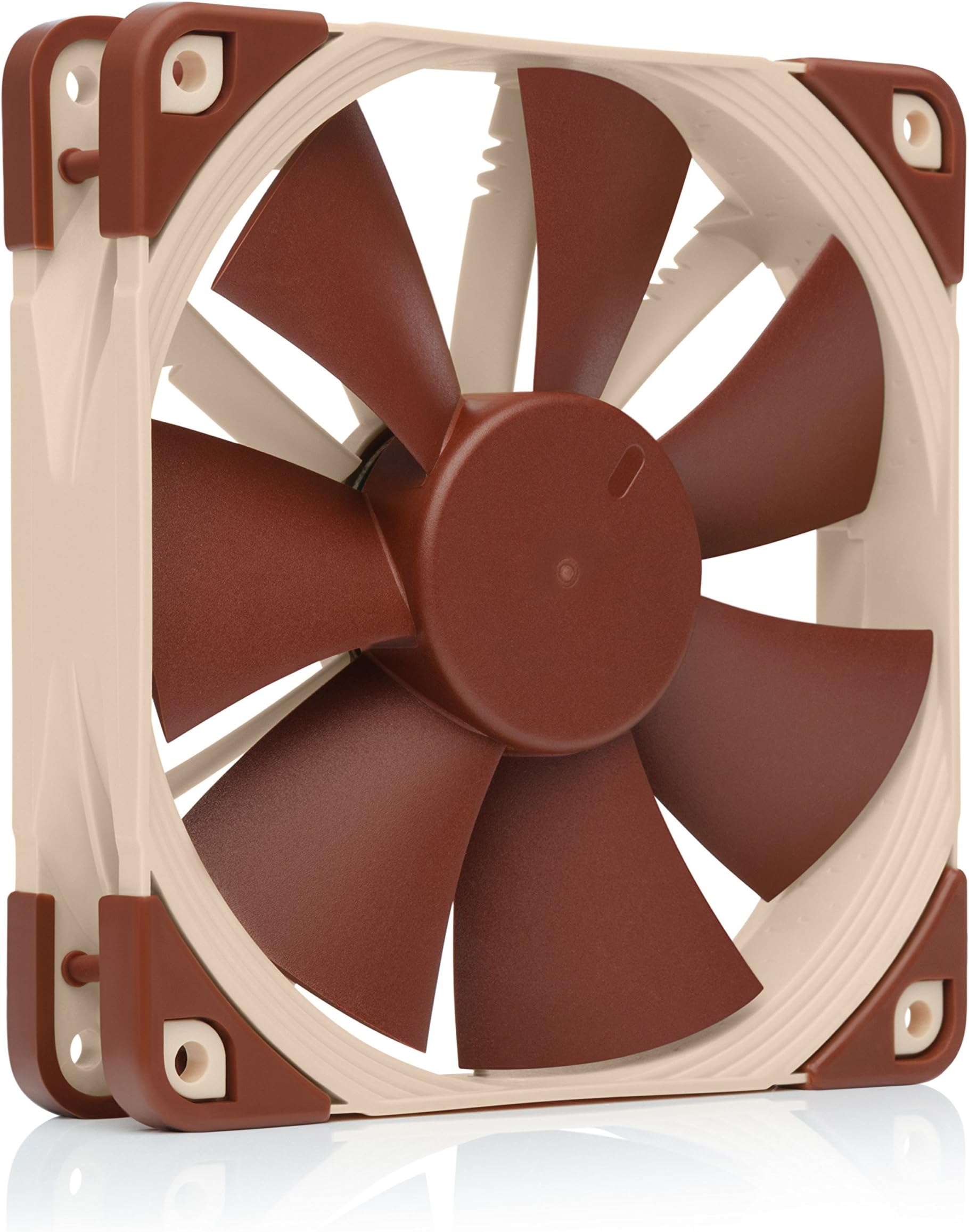
The Noctua NF-F12 PWM is a premium 120mm case fan engineered for high static pressure and ultra-quiet operation. Featuring a Focused Flow frame, 4-pin PWM for precise speed control (300-1500 RPM), and noise levels as low as 22.4 dB(A), it excels at cooling CPU heatsinks and radiators. Built with durable fiberglass-reinforced PBT blades and anti-vibration mounts, it offers exceptional longevity (>150,000 hours MTTF) backed by a 6-year warranty. Included accessories like Low-Noise Adaptor and splitter cables provide versatile installation options, making it the go-to choice for professionals who demand silent, efficient cooling without compromise.


| ASIN | B00650P2ZC |
| Air Flow Capacity | 93.4 Cubic Meters Per Hour |
| Best Sellers Rank | #241 in Computer Case Fans |
| Brand | Noctua |
| Brand Name | Noctua |
| Compatible Devices | Desktop |
| Cooling Method | Air |
| Customer Reviews | 4.8 out of 5 stars 7,997 Reviews |
| Global Trade Identification Number | 00808111654668, 04716123314660 |
| Item Dimensions L x W x H | 4.72"L x 0.98"W x 4.72"H |
| Item Weight | 299 Grams |
| Manufacturer | Noctua |
| Material Type | Fibre-glass reinforced PBT |
| Maximum Rotational Speed | 1500 RPM |
| Model | NF-F12 PWM |
| Noise Level | 22.4 Decibels |
| Number of Items | 1 |
| Part Number | NF-F12 PWM |
| Power Connector Type | 4-Pin |
| Product Dimensions | 4.72"L x 0.98"W x 4.72"H |
| UPC | 172304222300 808111654668 842431014009 804066535816 132018224762 731215276927 191120056883 115970710160 168141420245 782941813023 809185316612 809385165881 013591007457 782386479440 |
| Unit Count | 1 Count |
| Voltage | 12 Volts |
| Warranty Description | 6 year manufacturer’s warranty |
B**R
The best money can buy.
So, a computer fan. How exciting could it really be? If it spins it spins, so what difference does it really make? A big difference. Noctua is an Austrian company that specializes in making the best of the best computer cooling components. These fans, unlike the cheap ones that come bundled with computer cases, are very sturdy, professional-looking, and overall designed very well. From the moment I opened my first Noctua fan 4 years ago, I’ve been in love. The box itself is very nice looking, sturdy feeling, and just rings of high quality. Here, you won’t find any over-the-top “gamer” references, such as “XTREME TWIN FROZR FANS!” (not an exaggeration). For me, I don’t want whatever fan has the most RGB color-changing lights on it, or the most buzzwords. What I care about is the quality of the product. After marveling at the gorgeous design of the boxes for a few minutes, you move on to open them. On the front of the box, there is a flap covering the entire front, which is velcroed and hinged to the box. After ripping apart the velcro, which is of course very satisfying, you find a nice window into the box, showing you the beautiful brown and light-brown fan you bought. Similarly, on the back of the box, there is another velcroed flap, which opens to reveal more marketing material about the fan. Honestly, I’ve never read what’s on the back of these boxes, but I’ve opened the flaps more times than I can count, solely due to the satisfaction of it. After you play around with the front and back flaps fo the box for another 5 minutes, you get to opening the box. This, unfortunately, is the one negative I’ve been able to come up with of the fans. When opening the top of the box, I’ve always found it difficult to get my finger in the box to pull up on the flap, and it seems like I always end up bending the top of the box slightly to get it open. This is something that hasn’t changed in all 4 years I’ve been using these fans. However, once you get the top open, you can pull out the plastic container that the fan and accessories are stored in, and you’ll probably end up with the manual on your lap. This isn’t just any old manual though. It’s elegantly designed, with a nice cover page. On the back, a little message from the CEO is included, thanking you for your purchase, and explaining how they sincerely hope you enjoy the product, which if it isn’t evident, I LOVE. After glancing at the outside of the manual, you’re greeted with the main plastic container, holding the fan and its accessories. This plastic container consists of two overlapping pieces of plastic, similar to an iPhone box. After lifting up on the top, the bottom part containing everything gradually slides away from it, gently falling to the table after another very satisfying second or two. This is when things really get exciting. Here, you are greeted with a very well built fan, colored brown and light-brown. Other color options are available, however, anybody very into building computers will recognize that distinctive color palette, and know immediately that you only use the best of the best for cooling of your computer. I suppose it’s a status symbol of sorts. Upon taking the fan out of the snug-fitting plastic container it rests in, you can feel the quality right off the bat. The fan is pretty heavy, weighing 5.84 ounces, almost half a pound. This doesn’t sound like very much, but compared to the fans that came with the computer case I bought, made by NZXT, which weigh in at 3.92 ounces, it makes a big difference. Another really great part of these fans is the rubber corners they have. On each corner, there are small, yet thick pieces of rubber. Although these may seem unnecessary, they help (and to a great job) of reducing vibrations from the fan that are transferred into the computer case, which can make for some very frustrating noise. In addition to these rubber bits, the blades of the fans are very wide, and fewer in number compared to the NZXT fans I have. Although I know very little about aerodynamics, I’d be willing to guess that this arrangement leads to more air being sucked in/out of the computer, while making less noise due to less steep of an angle of blades. So, now you’re 10 minutes closer to dying, and all you’ve done is ogle the fan, and you’re no closer to actually installing this premium cooling solution into your computer. Time to install them I suppose! The mounting process isn’t much different from any other fan, other than the fact that it is just better. In the package, they provide you with four rubber “anti-vibration mounts”. These are somewhat hard to describe, but they look like a miniature version of something you might find at the Lion’s Den used for backend penetration testing. (That is actually a phrase I’ve used in the context of one of my IT classes in the past week). I, however, don’t like these “anti-vibration mounts” though, as they’re a pain to install and uninstall, at least compared to screws. Also, I’ve had to fix a handful of Dell computers that utilize a very similar system, where the fan has fallen off of the case due to the rubber mount giving out. Before you go screwing any fans into your case though, it is important to make sure that the fan is pointing the correct way. I could talk for a long time about the benefits of positive, negative, and neutral pressure when building computers, but as a rule of thumb, you want as many fans blowing into your case as blowing out. Figuring out the direction of airflow of fans can sometimes be a pain though, and I’ve often had to Google which way is which. Not with Noctua fans though. These fans contain two small arrows on one side, one pointing away from the fan, indicating the direction of airflow, and another pointing into the fan, indicating which way the blades spin. Although this isn’t necessarily uncommon in higher-end computer fans, it is still appreciated. So, you’ve admired the fan and figured out which way it should point in your case. Time to finally screw it in. When you purchase these fans new, the screw holes don’t have any threading that they come with. The reason for this is two-fold: it allows for the use of the anti-vibration mounts, as well as reducing the tooling necessary to manufacture these fans. In some cases, I’d call this laziness, however, with these, creating the threading is the best part. You start by just taking one of the five (they give you an extra!) screws that come in the box, and twisting it. Continue screwing it in until just tight, but not too tight. This doesn’t sound exciting, however, the experience of screwing in the fans is perhaps the best part of the whole product. It’s really difficult to describe what feels so satisfying about screwing these fans in, but it just does. So, you’ve mounted the fan, and now it’s time to wire it up to your motherboard. Normally, this would be very simple, just plugging it in, however, an extra step is typically required with Noctua fans. This may sound like a negative, but it isn’t. Noctua’s fans come from the factory with very short cables, which is really great usually only for the CPU cooling fan. However, in the box, they offer a variety of additional cables, including long and short extensions, and a splitter. The splitter is really nice for computers with lower-end motherboards with fewer fan connectors, typically for the front of the case. These different choices allow for a lot of flexibility when connecting the fans, meaning that you can make the cabling just how you want it. All of the wires included are very high quality, wrapped in a black mesh-looking sheath. Another small, yet important design feature of these cables is that they are all multiples of the length of the sides of the fan. This makes wiring multiple fans in a row up very clean, making the length of wiring perfect in a lot of cases. So you’ve wired the fan up and assembled the rest of your computer. You press the power button, and see your new motherboard’s splash screen for the first time, giddy to start using your new computer. This is when these fans really shine. And by shine, I mean that you never notice them. These fans are rated at 22dB, which is incredibly quiet, if audible at all. Even with the most demanding of loads, these fans promise to keep up. Never once have I had to worry about my computer overheating with these fans, and even when I pump everything up to full throttle, they hardly make a sound at all. During my life, I’ve bought, or convinced people to buy upwards of 20 of these fans. Although that isn’t a huge sample, it’s enough for me. Everybody I talk to also agrees that these fans are absolutely wonderful, and one of the best purchases they’ve made, at least for their computer. That all said, super high-quality fans come at a premium price, although it is still very reasonable. These fans always hover around the $20 range, which when multiplied by the three or four fans that most people have in their case, isn’t super cheap, but is well worth it. Most people undervalue fans, thinking that it doesn’t really matter which you get. However, when the longevity of the (very expensive) components of your computer is at hand and keeping them cool is one of the highest priorities, I beg to differ. Good cooling does matter, and these fans are worth every penny, and more. Frankly, in my opinion, the unboxing experience afforded by these fans is justification enough for the price tag.
C**E
Lowered my CPU temps 10°
I have a corsair 800D with a swiftech mcr360 radiator up top and swiftech mcp655b cooling a FX-8350. I've tried several different fans on the radiator, Xigmatek, Corsair, and Scythe to name a few. I haven't been impressed with any of them as far as noise and cooling temps. The Corsair were by far the loudest but cooled maybe a couple degrees more. The Xigmateks and Scythe were about the same temps, but Scythe being noticeably quieter. Then came these.. The main benefit of these over the others is the static pressure. More static pressure is important when put up against resistance, like a radiator. As a straight case fan it probably wouldn't matter nearly as much. However the 2.61mm/H20 rating of these is nearly twice as much as the other fans I had. Especially considering it's 2.61 @ 22.4 dBa. Corsair does have a "High Performance" 120mm fan that I don't have, it's rated at 3.1mm/H20, however at 35 dBa. Other highlights are : * The fin notches on the back, actually work. They change the frequency of the "air" noise which makes it much less annoying. I recommended these fans to two other people, and they both agree that this effect is very noticeable. * 22 dBa @ 1500rpm, 2.61mm/H20, 93.4m3/h (55cfm). * 6 Year manufacturer warranty. Pretty much unheard of when it comes to fans. Cheap fans generally last 1-5years I've found, in a 24hr environment. * PWM interface, hooks up to motherboard headers for great fan control. Results : * I don't bother with the LNA adapters, there's no point since it can be better controlled with your mobo. My fancontrol daemon usually keeps these running at 600-800rpm at idle. Which are more silent then everything else in my case, and my room for that matter. They're still what I would consider "uber quiet" up to about 1200rpm. * They keep my FX-8350 overclocked at 4.6ghz around 18-22°c at idle ( around 20°c room temp average ). At max load it reaches around 50-54°c. This is consistently 8-10° cooler then my Corsairs previous to this, with no other changes made to the system. * The noise they do make is just air noise, you don't hear the bearings like cheap fans. In my opinion the air noise seems to be at a lower frequency, more "acceptable" then usual fans. * 22dBa is optimistic when ran outside a case. Inside a case and up against a radiator it's definitely louder. Standard ambient noise temperature in a room is around 30-35dBa I've found, at max speed these run around 1475rpm and my case puts out 40dBa at 1m. This is "near silent" to most people in an average room/office environment. To compare my Corsairs were around 45dBa in the same test, yet cooled significantly worse. Dislikes : * The color. What everyone complains about. I realize it's their unique hallmark, but to be honest it's extremely rude to force that upon people. A simple black or grey would be significantly more universally acceptable. * The price. 20$ is a bit much. My next most expensive 120mm cost 10$. Sure these have a warranty that last more then twice as long, doesn't mean the 10$ Scythe's wouldn't last that long though. They do cool significantly better at lower noise, on the other hand. So it's balancing if the top-end quality fans are worth it in your situation. I would definitely recommend these to anyone that needs a quiet to high performance ratio in a radiator fan, and has the money to spend. In my opinion these are simply the best fans out there, in an all around sense.
P**S
Three Words: BUY IT NOW!
Pros: - High static pressure at low RPM, perfect for radiators - Focused airflow, meaning strait air path for better dissipation - PWM 4-pin fan connector, which is always awesome and great to have due to its optimal adjustments depending on the temperature scenario, and regulates fan speeds perfectly and with ease - Very quiet, seriously plug into you mobo's cpu 4-pin and let it flow! you won't hear it anyway at anytime... until after 1200rpm - Rubber grommets available for use, as well as padding on corners for reduced vibration - Cabling, all throughout from 4-pin connector to extension cable very well braided with rubber and sealed perfectly and with quality - Top of the line and beyond quality everywhere that was touched by anything related to Noctua, they really care and pride the quality from components, to aesthetics, to performance and most noticeably sound. Cons: - Price is definitely a downside, with prime the 2 fans i bought for my H100i were $45 - Color... I know this is their brand image, but at least allow some small customization options like Corsair did with fan rings... - Cabling, despite being very well braided with rubber cover and seals all around the connectors, are very difficult to connect to motherboard 4-pin headers when placed in tight corners or places, putting force on the pins and possibly damaging them in the long run Other Thoughts: This product is the best in its category, and should be considered in a class all of its own. The attention to the flow of air and balance between performance and quietness is the shinning grace of this fan, and truly makes it the best options for heatsinks and radiators of any kind that fit 120mm fans. If connected with the PWM header to the mobo and left as is, the idle speeds will be 600rpm, and will go up to 1200rpm gradually until temps are so high it must go to full speed. If you are like me, and believe in performance at all times, you will set this up to be always at full speed, which still maintains a much quieter profile than any other cooling fan out in the market and at unmatched dissipation at this rotation speed. A must have for radiators, heatsinks and pressure-demanding locations within the PC, and the extra connectors and accessories that come really make this product worth the higher value no matter who owns it and where it is placed. BUY IT NOW!
M**S
Fantastic Fans, Very Quiet + Great Performance
TL;DR -------------------------- Fans are awesome, buy them, period. The none TL;DR version -------------------------- ~Background~ I had purchased a H100 Water Cooler (from Corsair) a while back for a Phenom II x6 (3.3GHz), the cooling was fantastic but the stock fans were very loud and could be heard a mile away (ok, outside the room). ~The Fans~ I had never heard of Noctua before but after searching around I could not find a single complaint/review about them, excluding the price (however we will discuss this later). I decided two order 2 for the H100. With just two Noctua fans I was able to remove 4 stock fans from my case and keep the relatively same temp. The idle temp when up about 2°C however I can not hear them at all, in fact the only noise coming from the case now are the other 2 fans (1x120mm and 1x200mm, both stock). I may have said that the temps went up 2°C however on full load the temps are the same from my last configuration (4 fans). I had read many reviews that it perform better on load and I can easily confirm that, in fact I think they perform better than before. ~The Price~ I managed to snag these fans for $22.99 (each) however it was WELL WORTH IT. I have never owned fans of this quality and Noctua really has the science down, Fin design, Ball-Bearings in casing the fan shaft, rubber corners to remove vibrations, even rubber screws if you not mounting to a water cooler to reduce the vibration. Noctua has really thought of it all and deserve much more praise. These guys are not just designers, they are enthusiasts and are proud of what they built. ~Finial Note~ I recently orders a new case with better fan arrangement and I'm seriously thinking of replacing all the fans with the NF-F112's. They may be $22.99 and took over 2 weeks to deliver but I honestly can't say anything bad after about a week and a half of use, they are amazing. Buy them, period.
R**S
You Get what you Pay For with Noctua
First let me be clear, you get what you pay for and Noctua are rock solid fans. I have heard people complain about mounting Noctua to radiators, and I seriously disagree, as Noctua fans are engineered to provide much more controlled airflow, and static pressure and these NF-F12 are designed for Static Pressure NOT airflow. These are used for pushing air through obstructions and radiators, and will not have the higher CFM ratings like airflow fans do. That is not what they are designed for period. These fans came highly recommended after extensive research and help from Linus Tech Tips off YouTube. These fans were purchased based on mounting them to a Corsair H105 closed loop all in one water cooler. I mounted them in pull configuration and connected them to a NZXT Sentry 2 fan controller. This way I could fully control their speeds as needed. At full speed they can be heard but are far quieter than the Corsair 120 and 140 AF quiet edition case fans. I use the fan controller to keep speeds and sound under control with the Corsair fans, but running the two Noctua fans at full speed can be heard but are so much quieter on the radiator than the included Corsair SP120L fans on the H105 and those are already much quieter than the H80i and H100i fans. These fans sound clean and quiet at full speed, and go completely silent at half voltage and low voltage. Seriously impressive. I heard the reviews, did my research and they were no joke. I am highly impressed with Noctua fans. Using them on a radiator in pull configuration is based on research and Linus Tech Tips for both easier dust cleaning without having to remove the fans, as well as Static Pressure and noise levels. Vibration is at a minimum due to the rubber mounting corners and much needed when ramping up the speeds. Also they come with a low voltage adapter if you want them to run even slower and more quiet, as well as extension cables. All cables are professionally sleeved and look very good. If you have LED lighting strips in your case, I use IceModz 12 inch blue LED strips, seriously high quality from Iceland, and they cause the Noctua case fans to glow like they are under black light and it puts off a seriously cool effect. Highly recommended and for the price I will say it again, you will get what you pay for, trust me.
T**D
Nice design. Hard to fail.
I bought this freestanding fan to add to the other side of my Noctua NH-U12S heat sink. Wanted to create a push-pull arrangement to bring temps down a few more degrees. I read you can get another three degrees of cooling doing this, but for me it was about five C cooler under heavy load. Designed in Austria, built in Taiwan, there's no "made in China" feel to this product. If you get a sense of satisfaction from things that are well designed you'll like this. They've done everything they can to make it hard to fail. This product ships with the little rubber corner guards to block the transmission of vibration, as well as the quick install rubber pull through snaps for installing on the back of your case. If you don't like the rubber pull throughs, there's a bag of four self threading screws if you know how to use a screw driver. Other than that option, you shouldn't even need tools. Comes with two handy wiring extenders, should you need them, both enclosed in a sleeve. One allows you to join with another fan, one just expands your reach. Similarly, I didn't have to worry about easy snap on clips to attach to my heat sink because the Noctua heat sink came with an extra pair.. just in case. They really don't want you to fail. Bearings are milled out of brass with a CNC machine. Thus the 6-year warranty and the quiet. Very artful engineering on the fan blades to dampen resonance and break down the turbulance that might arise. The box says the motor is designed to suppress any start-up hum and I think they got that right too. Mine runs at about 750 rpm under normal load using the standard PWM header on my motherboard for the CPU and it goes up to about 1400 when all 8 cores are maxed out at 100% stress testing with Prime 95. I did learn that my case itself needs better ventilation to take full advantage of these fans, so I'll be adding a port. Worth every penny in my book.
B**Y
Worth every penny!
This fan is awesome! It's very quiet and fits perfectly on my Cooler Master Hyper 212 Evo. I replaced the stock Evo fan when its bearings failed and it started making a loud knocking noise. I bought this fan mainly for the quality of its bearings and wasn't all that concerned about the cooling performance, which I assumed would be no worse than the original. My case stands vertically, so the cooler winds up horizontal and the fan winds up upside down, so I really wanted good bearings because I think that the upside down orientation on the original fan is what led to the bearing failure in less than 2 years. I expected the Noctua to be more quiet, but I was really surprised at just how quiet it is. Even under extreme stress I couldn't hear the fan. I couldn't say that about the original fan. I'm cooling an AMD FX-8320 8 core chip running at the stock frequency of 3.5 Ghz. CPU temps are very good. The CPU idle temp is 31 Deg C with the Noctua, which is the same as with the stock fan. The Noctua maxes out at 53 deg C during the Prime 95 "In Place Large FFT" test with 8 worker threads, whereas the original fan hit about 56 Deg C, so that's a huge improvement. After test is stopped temps drop from 53 Deg C to 40 Deg C in about 20 seconds and then dropped to below 35 Deg C in less than a minute, similar to the stock fan. However, during the entire time of the test, I never heard the Noctua fan. That being said, I sit a few feet from my case and have a large monitor in between me and the case, but when I've run that test in the past with the stock fan, it was much louder. Anyway, at this point I've had the fan for a little over a month and I'm quite happy with it.
K**.
Great for the right application and I can admit when I'm wrong.
I'm a bit of a fan nut. I bought this one because of all the great reviews and because of the stator vanes in the design. If I had seen the very low wattage (0.6) of the fan, I would have passed on it. I also bought a Delta 1.5 amp/ 18 watt 120mm server fan that also has stator vanes. The Delta is a monster but can be easily tamed by giving it 5 or 7 volts. It might even run on 3 volts but I haven't tried that yet. All those voltages are easily available from any PC power supply, google it if you don't believe. At 3,5 or 7 volts, the Delta is 4.5 watts, 7.5 watts or 10.5 watts. Not easily adjustable tho, I haven't found a way to switch the wires to get 3 speeds with a switch. ***** Update ***** I tested the Delta monster and found that as impressive as it is, it's not needed. It's much easier to use good PWM fans - see update below. The application is a 2-fan stack pushing thru an Antac 620 radiator. So it will be either the Delta or the Noctura pushing into the standard Antec fan, then into the radiator. I thought that stator vanes were important in a 2-fan sandwich to get a better overall flow volume and cooling. I haven't finished the rig yet but so far in testing, this Noctua is an overpriced wimp. I will give it a chance and update my review. ***** UPDATE 8/15/2013 ***** I gave this thing a chance. This fan is pointless. I'm going to be the first 1-star review too as I've dropped my rating a star. This fan blows my mind regarding how it can have such great reviews and be so lame. I agree with the Russian fellow that gave a negative review. In my testing on an Antec 620 compared to several other fans, this Noctua is next to worthless. I'm going to slice it in half and use the stator section as a spacer and place that between two good PWM Coolermaster fans. (The rest of the Noctua will go into the parts bin.) This will give me a 2-fan stack with (.65amp) 8 watts of oomph. About 12 times what the Noctua has by itself. ***************** update Feb. 2, 2014 ***************** I finished the rig and the Nactua stayed in the parts bin. I didn't slice it apart like I had planned. I was just using 2 good PWM fans together on the Antec 620 radiator on the same side pushing. I decide to try to reduce overall noise on the PC because cooling was no problem and I have such a huge collection of fans. I ended up using the Nactua pushing into a Coolermaster PWM .37 amp and I used the Nactua speed reducer cable on the Coolermaster fan. When I was finished the PC is quiet and even at full-song (gaming) The rig has a pleasant, soft, whooshing sound. I'm thrilled so my 1 star review is now 5 star, even tho the Nactua is ugly and overpriced.
A**R
går tyst
bra kvalite tyst funktion
M**K
A great choice
Excellent fan, the usual Noctua quality. You buy these because you want the best and the quietest. The PWM is todays standard as well.
G**U
Süper kalite
Satın alabileceğiniz en iyi fan. Her şeyiyle birlikte geliyor uzatma kablosu y kablosu düşük voltaj kablosu. Plastik vidalar, alüminyum vidalar kalitesini belli ediyor teslim tarihi 2 Mayıs'ta 24 Nisan'da elime ulaştı.
D**Y
Best Choice adding to other Noctua Fans
Best to mix with other Noctua Fans given its cheaper
R**E
No-Brainer for Radiator Applications
I bought two of these to replace the stock fans on a Antec Kuhler H2O 920, cooling an i7 3770K, not currently overclocked (breaking in the Arctic Silver 5), but I have confidence that this cooling solution will more than handle it. The fans are more than I could have hoped for; quieter than the (very quiet) Kuhler pump at low speeds, running down to about 120 RPM, and still pretty quiet at full tilt, achieving a steady average 1500 RPM with less than the stated 10% variation. The comparison to the stock fans supplied with the Kuhler is stark, in addition to being far quieter, the sound at top speed is subjectively 'more pleasant'; a background hum rather than an aircraft throttling up for take-off! The accessories supplied with this fan are second-to-none. The short cables fitted to the fan worked perfectly with the connectors from the Kuhler, allowing tidy cable management, but the neatly sheathed extensions came in handy for tidying the cabling for the other case fans away behind the motherboard tray. The Y-connector would be very useful if you had fewer PWM headers on your motherboard than case fan mounting options, and the LNA (Low Noise Adapter) if your motherboard did not allow you to limit the top speed. The mounting options are similarly well thought out, with vibration damping mounting cones to complement the (removeable) silicone corner mounts on the fan itself, as well as conventional fan screws. If I had to find anything at all wrong with these fans the only thing I could mention would be that the silicone corner mounts made it slightly tricky to get the mounting bolts for the radiator engaged, as they add a little extra width. Once the first bolt was located and tightened a turn or so the others went in fine though, and the compression in the mounts allowed them to be tightened securely. This really is a clutch-at-straws to nit-pick however! In summary, these are excellent fans, which do the job asked of them to a very high standard, all whilst remaining extremely quiet, and leaving you with a nice little handful of spares to use elsewhere in your PC build. Well worth every penny!
Trustpilot
2 weeks ago
2 weeks ago