Buy anything from 5,000+ international stores. One checkout price. No surprise fees. Join 2M+ shoppers on Desertcart.
Desertcart purchases this item on your behalf and handles shipping, customs, and support to Italy.
🎞️ Relive, Record, and Reimagine Your Memories in HD!
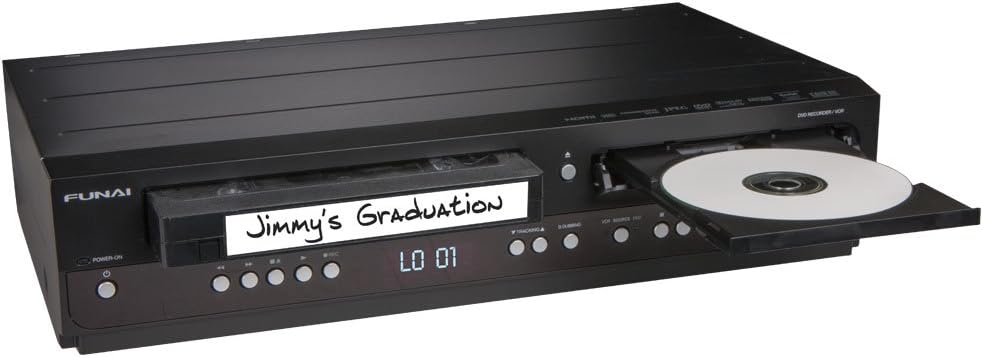
The Funai ZV427FX4 is a versatile combination VCR and DVD recorder designed to breathe new life into your legacy VHS tapes by converting them to 1080p HD DVDs. Featuring HDMI output with upscaling, Dolby Digital surround sound, and line-in recording capabilities, it offers a seamless bridge between analog nostalgia and modern home entertainment. Ideal for professionals seeking to preserve cherished moments with crystal-clear quality and effortless operation.

| ASIN | B00CCILYDA |
| Analog Video Format | NTSC |
| Audio Encoding | DD |
| Audio Output Mode | Surround |
| Best Sellers Rank | #108,925 in Electronics ( See Top 100 in Electronics ) #13 in DVD Recorders |
| Brand | FUNAI |
| Built-In Media | DVD Recorder |
| Color | Black |
| Compatible Devices | Television |
| Connectivity Technology | HDMI |
| Connector Type | HDMI |
| Controller Type | Remote Control |
| Customer Reviews | 4.2 out of 5 stars 1,278 Reviews |
| File Format | MP4, AVI, MP3, JPEG, WAV, WMA, AAC |
| Global Trade Identification Number | 00053818470565 |
| Item Weight | 9.33 Pounds |
| Manufacturer | Funai Corp. |
| Media Type | DVD, VHS |
| Mfr Part Number | ZV427FX4 |
| Model Name | ZV427FX4 |
| Model Number | ZV427FX4 |
| Number of Channels | 4 |
| Other Special Features of the Product | Built-In Converter |
| Resolution | 1920x1080 |
| Special Feature | Built-In Converter |
| Supported Audio Format | Dolby Digital |
| Surround Sound Channel Configuration | 5.1 |
| Total Number of HDMI Ports | 1 |
| UPC | 053818470626 809301959044 640206588072 069060051476 012304073703 823019589645 053818470565 642125191487 |
| Video Encoding | H.264/AVC |
| Video Output Resolution | 1080p |
P**N
Very versatile product! Great! [Although the VCR side can fail from non-use]
UPDATE May 17, 2022: After nearly 7 years the VCR deck has started to fail - it spits the tape out or shuts off. I have used the VCR many times since I bought this in 2015. The last I used it to watch a VHS tape was around late 2019 or early 2020, I cannot be certain. But I know I never used it during the 1 1/2 years, about. Less than two weeks ago I wanted to watch a tape; and to my surprise, shock & disappointment when I put the tape in, pressed PLAY...and the machine stopped and spit the VHS tape back out! When I grabbed the tape it was tangled inside the machine. I was able to simply lift the tape off the playhead roller and free the VHS. I had to untangle the tape, but it wasn't snapped. I tried playing another VHS and the machine shut off this time. When I turned it back on, I was able to eject the tape with the STOP/EJECT button. I was able to simply lift the tape off the rollers and pull if free with no damage to the tape. Two more attempts and the VHS tape either just ejected the tape or it shut down the machine. (See video of this phenomenon, IF I uploaded the video) The DVD deck works still, as that is what I used most anyway. I feel bad that I didn't use the VCR deck as much. In fact, I would eject the tape out when I was done, because sometimes (as with Sony VCRs) leaving the tape in can cause problems. Anyway, so far, the VCR side doesn't work properly, as it shuts off when trying to play a tape or it get the stuck. I'm sad now. I have a lot of VHS tapes I would still like to watch, so I am considering buying this model "new" again or another VCR player. But in 2022, finding a VCR that is in pristine condition can be a challenge. I'm sad now. UPDATE: DEC 7, 2015: I have since used the DVD recording feature to record my play session from my Dreamcast and PS2 and both were flawless on a Memorex DVD-RW 4x. While the manual guarantees Memorex DVD-Rs only, the DVD-RWs works great. Now the Verbatim DVD-R recorded, but because I forgot to have a signal going through the L2 port, it stopped recording after 5 seconds, and auto finalized (I had it setup that way) since it couldn't detect a clear signal. It all happened so FAST. I mean, you push that one button and then BOOM! it starts recording. I was able to record my PS2, stop and record my Dreamcast without any problems. It even tells me I have 17min left on that DVD-RW. Since my Wii is connected to Component, I cannot record to DVD from that connection as the FUNAI ZV427FX4's Component ports are for OUTPUT only. Still...this was awesome investment, just wish I made it sooner than now. Yay!! November, 2015: [I bought this brand new for 173$] I love this thing. I just hook[ed] up my HDMI cable to the FUNAI ZV427FX4 Combination VCR and DVD Recorder and it outputs all [of my devices to my TV]. I [even] have an A/V security camera that I used for my old Sony VCR (before it started eating tapes); I thought it [required] the RCA input on my HDTV, but video was passed through the HDMI connection. Cool! Watching VHS tapes just got fun again! I bought this to really watch VHS tapes, and have my old camera connected [which I have set to] the L1 rear input [of the unit]. Point [is:] this set rocks. What I learned is (1) by pressing the HDMI BUTTON [on] the remote you can switch the HD modes from 480p to 1080p. By default is it set to 1080p; [however, some media when played on a 16:9 HDTV using modes 480p or 720p, will either stretch the image or have it [centered in the middle] of the screen. Switching to 1080(i/p) formats the images correctly, OR you may need to adjust the ZOOM or SCREEN SIZE on your TV.] (2) By connect[ing] my A/V switcher (which has my Dreamcast, PS2, & Wii connected) into the FUNAI's L2 front S-Video port I am now able to play my DC, Wii & PS2 in 1080i or 1080p!!!!!!! Aaaaaauuugghjhhhh!!!!!!! Wheewwoo OK. Anyway, I have not tried the DVD recording as yet. I'll update this when I do. PLUS I FOUND OUT YOU CAN RECORD YOUR PLAY SESSION TO DVD WHILE YOU'RE PLAYING!!! (Probably, I just assume as such while reading the manual).
W**B
Great way to get your old VHS tapes onto DVD while you still can!
2025 Update. Warning. Be careful about loaning this to a friend. You may never see it again. That happened to me. Executive summary. This works as advertised and is a great way to get your old VHS and VHS-C tapes converted to DVD, before they self-destruct from age. And one of my really old VHS tapes did, in fact, break, after I had copied it to DVD and was rewinding it. Close call. Background. Like many people, I imagine, I left VHS behind a long time ago. However, before that, our household accumulated quite a few home videos--dance recitals, vacation trips, special events. Most were on VHS-C, usable in a regular VCR with an adapter. Some were actually full size VHS tapes. Others were VHS-C converted and edited onto standard VHS tapes. A few years ago I bought a Roxio USB capture device for connecting standard RCA outputs or S-Video to a computer. In conjunction with a video editor, those tapes could be converted to digital, then to DVD or other media. I tried one with OK results but then got distracted by other things. When I got back again two weeks ago, to my surprise, Windows 8.1 did not recognize the Roxio converter, even with the "latest" driver from Roxio. Then I discovered that my old JVC VCR had also given up after only 22 years. I looked at some local VHS-to-DVD services and saw I could get my home movies converted for $20-25 each. With 8 standard VHS cassettes and about a dozen VHS-C, that's $400-500. Which brings me to the Funai. I don't know if I'll get the Roxio converter to work, so buying a new VCR for $75-100 is a gamble. Then appears Funai Combination VCR and DVD, and it will convert a VHS tape to DVD-R. $168 plus $12 or so for 50 Verbatim DVD-R's. Decent reviews, and the bad ones seem to be by people who didn't notice the lack of a TV tuner in the description. Good. Fairly easy to understand the manual, although parts of it seem to refer to a different model. Once you get the system down, it is a quick and easy process to copy home VHS tapes to DVD-R. The manual says it will not copy protected copyrighted material. Since I have none, I couldn't test that. The machine has HDMI out making connection to a modern TV for playback easy. The TV I have it connected to has limited display options, so my old 4:3 aspect ratio video shows both VHS and DVD content stretched to 16:9, however, the DVD's created using "auto" aspect ratio play correctly on other TVs. The DVD's are 1080p, upsampled, according to the manual. Of course, with source material at 720x480SD, you can do only so much. Bad. Not much. I never heard of Funai. Don't know about future service. HDMI or IEEE1394 inputs would have been nice for going from a modern camcorder or DSLR to DVD. In any case, I accomplished what I bought the recorder for in just a couple days, saving $250-300 in the process, so any additional use I get from it is a bonus. Other. DVDs created on the recorder can be copied on a computer DVD drive. I made copies of our now-grown daughter's dance recitals for her. I wasn't even sure my computer's DVD burner would work with DVD-R, but it did quite nicely. The machine will also copy from DVD to VHS, although, I am really hard pressed to think of a reason to do that! All in all, this was a very good purchase. Maybe I'll advertise in my neighborhood: VHS tapes copied to DVD for $10 each.
O**R
Good VHS Tape to DVD Recorder
A couple of comments first: 1. This Funai ZV427FX4 combo VHS tape-to-DVD (and DVD to VHS tape) recorder is NOT the same machine as a Magnavox ZV427MG9 (I own both), and 2. Magnavox does NOT own Funai; the Magnavox trademark for North America is licensed by Funai from Philips. There seems to be some confusion about these points among reviewers. I've been please with this machine's abilities to transfer content of my many old VHS tapes, both commercially recorded and home-produced, to DVD. Quality of the DVDs, of course, is no better than that of the original source material. Nonetheless, having a DVD makes the material more easily searchable, playable on cheap and available DVD players, and more importantly, archived on media more stable than the original VHS tapes, some of them now 25 years old. Sharing my old tapes with grandkids is a non-starter - they may vaguely remember VHS tape from early childhood, but they darned sure don't own any VHS machines, or have any desire to pay for the few new machines they could find today. They do have DVD players. This Funai ZV427FX4 and the related Magnavox ZV427MG9 are similar, with one major exception: The Funai will NOT record to DVD+R blank or re-writable discs; the Magnavox will. Both machines will record to DVD-R blank or re-writable discs. Both machines will play back DVD+R or DVD-R discs recorded and "finalized" in standard DVD video format using either of the machines, or various computer-based video editing programs. Both machines insert at the front of any DVD recording a ghastly-looking title block. User manuals indicate there is some way to get rid of this ugly title rectangle, and other title rectangles appended after the end of the DVD video/audio recording. I haven't figured out how to remove these title blocks, and haven't spent a lot of time pursuing the matter. Neither machine is rated by the manufacturer to record DVD (+/-) R - DL (double layer) discs, and I haven't tried this. Both machines have built-in record mode selections which - according to user manuals – record on standard single-layer DVDs, and for recordings with longer time spans, at reduced DVD quality. Both machines produce recorded DVDs in standard definition (not HD). All this info, and much more, is available from downloadable user manuals at the manufacturer's Web sites. Some terminology in manuals for both machines is either technically incorrect ("dubbing") or misleading ("deleting titles"). "Dubbing" is used incorrectly – as it widely is – to mean "Duplicating". True dubbing means to replace existing material within an overall existing production with new material, audio, video, or both. "Deleting a title", to those accustomed to editing in either analog or digital devices, or with computer-based editing programs, means exactly that: delete the title to a recording or assemblage of video/audio, leaving the production / recording intact . In manuals for these combo recorders, "Delete a title" means "delete the entire recording which has a selected title", so beware. Instead of deleting only a title, you may inadvertently delete an entire recording, which you can't recover. A surprising benefit of this Funai machine is that it will play back S-VHS (Super-VHS) tapes, even though the machine is NOT spec'd as a quasi-S-VHS device. Playback of a number of my own recorded S-VHS tapes shows a minor amount of "flagging" (short horizontal streaks) in the playback, but if you have S-VHS tapes and no S-VHS or SQPB (S-VHS Quasi-Play Back) machine, this Funai offers a way to view your old S-VHS tape content. Playback of VHS tapes and DVDs is consistent with quality of the source material. We use the DVD playback capabilities from the Funai's HDMI output to view DVD movies regularly; quality is good. VHS tape playback looks somewhat fuzzy on our HD TV set, but that's to be expected, since VHS native definition is even lower than digital SD. All-in-all, the Funai ZV427FX4 combo VHS-DVD recorder has been a good purchase for us. We can watch VHS tapes or DVDs, and transfer video content to DVDs from our old VHS tapes (or vice versa, if for some reason we wanted to put DVD content on VHS tape). Some of the machine's limitations are irritating, particularly with respect to quality of longer (more than 2 hour) DVD recordings, lack of support for DVD+R format, technically incorrect terminology, and confusing user manuals, but for the price, the Funai ZV427FX4 is a bargain. A five-star machine would not have the limitations of this Funai (and its similar Magnavox cousin).
R**8
Great and does the job
This will be quite a long review. I once had this unit [badged as a Symphonic over 14 years ago] Symphonic and Funai are the same back then and still are. I am not sure if any of these items are still badged as a Symphonic unit but the Funai/Magnavox unit here is the same. So it was rather easy to use since it is identical to the older Symphonic unit I had 14 years ago. It indeed does burn DVD's from old VHS tapes. You have 5 or maybe 6 recording speeds from 1 hour, 2 hours, 4 hours, 6 hours, 8 hours and I think also 10 hours. Once you figure out how to dub video tapes to blank DVD disks, it's quite a breeze. It records in "real time", same length as the video tape is also is how long it will take to record/dub VHS tapes to blank DVD's. I have dubbed over 100 of my older homemade VHS videotapes onto blank DVD disks so far with no problems. You can also dub from DVD's to the 4-head stereo VHS VCR on this unit. It comes with a complete remote using 2 AA batteries. This DVD unit uses only DVD-R or DVD-RW for recording purposes, not the DVD+R/W version. You can play any DVD version however just fine with this unit. Tapes play well on the VCR with the usual video quality for a 4-head VCR. DVDs play very well in this unit. It does have 1 HDMI connection for TV or receiver plus the usual RCA and even S-Cable connection. I gave it 5 stars, easy to use, works well, looks good and basically does the job with no problems.
S**W
Very disappointed and angry with this piece of crap
I am very dissatisfied with this machine. I copy a lot of things that need the commercials edited out of them which I use +RW disks to do. Someone said this machine is made by Magnavox. The Magnavox I've been using for a couple years or so looks like this one but the similarity stops there. When I went to record with this Funai, I found out that it won't use any +R DVDs at all so I'll have to try to find some -RW disks and they seem to be very scarce. UPDATE: I found one place on the internet that sells -RWs so I bought a pack. I just now tried to copy and edit a movie and found out that this model won't edit anything except the title in the menu!!! I have been copying some of my tapes and DVDs that have commercials in them and editing out the commercials and that's why I wanted another recorder to have when my Magnavox combo quits working but I won't be able to do it with this thing. I realize that editing can't be done when playing and copying in a combo but I have been using separate players to copy from so I could edit the dvd in the combo. Being a low income senior citizen, I can't afford to buy another one that WILL edit so I'm stuck with this worthless, to me, piece of crap. If you want to copy something without editing or record from cable or satellite channels that aren't blocked, this machine might be okay but if you want to edit, look for something else. Also, there's no way, at least none that I could find, to put a picture in the menu. In my opinion, this thing is worse than crap.
V**C
A simple and practical way to transfer those old VHS home videos to a DVD.
I have tried several different ways of copying my home camcorder VHS tapes to DVD with subpar results. Spent a lot of wasted time and money on capture devices, programs, etc. Since I have hundreds of videos to transfer, I needed a more practical way to do it. I read the specifications and reviews for this recorder and gave it a try. This recorder makes an exact high quality copy from the VHS tape to the DVD with excellent results. Sound and video syncing are spot on (no drifting). It is so easy to use. Now I do not have to waste time sitting in front of my computer watching what is being recorded. Now all I have to do is press the dubbing button on the recorder, and the recorder automatically records the VHS tape and then automatically stops the recording when the tape is finished (I can leave the room). There is an upconverter to HDMI (there is an HDMI output on the recorder) so you can WATCH (watch only, not record in HDMI) the VHS and DVD on an HDMI TV/Monitor. Once you make the copy, you now have a "one to one" copy of your VHS tape to a DVD (now archived in digital format) that you can now edit or copy on your computer. It is a very simple solution to a technology format change. The recorder is not that expensive considering you get a four head VHS and DVD player/recorder with HDMI output. My wife is now happy that I finally have a DVD copy of our Wedding video !!! That alone earns five stars!!!
P**H
Not much
Works well
X**G
About the best money can buy.
This VCR has one really big stand-out feature: it up-scales the composite video and S-Video inputs to HDMI! Definitely a good reason to keep this VCR around long after the VCR and DVD parts wear out. The VHS tapes played on this deck also come out on the HDMI connector too. However the upscaling has a lot of lag (maybe 250ms?) so it's not appropriate for playing old video games over HDMI. Works just fine for everything else. Otherwise it's a pretty standard VCR/DVD recorder combo. You can dub VHS tapes to DVD and DVD discs to VHS. DVD copies of VHS tapes look good with a clean picture and clear stereo audio. The interface is clean and nothing feels cheap or flimsy about it. It hasn't made any coasters yet after a few months of use. The VCR has no analog or digital tuner, meaning there's no RF input to connect devices that are RF only. Other than that it supports just about every input and output type you can think of: S-Video, composite, component, HDMI, digital audio, etc. Overall it's a really good VCR.
K**N
The seller very supportively, and dealt with the situation professionally.
The machine did work properly. The reason of the purchase was to use it to transfer my VHS tapes unto DVDs. The VHS compartment didn’t work but the DVD PLAYER WORKED. The good thing is that when I contacted the seller, he changed it for with no extra cost, and this one worked perfectly well. He was really supportive and dealt with the situation professionally.
J**R
Perfect
Most Grateful Thank You
B**.
Funcional
Es Muy bueno y funciona a la perfección
A**R
both playback functions work great, have not recorded with either yet
both playback functions work great,have not recorded with either yet. remote is straight forward. delivery was very quick,however unit could have been more securely wrapped inside the box ,but was not harmed. i say "thank you" to everybody concerned. i will be a repeat amazon customer.
J**G
Just received this unit on December 1, 2016. ...
Just received this unit on December 1, 2016. Installed and hooked it up and everything seems to work ok (via HDMI connection). I primarily bought this to play old VHS tapes for now, so this review may change once I convert VHS to DVD.
Trustpilot
1 month ago
3 weeks ago