We remain fully operational. Our teams are working around the clock to ensure your deliveries continue safely.

DOWNLOAD THE APP


Customer Services
Copyright © 2025 Desertcart Holdings Limited
DOWNLOAD THE APP

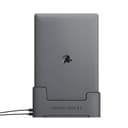
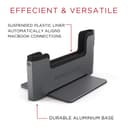
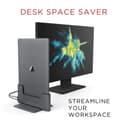

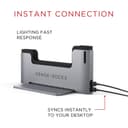
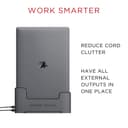
⚡ Elevate your MacBook Pro docking game—where power meets precision.
The Henge Docks Vertical Docking Station is a precision-engineered accessory designed exclusively for the 15-inch MacBook Pro (2016-2018) with Thunderbolt 3 and Touch Bar. Featuring dual USB-C ports, support for dual external displays, and advanced airflow vents, it ensures seamless connectivity, enhanced cooling, and a sleek, space grey metal finish that complements your MacBook Pro’s aesthetic. Perfect for professionals seeking a clutter-free, high-performance desktop setup.



C**K
To tight, will damage your computer
I wanted to love this docking station. Pulling it out of the box, I was in love almost instantly. It is a heavy duty dock, built elegantly with class. Once I had it on my desk, I placed my computer in it and I was very impressed. It stands tall, with little to no risk of tipping,However, the relationship went south fast. The computer was stuck! It took the full weight of my body pressing on one of the sides and my right arm pulling as hard as I could to get the computer to release. They clearly molded the internal casing to close.Well, I thought it might just be that “new product snuggness” and decided to put my computer in it a few more times, but unfortunately ended with the same result. However, as I continued to place my computer in the dock, I starting hearing an awful grinding sound. After pulling my computer out, I was appalled to find the dock has denting the edges of my lighting ports.Beautiful concept, terrible design. You will ruin your computer.
A**R
Looks Brilliant, But Rough on Functionality
The drop-in process and aesthetics of this device are beyond my expectations; however, the interior build quality with the plastics worry me about long term viability. The actual functionality added by this device other than an appearance piece for Clamshell mode is little; however, if Hengedocks figured out how to add some additional USB-C ports, this would an AMAZING product.In my case, I really needed a third-USB C port and connected a nicely matching UtechSmart hub, the Hengedock hub reviews were concerning. With a hub connected, I was able to achieve all that I needed.I purchased two Hengedocks, because I do love how they look. For appearance this Hengedock gets a 6/5.God-forbid you accidentally put your Macbook in backwards... good luck getting your Macbook out without a fight. I was thoroughly concerned for my Macbooks safety when that happened. It acts like a Chinese fingertrap for your Macbook when you insert it backwards. The other way this dock could get a 5-star review from me would be to make the dock-exiting easier. You have to put your hand down on the metal base and pull with a surprising amount of effort. If you have tight confines, like my home office, I end up whacking my hand into the top-overhang of the desk.
M**K
Not worth it
Wasn’t worth the money.. I had to keep inserting my MacBook 3 to 4 times just for it to actually connect..
R**H
What Is It Supposed To Do?
I put the computer in the dock, and I attached the charger and a disk drive to the dock. My goal was to allow a backup to take place while the computer was in the dock. However, the backup only happens if the computer is left on while in the dock, and then when you pull the computer out of the dock, you get a message that the drive was not ejected before it was disconnected, and some data may have been lost. So the dock is not usable for attaching a disk drive unless you also find a way to attach an external screen, a keyboard, and a mouse. The dock has two connectors, and if one attaches the charger and the other attaches the disk drive, there's nothing left. So you need this dock and then another dock with more ports connected to this one to let you attach the external screen, and if you have that, then why do you need this one? Having your computer stand up on its side is cool, but getting it in and out of the dock is really cumbersome. So the only purpose of this dock is to let your computer stand up on its side. To me, this is poor value.
M**L
Pretty Good under $200
It's a pretty good product for under $200, on top of that I can display my macbook onto two screen. Granted it does have its pros and cons; but it was definitely worth purchasing. It's gonna make doing my school work, and personal use a lot easier, and a lot more fun now.Updated review 5-5-19:It's still a pretty good product, I mainly use when I want to use my MacBook for personal, for school use, and it's nice and convient that it docks like a Nintendo switch; but supports both my BenQ monitors. I added a few more pictures of it connected to my 2018 MacBook Pro 15"
L**K
Ports stopped working just outside of return window.
Bought the dock for a space saving solution on a desk. USB C output #1 connected to LG monitor for 4k60fps capabilities, USB C output #2 connected to 10gbps ethernet adapter. Initially, all was working well, but then about 2 days after return window closed, started noticing flickering of the monitor connected via USB C. Then started noticing dropped hardwire connection. Removed macbook from dock and connected port replicator, and all connections stable. Can't return, working with unstable vertical dock that causes dropped ethernet connectivity and flickering monitor. Henge dock also has only 20 day return/warranty policy, which was honestly my own fault for not reading into it more before purchasing. Left with a nearly $200 paperweight. Will not buy again, and do not recommend. Bummer.
V**O
Nice Product, But Zero Customer Service
Bought a Henge dock for my Macbook Pro. Works really well and I'm very happy...now. I was having an issue when I first got it. When I reached out to Henge all I got back was a tweet telling me to email support. I did and...nothing. Fortunately, I figured out the problem on my own. Save your box (really nice box BTW) in case you need to return it.
V**E
Exactly what I was looking for
I recently got a MacBook Pro to replace an older iMac and Macbook. I needed to use one machine rather than two, but when I'm in the office I need two monitors and a rock solid, simple way to dock without spending any time tinkering with things to get it to work. I'll have to keep this setup for a few years so it has to be bulletproof. The Henge Dock and the right adapter(s) does just that. I walk into my office, slide it into the dock and all my connected peripherals just work... monitors, printers, headset, keyboard, trackpad, all of it. Couldn't be happier. I know it seems pricey, but I do NOT have to fidget or mess with anything. Once I got everything setup, that was the last time I touched it.
S**N
Works but has ruined my Mac!
The product itself is a great concept and does what it’s supposed to do but it has burnt this orange part on my screen!!
_**_
Handy stowage - low functionality - the videos...
So I've have a stone for almost as long as my latest laptop and it does a great job. I got the Vertical dock as a tidier solution than my current setup. Certainly the Stone provides a lot more functionality and if you only got one I would go with the stoneThe Henge dock is certainly rugged but the fit can be hit or miss. The biggest issue though is removing the laptop. It is not a one handed lift as in the videos on the site - one hand on the dock and a firm pull are required to disengage, certainly this is not a solution for anyone that has issues with grip strength. However if your MBP spend most of its time hooked up to an external monitor and keyboard then this is a tidy solution.
D**K
Amazed
Amazed with the build quality of the dock. Like no other I've seen on the market and really hope to see some revisions made to the current design.There is a custom hinge system that is very sturdy and heavy (amazing material to quality ratio), however when picking up your Macbook, sometimes it lifts the deck with it before dropping and falling off. Not sure if that's scratching my laptop but considering how heavy and sturdy the material is, the drop off is very loud.My only real complaint is the lack of ports. Your laptop will need to be using 1/2 ports available on the bottom of the dock to charge and only have access to the 2 ports at the top of your laptop. Meaning 1 port is fixed to your charge from the Dock and the other is free for you to fix something else (e.g. Type C to HDMI)Feels a little big occurred dropping my Macbook into the dock and having only one HDMI output on the bottom, then reaching for my second Type C to HDMI and plugging that on top for a dual monitor setup. This would be worse with a triple monitor setup.With that being said, you can attach another dongle to fix it to the dock on the bottom but that would be defeating its purpose.My recommendation, give us more ports on the bottom! I know it's possible, give us at least 3! Good to have 1 Fixed port for our charger and 2 others for monitors or peripherals.
J**G
Looks and works great but it’s not perfect.
This is my second dock from the company. I had purchased one previously for my 2015 MacBook Pro. This once doesn’t slide in smoothly. You have to adjust it a bit to get the ucb-c slots to connect and the laptop to go in properly. It’s not a problem - it functions great once it’s in - however it’s not as perfect as the previous generation.Visual quality is great and it keeps the desk tidy.I have it connected to a caldigit t3 hub which in turn is connected to a startech KVM switch. I sometimes have to unplug and plug the cable to the T3 dock when I turn on the MacBook to get the dual monitor display working but that’s reasonable since there are effectively 3 docks between the laptop and the monitor.
J**G
Please do not buy it.......
When inserting and removing for installation, the connector of the Mac Pro is damaged and there are many malfunctions.The price is too expensive, will be good deal if it is below 100 CAD.
Trustpilot
3 days ago
3 weeks ago